
SDV Media exposes available displays to OEM apps with Linux DRM API.
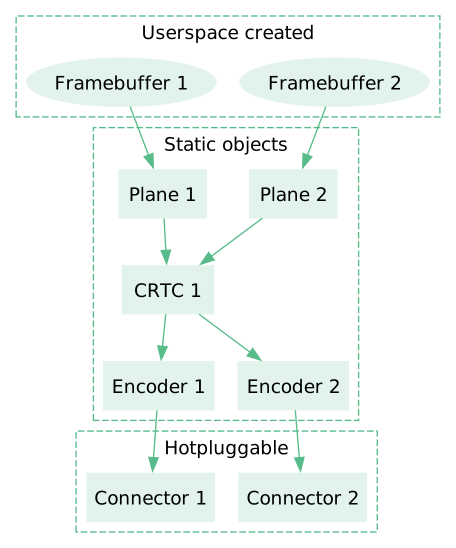
Figure 1. Interaction between DRM components.
A framebuffer is a source of pixel data, backed by some externally allocated memory buffer.
A plane is an image source used by CRTC. It's associated with a framebuffer, and can represent a cropped view of the framebuffer.
CRTC represents an overall display pipeline. It can combine multiple planes to create the final video output, and dispatch the output to multiple encoders.
An encoder converts video output from CRTC into a form suitable for specific connector.
A connector represents an available display connector. For example, an HDMI port.
For more in-depth description, refer to:
API surface
SDV Media provides the Linux DRM interfaces. While they can be used directly
using ioctl syscall, for application development it is recommended to use a
userspace helper library. For example:
drm-rscrate for Rust (recommended),libdrmfor C/C++.drm-kmsman page provides an extensive overview of the APIs and their usage.
Set up rendering to a single display
Open a DRM device (
/dev/dri/card*) and use Linux DRM APIs, for example, throughlibdrm, on its file descriptor to select the display and its mode.Usually, the host system exposes only a single virtual GPU device, which shows up as
/dev/dri/card0.Allocate front and back buffers with Linux DRM API.
It's recommended to use
minigbm'sgbm_bo_create()and get the DMA-BUF file descriptor withgbm_bo_get_fd().Create GL framebuffers backed by the allocated buffers.
Create an
EGLImageout of the DRM buffer witheglCreateImageKHRwithEGL_LINUX_DMA_BUF_EXT(fromEGL_EXT_image_dma_buf_importextension).Create a GL texture and use
glEGLImageTargetTexture2DOES(fromGL_OES_EGL_imageextension) to set the texture's storage to theEGLImagefrom previous step.Create a GL framebuffer and use
glFramebufferTexture2Dto set its backing texture to the one created in the previous step.
To render a frame:
Bind one of the created GL framebuffers.
Draw a frame with usual GLES APIs.
Display the frame on a screen: use Linux DRM API (
drmModeAtomicCommit()) to send aDRM_MODE_PAGE_FLIP_EVENTwith the DMA-BUF file descriptor used by the bound GL framebuffer.
Compose video output from multiple layers
For hardware accelerated multi-layer (multi-plane) composition, we rely on the host system exposing each layer as a separate DRM connector (virtual display), and mapping them to the right hardware location / pipeline.
See Setup rendering to multiple displays for details.
Set up rendering to multiple displays
Open the
/dev/dri/card*DRM device as in the single-display flow.List available display connectors.
Each display is exposed as a separate DRM connector of the DRM device.
For each display connector:
Select a CRTC compatible with the connector. Each connector has a list of available encoders, and each encoder indicates which CRTCs it can be used with. There is always at least one compatible CRTC.
Select a plane compatible with the CRTC.
Create DRM framebuffers backed by the a GPU buffers. This process looks the same as for single-display variant.
Connect plane, CRTC and connector, and set the video mode on the CRTC.
It's possible to set the mode of multiple displays at the same time by using the atomic API for setting following DRM properties for each connector, CRTC, and plane set.
The full list of necessary properties:
Target Property Type Description Connector CRTC_IDCRTC ID ID of the CRTC to assign to the connector CRTC MODE_IDBlob ID ID of a property blob created using drmModeCreatePropertyBlob, containing thedrmModeModeInfostruct of the selected video modeCRTC ACTIVEBoolean trueto mark the CRTC as activePlane FB_IDFramebuffer ID ID of the DRM framebuffer to display on screen Plane SRC_XPixels X coordinate of the framebuffer source image rectangle Plane SRC_YPixels Y coordinate of the framebuffer source image rectangle Plane SRC_W16.16 fixed point Width of the framebuffer source image rectangle (pixels shifted left by 16 bits) Plane SRC_H16.16 fixed point Height of the framebuffer source image rectangle (pixels shifted left by 16 bits) Plane CRTC_XPixels X coordinate of the CRTC destination image rectangle Plane CRTC_YPixels Y coordinate of the CRTC destination image rectangle Plane CRTC_WPixels Width of the CRTC destination image rectangle Plane CRTC_HPixels Height of the CRTC destination image rectangle Enter the render loop:
Wait for the page flip event on a CRTC before rendering the next frame.
Render a frame and display it on the screen by scheduling a page flip for given CRTC+framebuffer.