
This page provides a guide on the architecture of the SDV User Preferences system and instructions for implementing a user-controllable service and client.
Architecture overview
The User Preferences system decouples the storage and management of user settings from the enforcement and application of those settings. The key architectural terms are summarized in the table:
| Feature | Description | Role | Responsibility |
|---|---|---|---|
| User-controllable service | A standard SDV service bundle that manages a specific domain (for example, HVAC, car seats, audio) | Provides the intended state of the capabilities and constraints of the hardware or subsystem it controls. |
|
| User preferences agent | The central orchestrator | Provides centralized storage, user profile management, and notification hub. |
|
| User preferences client | An app or service that provides a user interface, for example, an IVI app with an HMI or other logic that needs to interact with user preferences | Interacts with users, displays settings, and initiates change requests. |
|
Implement a user-controllable service
To inform the User Preferences agent which keys exist, their data types, default
values, and constraints (for example, minimum and maximum values), your service
bundle must interact with the UserPreferencesRegistryService interface. When
your service starts, it must register the settings it exposes. The agent calls
RequestSettingsChange on your service when a user tries to modify a setting
(or when switching users).
Follow the steps in this section to let User Preferences (and a user with HMI) control your service.
Define service interfaces in the VSIDL file:
- As a server, implement
com.sdv.google.user_preferences.user_controllable.UserControllableService. This lets the agent send you change requests. - As a client, consume
com.sdv.google.user_preferences.UserPreferencesRegistryService. This registers your settings on startup.
The following example shows
service_bundle.vsidlfor a user-controllable service:service_bundle { name: "MyFeatureService" server { service: "com.sdv.google.user_preferences.user_controllable.UserControllableService" } client { service: "com.sdv.google.user_preferences.UserPreferencesRegistryService" } }- As a server, implement
Register settings on startup in the key proto
user_preferences_registry_service.proto:- Connect to
UserPreferencesRegistryService. - Create an instance of
RegisterSettingsRequest. - Define an instance of
SettingsGroup(a logical collection of settings). For each setting, define:
*   **Key:** Unique string ID (for example, `TEMPERATURE`)
*   **Kind:** `PER_USER` (stored per user profile) or `SHARED`
    (global)
*   **Default value:** Initial value if no user preference exists
*   **Constraints:** (optional) Validation rules (for example, Min
    16, Max 32 for HVAC).
Call
RegisterSettings().
The following example is in conceptual Rust:
let temperature_setting = SettingDefinition { name: "TEMPERATURE".to_string(), kind: SettingKind::PER_USER.into(), default_value: Value::Int64(22), // Default 22 degrees constraint: Some(Constraints::Int64Constraints(Int64Constraints { min_value: Some(16), max_value: Some(32), ..Default::default() })), ..Default::default() }; registry_client.RegisterSettings(&RegisterSettingsRequest { group_name: "HVAC".to_string(), version: "1.0".to_string(), settings_definitions: vec![temperature_setting], }).await?;- Connect to
Handle settings change requests in
user_controllable_service.proto:- Implement the
RequestSettingsChangeRPC. - Validate if the requested values are valid within the current context (for example, if the hardware is ready).
- Apply specific logic to apply the change (for example, move the seat, change the fan speed).
- Return the applied values in
RequestSettingsChangeResponse: - If you accepted the change, return the new value.
- If you rejected or clamped the value, return the value you set (or kept).
The following example is in conceptual Rust:
async fn RequestSettingsChange( &self, _caller_id: ServiceFqin, request: &RequestSettingsChangeRequest ) -> SdvResult<RequestSettingsChangeResponse> { let mut applied_settings = Vec::new(); for setting in &request.settings { if self.hardware.set_value(setting.key, setting.value).is_ok() { // Change accepted applied_settings.push(setting.clone()); } else { // Change rejected, return current actual value let current_val = self.hardware.get_value(setting.key); applied_settings.push(create_setting(setting.key, current_val)); } } Ok(RequestSettingsChangeResponse { settings: applied_settings, }) }- Implement the
Implement the
FactoryResetRPC to revert your subsystem to a clean state:- Reset all settings to their default values (as defined in your code configuration).
- Call
UpdateSettingson the registry service to inform the agent that the values have changed externally (by the reset, not by a user request).
Backward compatibility and schema evolution
The schema of the settings defined by a user-controllable service is considered a public interface. This interface is consumed by the user preferences agent and various clients (for example, HMIs), which might have different release schedules. Therefore, maintaining strict backward compatibility is essential to prevent system instability and client breakage.
Compatible changes
A user-controllable service should introduce only compatible changes to its settings schema. These changes ensure that older clients continue to operate correctly without updates:
Add a new, optional setting with a reasonable default value:
- This setting is optional, so clients must check for its presence to support different versions of the service.
- Clients ignore this setting if they haven't been updated to recognize it.
- If no user preference for the new setting exists, the agent uses the provided default value.
Incompatible changes
The following changes are considered breaking and are prohibited as they immediately compromise older clients:
Remove an existing setting.
Change the meaning, unit, or data type of an existing setting (for example, changing from an integer representing temperature in Celsius to a float representing pressure in Pascal).
Change the default value of an existing setting. The primary reason for prohibiting default value changes is the potential complication with persisted data migration. The agent stores settings based on the service's registration schema. Changing a default value would require complex logic to migrate all existing user profiles to the new default or risk using a technically incorrect value for users who never explicitly set the preference.
Handle required breaking changes
If a breaking change is required, the service must not modify the existing setting. The approach to manage this transition while maintaining compatibility is primarily located in the user-controllable service logic:
- Create a new setting with the desired new definition, key, or unit.
- Deprecate the existing setting by registering it for compatibility. Use this new setting when you develop new clients.
- Advise new clients to implement compatibility logic within the User-controllable service's business logic.
The service's RequestSettingsChange implementation must ensure that a change
to one setting is reflected in its deprecated counterpart, and a change to the
counterpart is reflected in the setting.
Example compatibility logic:
A service deprecates the old setting
TEMPERATURE_C(Celsius) and introducesTEMPERATURE_K(Kelvin).When the agent sends a request to update the new setting:
The service receives a request for
TEMPERATURE_K(for example, 295.15 K).The service's logic converts this to Celsius (22°C) and internally updates and persists both values to maintain consistency for legacy clients.
When the agent sends a request for the deprecated setting from a legacy client:
- The service receives a request for
TEMPERATURE_C(for example, 24°C). - The service converts this to Kelvin (297.15 K) and internally updates and persists both values.
- The service receives a request for
This dual-write strategy ensures that all clients, regardless of their release schedule, read consistent and accurate data, avoiding breakage caused by external release mismatches.
Implement a client
To implement a client (for example, an HMI) that interacts with the User Preferences agent:
Define your client service bundle to interact with specific User Preferences interfaces. In your VSIDL file:
- As a server, implement
com.sdv.google.user_preferences.view.ChangeNotifierto enable the agent to send your client real-time notifications about settings changes. - As a client, use
com.sdv.google.user_preferences.UserPreferencesManagementServiceto request settings modifications and subscribe to updates. - As a client, use
com.sdv.google.user_preferences.UserPreferencesAdminServiceto manage user profiles (for example, create, select, delete, factory reset).
The following example shows a
service_bundle.vsidlfile for a client:service_bundle { name: "MyHmiClient" server { service: "com.sdv.google.user_preferences.view.ChangeNotifier" } client { service: "com.sdv.google.user_preferences.UserPreferencesManagementService" } client { service: "com.sdv.google.user_preferences.UserPreferencesAdminService" } }Add authorization policies accordingly. To allow communication for the user preferences agent, create a client for the specified servers. For example:
server { service: "com.sdv.google.user_preferences.view.ChangeNotifier" allow_all_channels: true } client { service: "com.sdv.google.user_preferences.UserPreferencesManagementService" allow_all_channels: true } client { service: "com.sdv.google.user_preferences.UserPreferencesAdminService" allow_all_channels: true }- As a server, implement
You can change request settings in
UserPreferencesManagementService:- Connect to
UserPreferencesManagementService. - Create an instance of
RequestSettingsChangeRequest, specifying theSettingsGroupIdand the desired settings. - Optional. Set the
ChangePersistencePolicytoPERSISTENT_CHANGE(default) orNON_PERSISTENT_CHANGE. - Call
RequestSettingsChange().
The following example is in conceptual Rust:
management_client.RequestSettingsChange(&RequestSettingsChangeRequest { settings_group_id: Some(SettingsGroupId { service_fqin: hvac_service_fqin.to_string(), name: "HVAC".to_string(), ..Default::default() }).into(), settings: vec![Setting { key: "TEMPERATURE".to_string(), value: Some(Value::Int64(24)), ..Default::default() }], change_persistence_policy: ChangePersistencePolicy::PERSISTENT_CHANGE.into(), ..Default::default() }).await?;- Connect to
Subscribe to settings changes with
user_preferences_management_service.protoandchange_notifier.proto:- Implement the
OnSettingsChangeRPC from theChangeNotifierinterface within your service bundle. The User Preferences agent invokes this method when a change occurs. - Connect to
UserPreferencesManagementService. - Create a
SubscribeToSettingsChangeAndGetSettingsRequestspecifying theSettingsGroupIdyou wish to monitor. - To return the state of the settings and then send future updates through
your
OnSettingsChangeimplementation, callSubscribeToSettingsChangeAndGetSettings().
The following example of implementing the
ChangeNotifierinterface is in conceptual Rust:#[async_trait] impl ChangeNotifier for MyHmiServiceImpl { async fn OnSettingsChange( &self, _caller_id: ServiceFqin, request: &OnSettingsChangeRequest, ) -> SdvResult<OnSettingsChangeResponse> { // Process the active_settings, pending_changes, and persisted_settings // Update your UI or internal state accordingly. info!("Received settings change for group: {}", request.settings_group_id.name); // ... Ok(OnSettingsChangeResponse::new()) } }The following example of subscribing is in conceptual Rust:
management_client.SubscribeToSettingsChangeAndGetSettings(&SubscribeToSettingsChangeAndGetSettingsRequest { settings_group_id: Some(SettingsGroupId { service_fqin: hvac_service_fqin.to_string(), name: "HVAC".to_string(), ..Default::default() }).into(), ..Default::default() }).await?;- Implement the
Optional: Clients that manage user profiles (for example, a dedicated settings app) can use
user_preferences_admin_service.prototo interact with the admin service:- Connect to
UserPreferencesAdminService. - Use RPCs such as
CreateUser,SelectUser,DeleteUser,FactoryReset, andListUsersto manage user profiles.
The following example of creating a user is in conceptual Rust:
admin_service_client.CreateUser(&CreateUserRequest { user: Some(User { id: 1, flags: UserFlags::DRIVER.value(), ..Default::default() }).into(), ..Default::default() }).await?;- Connect to
Discover available settings and users through the admin service with
user_preferences_admin_service.proto:- Get a list of all registered users by calling
ListUsers()on theUserPreferencesAdminService. - Get the settings for a specific user by calling
GetUserSettings(user_id)on theUserPreferencesAdminService.
The following example of listing users and getting settings is in conceptual Rust:
// List all users let list_users_response = admin_service_client.ListUsers(&ListUsersRequest::new()).await?; info!("Available users: {:?}", list_users_response.users); // Get settings for a specific user (for example, user with ID 1) if let Some(user_id) = list_users_response.users.first().map(|u| u.id) { let get_settings_response = admin_service_client.GetUserSettings(&GetUserSettingsRequest { user_id, ..Default::default() }).await?; info!("Settings for user {}: {:?}", user_id, get_settings_response.groups); }- Get a list of all registered users by calling
Flow summary
- The client starts and connects to the agent's management and administrative services.
- The client discovers and subscribes to settings groups and displays the initial state.
- The client sends a
RequestSettingsChangeto the agent. - The agent sends an
OnSettingsChangenotification to the client with updated settings and state.
For a complete working example, see the HMIService in
@samples/user_preferences/v1/.
Implement the agent
An orchestrator-launched service bundle implements the user preferences agent. For convenience, a reference implementation is provided.
In addition, this sample service bundle user_preferences_sample.vsidl file
for the agent is provided:
package: "com.sdv.oem.user_preferences"

service_bundle {
    name: "UserPreferencesServiceBundle"
    server {
        service: "com.sdv.google.user_preferences.UserPreferencesAdminService"
    }
    server {
        service: "com.sdv.google.user_preferences.UserPreferencesManagementService"
    }
    server {
        service: "com.sdv.google.user_preferences.UserPreferencesRegistryService"
    }
    client {
        service: "com.sdv.google.user_preferences.view.ChangeNotifier"
    }
    client {
        service: "com.sdv.google.user_preferences.user_controllable.UserControllableService"
    }
}
The implementation can use the generated middleware and
should compile into a rust_ffi_shared that is referenced by
the service bundle that implements the user preferences agent:
sdv_service_bundle_metadata {
  # This name must match the agent's Bundle Name
  name: "UserPreferencesServiceBundle"
  version_number: 1
  version_name: "1"

  native_library_path: "lib64/<USER-PREFERENCES-FFI-LIB>.so"

  orchestration_config_path: "etc/user_preferences_service_bundle/<USER-PREFERENCES-ORCHESTRATION>.textproto"

  authorization_policy_path: "etc/user_preferences_service_bundle/permissions.textproto"
}
The client's authorization policy .textproto file requires the necessary permissions:
client {
    service: "com.sdv.google.user_preferences.UserPreferencesManagementService"
    allow_all_channels: true
}

client {
    service: "com.sdv.google.user_preferences.UserPreferencesRegistryService"
    allow_all_channels: true
}

client {
    service: "com.sdv.google.user_preferences.UserPreferencesAdminService"
    allow_all_channels: true
}
Appendix: key concepts
This section describes some key concepts.
Users
Each vehicle user (User class) can create an account in which they can store
their preferences. User Preferences supports accounts only for vehicle drivers.
Guest drivers can create temporary accounts that are automatically deleted after
one use.
message User {
  // Required.
  // A unique ID for the user.
  int32 id = 1;

  // Bit flags that define properties of user. Integer values have to be powers of 2 as they are used as
  // a bit mask.
  enum UserFlags {
    // Due to Protobuff requirement to have the first enum option set to 0,
    // Assign 0 to an unused flag
    UNSET = 0x0;
    // Marks the user as vehicle driver
    DRIVER = 0x01;
    // Ephemeral users have non-persistent state, once another user is selected
    // the profile is deleted automatically
    EPHEMERAL = 0x02;
  }

  // Required.
  // Bitmask for the user flags defined above
  int32 flags = 2;
}
Settings groups
Settings groups (SettingsGroup class) organize and manage related settings.
Each configurable component within the vehicle defines its settings as groups,
consisting of a list of settings represented as key-value pairs. For example,
vehicles with electric seats can define a setting group for the driver's seat
and another for the front passenger where both groups contain identically named
settings.
message SettingsGroup {
  // Required.
  // The identifier for this group.
  SettingsGroupId id = 1;

  // Required.
  // The version number of schema used by this setting group.
  string version = 2;

  // Required.
  // The list of settings within the setting group.
  repeated Setting settings = 3;
}
Settings
The setting, message (Setting class), represents a single setting within
SettingsGroup. This message consists of a key, which is the name of the
setting and a value, which can be one of several types.
This example shows how a setting is represented with a key and a value:
// A key value pair representing a setting within a UserControllableService SettingsGroup.
message Setting {
  // Required.
  // A name that uniquely identifies a setting within a SettingsGroup.
  string key = 1;

  // Required.
  // New value of the setting.
  oneof value {
    bool bool = 2;
    float float = 3;
    int32 int32 = 4;
    int64 int64 = 5;
    bytes blob = 6;
    int32 enum = 7;
  }
}
Setting definitions
Setting definitions (SettingDefinition class) serve as templates for
individual settings within a settings group. They specify the setting's
fundamental characteristics, such as whether the setting is shared across all
users, specific to each user, or managed externally (passthrough).
Importantly, setting definitions also define any constraints on the setting's value, such as minimum and maximum values, allowable increments, or a restricted set of options. These constraints lead to data integrity and consistency for each setting.
// The definition of a setting, along with its properties such as type and constraints
message SettingDefinition {
  // Required.
  SettingKind kind = 1;

  // Required.
  SettingWithConstraints setting_with_constraints = 2;
}

enum SettingKind {
  // A setting which is applied for all vehicle users.
  SHARED = 0;
  // Store the value of the setting for each vehicle user separately.
  PER_USER = 1;
  // UserControllableService is fully responsible for the storage of PASSTHROUGH setting.
  // User Preferences only notifies UserControllableService when the value is explicitly set by
  // user. User Preferences does not attempt to request changes based on user change or service
  // registration.
  PASSTHROUGH = 2;
};

message SettingWithConstraints {
  // Required
  Setting setting = 1;

  // Required.
  // Defines restrictions on the setting's value
  oneof constraints {
    FloatConstraints float_constraints = 2;
    Int32Constraints int32_constraints = 3;
    Int64Constraints int64_constraints = 4;
    EnumConstraints enum_constraints = 5;
  }
}

message Int32Constraints {
  // The minimum value that a setting can have.
  optional int32 min_value = 1;
  // The maximum value that a setting can have.
  optional int32 max_value = 2;
  // The step by which a setting's value can be increased or decreased.
  optional int32 step = 3;
}

message Int64Constraints {
  // The minimum value that a setting can have.
  optional int64 min_value = 1;
  // The maximum value that a setting can have.
  optional int64 max_value = 2;
  // The step by which a setting's value can be increased or decreased.
  optional int64 step = 3;
}

message FloatConstraints {
  // The minimum value that a setting can have.
  optional float min_value = 1;
  // The maximum value that a setting can have.
  optional float max_value = 2;
  // The step by which a setting's value can be increased or decreased.
  optional float step = 3;
}

message EnumConstraints {
  // Required.
  // List of unique values sorted in ascending order.
  repeated int32 possible_values = 1;
}
Example sequence of events when a user updates a setting
This example illustrates the sequence of events occur when a user uses the Android Automotive OS (AAOS) in-vehicle infotainment (IVI) to update a setting:
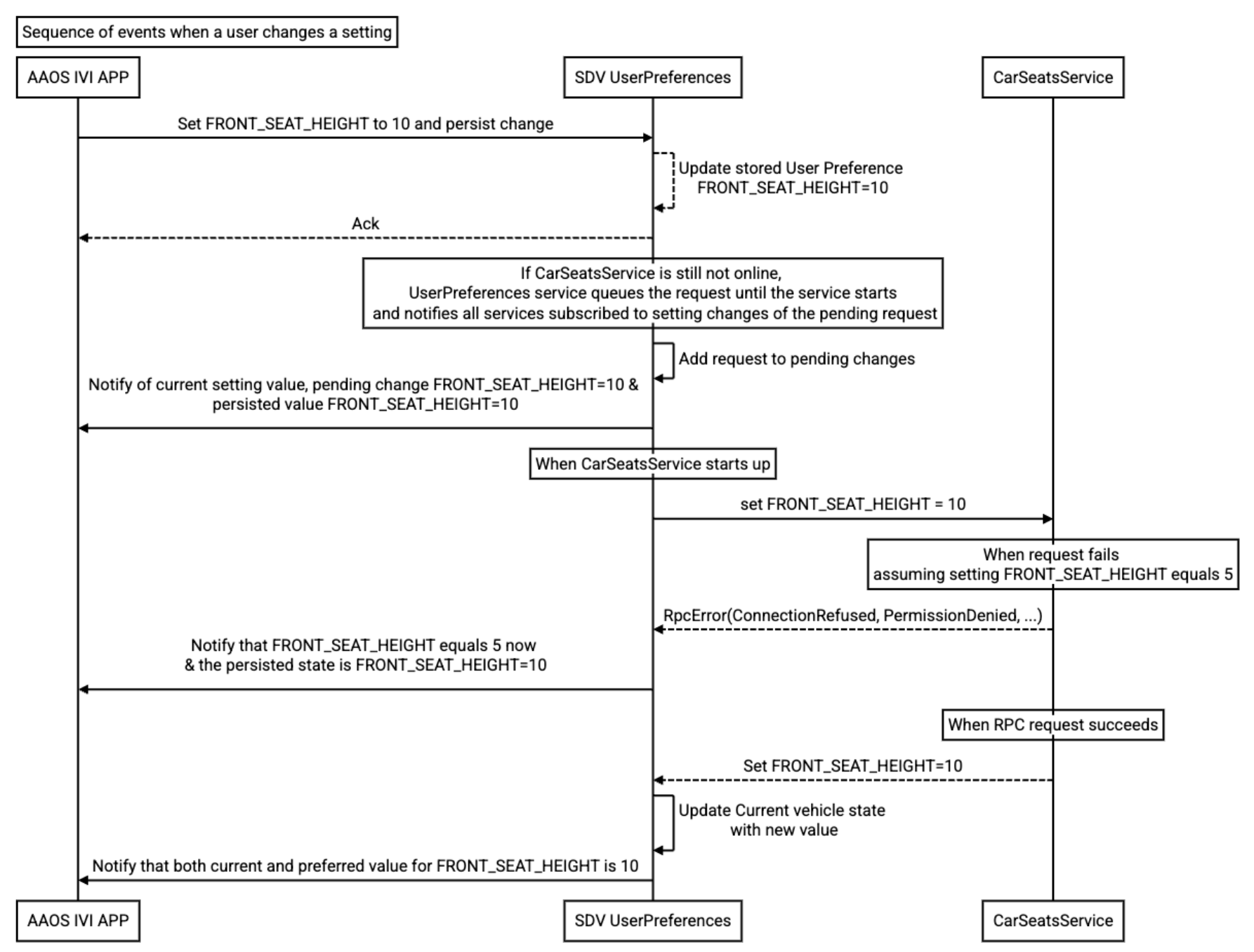
Figure 1. Events when a user changes a setting.
Example sequence of events when a vehicle is starting
This example illustrates how SDV User Preferences applies a user's preferred settings when a vehicle is starting:
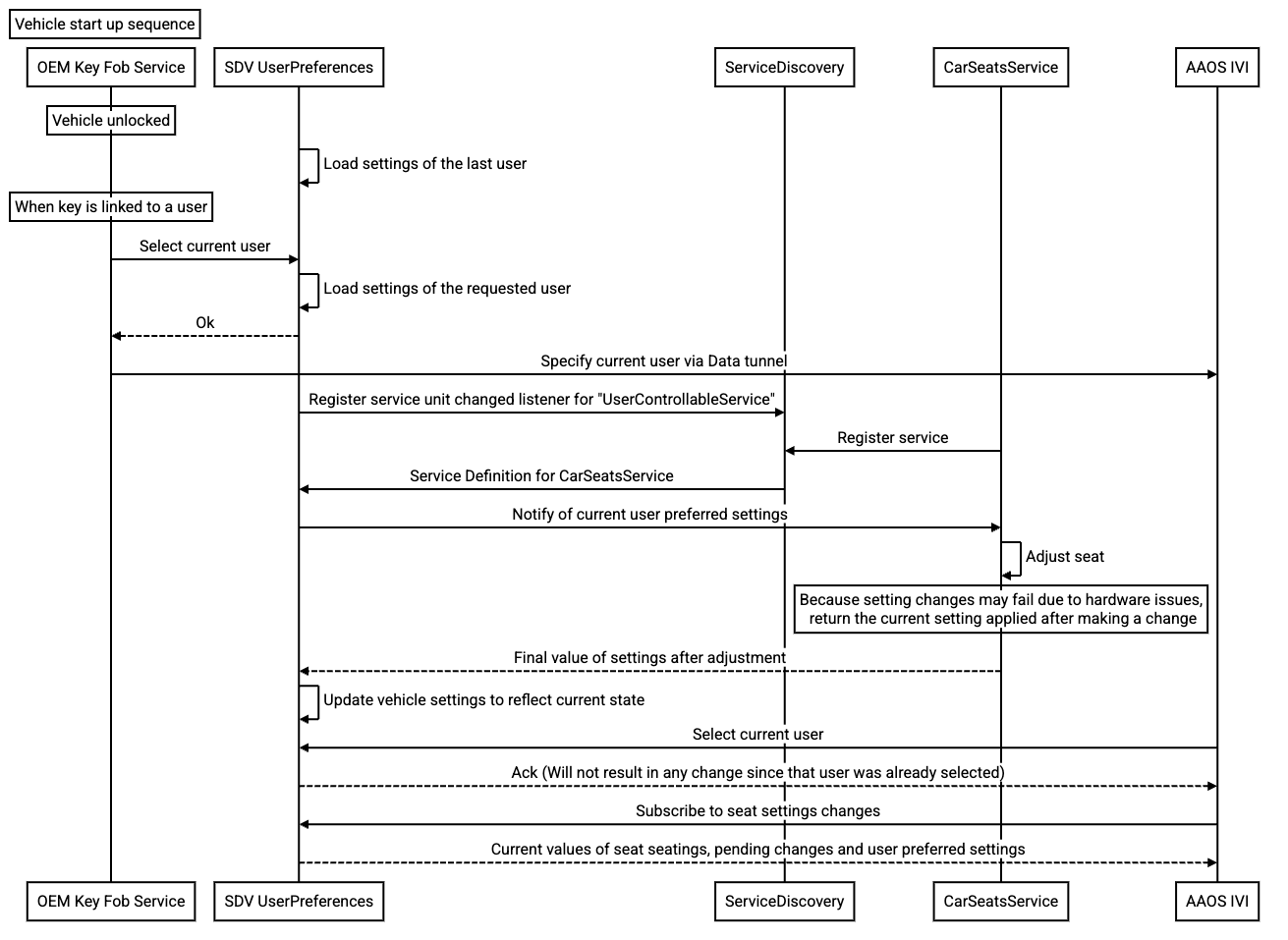
Figure 2. Events when a vehicle is starting.