
Use the high availability renderer (HAR) to show vehicle information that Android can't display. This can happen due to issues like start-up, availability, safety, or regulations. HAR is a portable, built-in app written in Rust.
HAR, also called the HAR framework, includes code you use to build apps. An app
built with HAR is a HAR-based app. The HAR framework has code sections for
different platforms. For example, on a Linux system, you use libraries such as
tinyalsa for sounds. QNX has its own unique audio libraries.
A platform includes hardware, an operating system, system libraries, and other factors. Platform-specific code has parts called subsystems. Each subsystem handles one platform feature, such as audio, EVS cameras, or vehicle data. To support a platform, the HAR framework needs all its subsystems implemented.
Platform-specific subsystem code might run in the same process as the HAR-based app or in a separate one. When separate, this code handles interprocess communication (IPC) to help verify the platform supports the app. Complex IPC mechanisms must be part of the platform-specific code.
The HAR test suite runs tests on all subsystems implemented for a platform. Use this suite to check if platforms meet HAR requirements and to find any new problems.
Terminology
These terms are on this page:
- HAR-based app
- An OEM or function-specific app built with the HAR framework. Apps differ by app state and other customizable aspects.
- HAR framework
- Provides a core set of tools used to build apps.
- HAR platform abstraction
- Part of the HAR framework that provides a known API that all target platforms must implement.
- HAR test suite
- A series of known tests over platform implementations, helping verify that platform implementations support the HAR framework on a given platform.
Out of scope
HAR doesn't address:
Individual implementations for all platform targets: Implementations for target platforms. Instead, this page describes the interfaces that platform implementations must fulfill and a test suite must satisfy.
Test cases: Specific test cases for all interfaces. Instead, this page describes individual functions for interfaces including arguments, return values, expected behaviors, and expected side effects. This page describes the test suite in which you can implement and run test cases.
Platform abstraction high-level crate structure
Rust projects consist of crates. Figure 1 shows the crate structure for the HAR platform abstraction layer. The platform abstraction layer affects two or more Rust crates:
Abstractions (Rust
traitdescriptions) are in the HAR framework crate.Implementations for a platform are by a separate
har-platform-xcrate. For example,har-platform-linuxorhar-platform-android.
You can't build or test the HAR crate without a specified platform implementation. This is intentional as the HAR framework is a framework.
An app that specifies a platform must be built with this framework to function and be tested. The connections between the HAR framework and the platform are in this diagram:
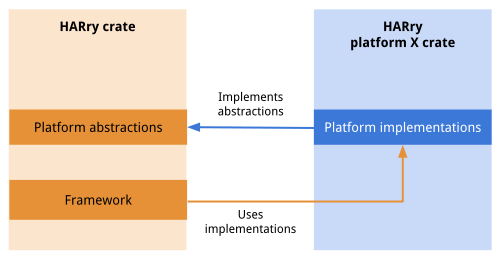
Figure 1. HAR crate.
General structure within display-safety
This design adds a series of new crates to the display_safety repository, as
illustrated in Figure 2:
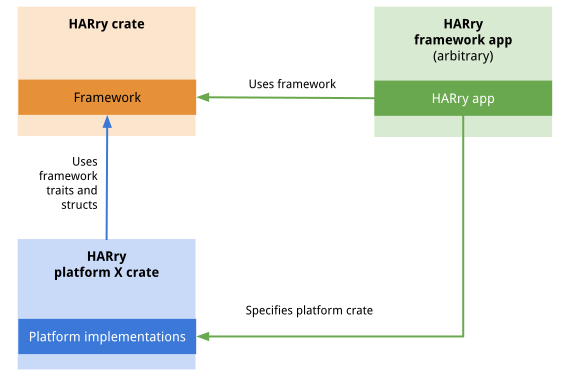
Figure 2. Abstraction modules.
A test suite is structurally similar to an app, but relies only on a given platform implementation crate. The test suite must refer to traits and structures defined in the HAR framework, but shouldn't refer to more complex implementations.
Platform abstraction layer high-level description
This table describes platform-specific subsystems defined by the HAR platform abstraction layer.
| Abstraction name | Related function | Description | Notes |
|---|---|---|---|
OpenGL |
2D rendering | Provides OpenGLES 2.0/3.0 rendering capabilities to the HAR framework crate. | |
Audio |
Audio rendering | Provides an Android SoundPool like interface to manage and play system audio. | |
Camera |
Vehicle camera display | Provides an EVS HAL like interface to manage and display vehicle camera information. | |
Looper |
App main loop and display configuration | Provides an Android Looper like interface to manage platform-specific app main loops and display configuration. | |
UserInput |
Touch, keyboard, steering wheel or rotary controller, and other platform-specific input | Provides an interface to supply HAR-based apps with touch and keyboard
input. Reference implementation based on Linux evdev in
har-user-input-evdev. |
|
VehicleData |
Vehicle state input | Provides an interface to supply HAR-based apps with a stream of arbitrary vehicle data such as provided by Android VHAL or a CAN bus. | |
ResourceManager |
App-specific cached design document | Provides an in-memory cache of resources necessary for HAR startup, such as cached images and design documents. No disk cache implemented yet. | |
Logging |
System logging and telemetry | Provides platform-specific logging support using the tracing system. This enables telemetry collection as required by the platform. | |
Tracing |
System tracing | Provides an abstraction for integrating with tracing and profiling systems. | |
Monitoring |
System monitoring | Toolkit for monitoring performance and latencies within the HAR framework. | |
Commlib |
Vehicle data | A reference implementation using protobuf serialization.
Deprecated: Use APIs defined in reference/harry-control-api and
implementations harry-grpcio-server and
harry-tonic-server (reference implementation). |
|
TestSupport |
Testing support hooks | Supports the build-up and tear-down of test cases, generation of test
events, and creation of test artifacts. For example, generating simulated
touch events to test UserInput and generating screenshots for
analysis. |
This feature is locked by Rust to prevent inclusion in production builds. |
Naming conventions and framework structures
This table presents these names and structures:
Expected subsystem
traitinstances provided by the HAR framework. Eachtraitrepresents a platform-specific subsystem that must be implemented.Expected names of platform-specific subsystem implementations in any platform crate. HAR-based apps expect these specific names to be implemented.
Related HAR framework
enumandstructinstances typically used to pass information from platform-related implementations to the HAR framework.
| Trait names | Implementation names | HAR framework enum and structs |
|---|---|---|
GlContextFactory |
OpenGL |
trait harry::Rendererharry::DisplayRotation |
AudioApiFactory |
Audio |
harry::AudioApiharry::AudioDeviceharry::VolumeMillibel |
ICameraManager |
Camera |
harry::ICameraDeviceharry::CameraDescriptor |
Looper |
Looper |
harry::LooperMessageharry::LooperOptionsharry::DisplayId |
PlatformVehicleData |
VehicleData |
harry::VehicleDataTypeharry::VehicleDataListener |
ResourceManager (Struct) |
ResourceManager |
harry::ResourceManagerMessageharry::ResourceTokenharry::RawImageData |
PlatformTracing |
Tracing |
N/A |
HarPerformanceMonitor |
Monitoring |
harry::Rendererharry::ResolveLatencyToken |
PlatformTestSupport |
TestSupport |
harry::TestConfigharry::TestDisplayConfig |
Errors and error handling
The proposed APIs use the Rust Result<> type. Rust requires you to check
Result types that carry errors. If not, the compiler generates a warning or
error. A build-time check enforces error checking from platform-specific code.
Errors returned by platform implementations are of type
harry::error::Error. To verify that platform error types don't leak into app
code, use the standard error type provided by the HAR framework.
The harry::error::Error type expands to include specific errors for all
subsystems:
// This is Rust
pub enum Error {
  Msg(String), // A generic message string
  // Legacy error type, likely to be removed or merged into Msg
  Audio(String),
}
Unrecoverable errors are primarily returned through the defined interfaces and callbacks.
Test suite detailed design
This section describes the design of the test suite, which verifies platform-specific implementations of the abstractions.
Build the test suite tests
For Soong builds (defined by Android.bp files), the tests are compiled as part
of the Android platform build system, and their execution is managed by atest.
Run the test suite
To test an individual platform:
Use the atest command with the relevant test target (for example,
atest <module_name>). This command deploys and runs the tests on an Android
device or emulator.