
The Vehicle Services Interface Definition Language (VSIDL) middleware defines a set of Rust libraries creating an abstraction layer on top of the software defined vehicle (SDV) communication stack to simplify the usage of the SDV ecosystem. The middleware provides a standardized way for services to communicate and interact with each other. Both the VSIDLC generated code and your custom code use these libraries.
The Vehicle Services Interface Definition Language compiler (VSIDLC) validates
definitions, generates build files (Android.bp) containing genrule targets
to produce Rust middleware code during the build process, and creates deployment
configurations from the VSIDL and protobuf files in a catalog. Figure 1 shows
input to VSIDLC and output generated by VSIDLC:
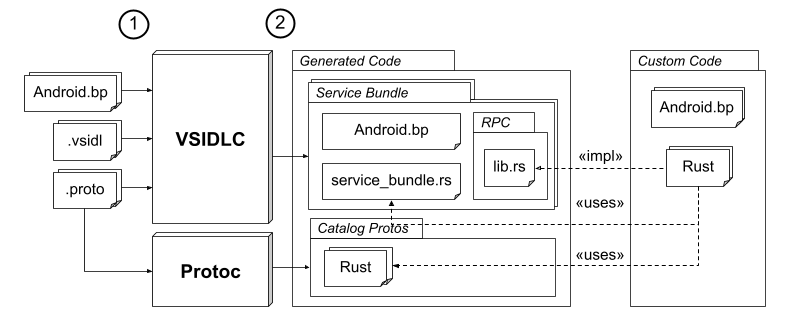
Figure 1. VSIDLC inputs and outputs.
Following is an explanation of the diagram:
As inputs, you provide the following files organized within directories known as catalogs:
- Proto files (with the extension
.proto) contain data structures that are exchanged between the service units defined by VSIDL. - VSIDL files (with the extension
.vsidl) define service bundles, service units, and unit type ownership. Android.bpfiles in each catalog directory definerust_protobufbuild targets for all proto files within the catalog. VSIDLC uses thecrate_namespecified in these targets to reference the generated protobuf message types in Rust.
- Proto files (with the extension
You run VSIDLC to output the following files:
Android.bpfiles are generated within each service bundle's folder. If you set--genrule, these targets generate up-to-date Rust files during the build process and include the necessaryrust_protobuflibrary dependencies.service_bundle.rsfiles are generated for each service bundle and contain the mainstructand functions for interacting with middleware components.lib.rsfiles are generated for each RPC service owned by a bundle and are placed in a subfolder named after the RPC service. These files include:An
Interfacetrait implements the server-side logic.A
Clientstruct makes calls to an RPC service.diagnostics.rsfiles are generated if adiagnostics_declarationis present in the VSIDL file, providing the necessary bindings for UDS-based diagnostics.Deployment and security configurations are generated when using the
--apexflag. These are placed inapex/andconfigs/directories and include orchestration.textprotofiles and security policies (permissions) required for service-to-service communication.A service boilerplate is generated when using the
--servicesflag. This is placed in aservices/directory and contains a Rust application skeleton, including amain.rsfile, to jumpstart your implementation.
Run VSIDLC
To run VSIDLC:
If you haven't set up your environment, run
source build/envsetup.sh.Run the following command to build VSIDLC:
m vsidlcEnsure your VSIDL catalog directory has the necessary build, protobuf, and VSIDL files.
Run the
vsidlccommand:vsidlc -c path_to_catalog -o output_directory -pWhere:
-c path_to_catalogidentifies the path to the main catalog directory.-o output_directoryidentifies the parent directory where thegenerated_rsoutput directory is created.- (optional)
--apexgenerates orchestration and security configuration artifacts. - (optional)
--servicesgenerates a jumpstart Rust application skeleton. - (optional)
-pdeletes existing generated directories (likegenerated_rs, and if applicableapex,configs, orservices) before generating new files. - (optional)
--genrulegeneratesAndroid.bpgenrules instead of Rust code. The genrules generate the necessary Rust code on the fly when runningmto avoid putting generated artifacts under version control.
A
generated_rsdirectory is created containing anAndroid.bpand the generated middleware files. This directory is organized within subdirectories corresponding to the fully qualified names of your defined service bundles.
Handle dependencies
By default, VSIDLC generates code only for the main catalog, not for dependency
catalogs. If your catalog uses types or service units defined in other catalogs,
specify the path to each dependency catalog using the -d flag:
vsidlc -c path_to_catalog -o output_directory -d dep1_path -d dep2_path ...
You must provide paths for the entire dependency graph, including transitive dependencies (dependencies of dependencies). For example, suppose you have the following catalog dependency tree:
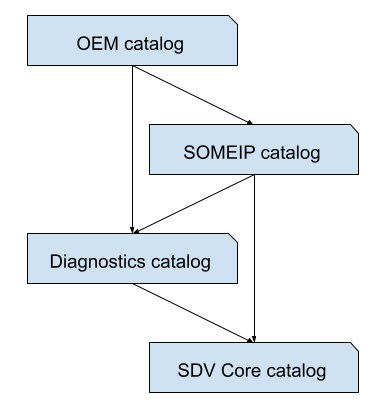
Figure 2. Example VSIDLC dependency tree.
To generate middleware for each catalog in the tree, you must run the following commands:
| Target catalog | Dependencies | Command |
|---|---|---|
| SDV Core catalog | N/A | vsidlc -o ./generated -c ./path/to/sdv_core_catalog |
| Diagnostics catalog | SDV Core catalog | vsidlc -o ./generated -c ./path/to/diagnostics_catalog -d ./path/to/sdv_core_catalog |
| SOMEIP catalog | Diagnostics catalog, SDV Core catalog | vsidlc -o ./generated -c ./path/to/someip_catalog -d ./path/to/diagnostics_catalog -d ./path/to/sdv_core_catalog |
| OEM catalog | Diagnostics catalog, SOMEIP catalog, (transitively) SDV Core catalog | vsidlc -o ./generated -c ./path/to/oem_catalog -d ./path/to/someip_catalog -d ./path/to/diagnostics_catalog -d ./path/to/sdv_core_catalog |
Format Rust output
By default, VSIDL uses rustfmt to format Rust output. For the default to
work properly, set the $ANDROID_BUILD_TOP environment variable or the
RUSTFMT_PATH and RUSTFMT_TOML_PATH environment variables. To change the
default format that Rust outputs, use --rust-formatter option with either
pretty-please or none:
To change output format to crate
prettyplease, use thepretty-pleasevalue:vsidlc -c path_to_catalog -o output_directory -p --rust-formatter pretty-pleaseTo change output format to none, use the
nonevalue:vsidlc -c path_to_catalog -o output_directory -p --rust-formatter none
What's next
After generating middleware, see Implement your business logic.