
The SDV platform provides a set of APIs to be used between the OEM-provided Diagnostics Manager and SDV service bundles, as well as utilities and general platform capabilities to support OEM's diagnostics use cases. Diagnostics are essential to the SDV efforts, automotive services, and technologies we provide to OEMs because the diagnostics stack is an essential component of any automotive operating system.
OEMs deploy Diagnostics Manager instances (usually one per ECU or one per VM) to handle requests from diagnostics clients by communicating with the SDV service bundles on the system. To do so, SDV provides a set of standard diagnostics APIs, utilities, and overall platform support for OEM diagnostics use cases. Our goal is to:
- Enable OEMs to implement Diagnostics Manager according to the UDS standard.
- Allow Diagnostics Manager to delegate tester requests to SDV service bundles.
- Allow SDV service bundles to expose diagnostics data in a vehicle-agnostic way.
To achieve this, SDV provides a set of APIs to standardize interactions between SDV service bundles (potentially provided by third parties) and the OEM's implementation of the diagnostics stack.
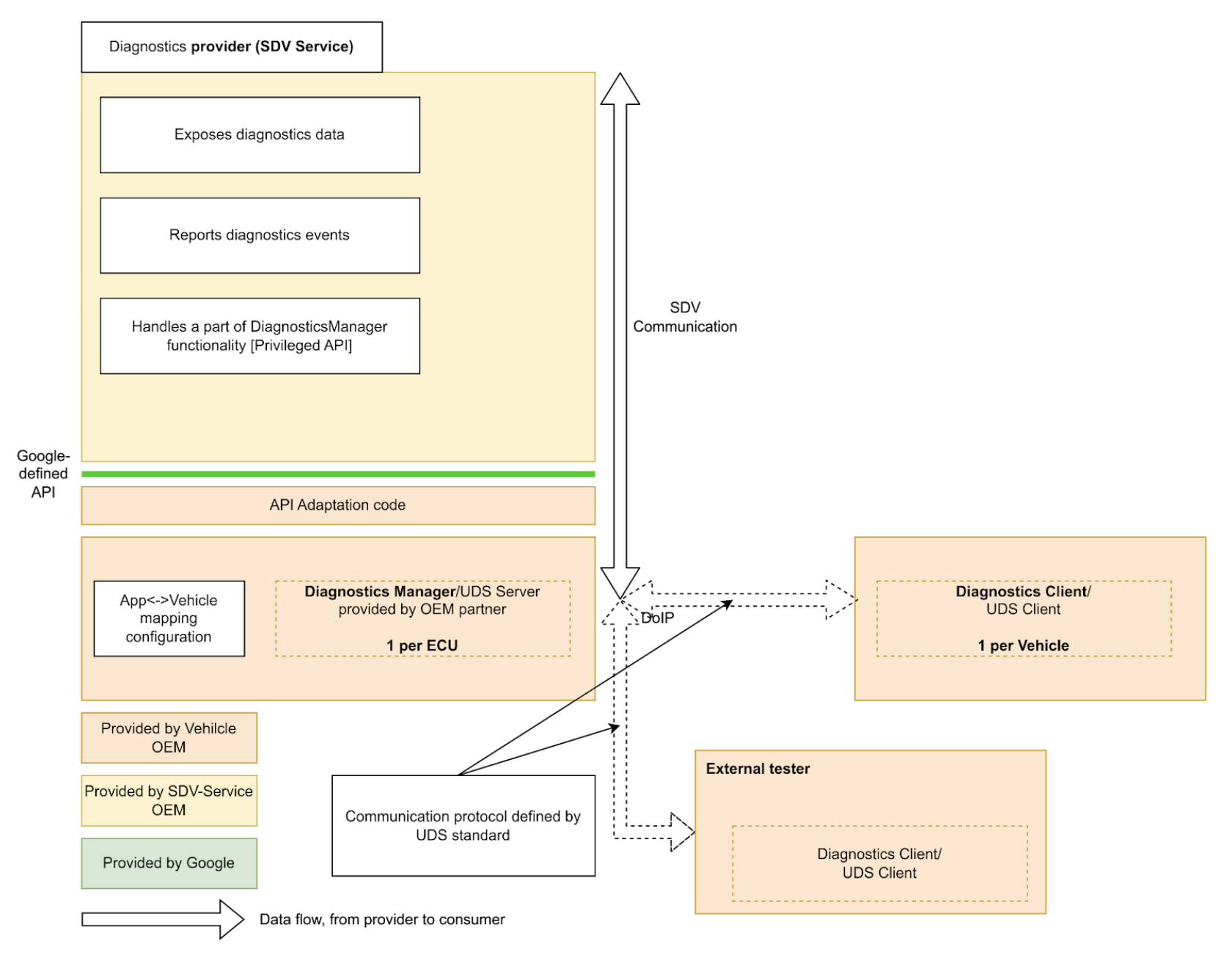
SDV service bundles can expose diagnostics data and entities, implement diagnostics functionality, and report malfunctions to the Diagnostics Manager.
By providing a standard SDV-wide diagnostics API, we simplify the implementation of SDV service bundles, avoiding the need to re-implement diagnostics to run on different vehicles from different OEMs.
Diagnostics Services API
SDV Diagnostics API defines the following services, which correspond to specific UDS (ISO 14229-1) services:
service AuthenticationService: 0x29 (Authentication). It provides a mechanism for the client to prove its identity to access restricted data or services.service DataItemService: 0x22 (ReadDataByIdentifier) and 0x2E (WriteDataByIdentifier). It allows reading and writing data elements identified by DIDs.service EcuResetService: 0x11 (ECUReset). It allows the tester to request a reset of the ECU.service FileTransferService: 0x34 (RequestDownload), 0x35 (RequestUpload), 0x36 (TransferData), 0x37 (RequestTransferExit), and 0x38 (RequestFileTransfer). It handles the initiation and processing of file downloads and uploads.service IoControlService: 0x2F (InputOutputControlByIdentifier). It allows external testers to control inputs and outputs of the system for testing purposes.service RoutineControlService: 0x31 (RoutineControl). It allows the tester to start, stop, and request results for specific routines (functions) implemented by SDV services.service SecurityAccessService: 0x27 (SecurityAccess). It manages the seed-and-key exchange required to unlock specific security levels.
SDV Diagnostics API additionally defines
service FaultListenerService and message Event based on AUTOSAR's
Diagnostic Event Manager (AUTOSAR_SWS_DiagnosticEventManager), which enables
applications to report diagnostic events and malfunctions.
Additionally, service DiagnosticsManagerService defines an SDV platform
service that lets other services to query the current diagnostics connection
parameters (Source Address, Target Address) and the session type.
Service Bundle Developer Guide
As a service bundle developer, diagnostics_declaration and the
following servers can be defined in the corresponding .vsidl file:
service_bundle {
    name: "<BUNDLE-NAME>"
    ...
    server {
        service: "com.sdv.google.diagnostics.data_item.DataItemService"
    }
    server {
        service: "com.sdv.google.diagnostics.routine_control.RoutineControlService"
    }
    server {
        service: "com.sdv.google.diagnostics.io_control.IoControlService"
    }
    server {
        service: "com.sdv.google.diagnostics.fault.FaultListenerService"
    }
    ...
    diagnostics_declaration {
        data_item {
            ...
        }

        routine {
            ...
        }

        event {
            ...
        }

        io_control {
            ...
        }
    }
    ...
}
The DiagnosticsDeclaration message is defined as:
package sdv.diagnostics.v1;

message DiagnosticsDeclaration {
  // Diagnostics data item declaration.
  //
  // See com.sdv.google.diagnostics.data_item.DataItemService service.
  message DataItem {
    // Required. Id of the data item.
    string id = 1;

    // Required. Fully qualified name of the message that defines a structure of
    // the data item.
    string message_name = 2;

    // Flag that indicates whether the data item is writable by the Diagnostics
    // Manager.
    //
    // Effectively, this indicates whether the call to DataItemService::Write,
    // is supported for this data item id.
    bool is_writable = 3;
  }

  // Declaration of diagnostics data for input/output control.
  //
  // See com.sdv.google.diagnostics.io_control.IoControl service.
  message InputOutputControlData {
    // Id of the input/output control data.
    string id = 1;

    // Fully qualified name of the message that defines a structure of the data.
    string message_name = 2;
  }

  // Declaration of diagnostics routine.
  //
  // See com.sdv.google.diagnostics.routine_control.RoutineControl.
  message Routine {
    // Information about routine control method.
    message Method {
      // Fully qualified name of the request message.
      string request = 1;

      // Fully qualified name of the response message.
      string response = 2;
    }

    // Id of the routine.
    string id = 1;

    // Information about routine start method.
    //
    // See com.sdv.google.diagnostics.routine_control.RoutineControl::Start.
    Method start = 2;

    // Information about routine stop method.
    //
    // See com.sdv.google.diagnostics.routine_control.RoutineControl::Stop.
    Method stop = 3;

    // Information about routine result method.
    //
    // See
    // com.sdv.google.diagnostics.routine_control.RoutineControl::RequestResult.
    Method result = 4;
  }

  // Declaration of diagnostics event and corresponding fault listener.
  //
  // See com.sdv.google.diagnostics.event.Event.
  // See com.sdv.google.diagnostics.fault.FaultListener.
  message Event {
    // Id of the event.
    string id = 1;

    // Fully qualified message name of the event's extended data message.
    string extended_data_message_name = 2;

    // Fault status changes which service wants to be notified of.
    //
    // See com.sdv.google.diagnostics.fault.FaultListener.StatusMask.
    uint32 fault_listener_mask = 3;

    // User-defined service unit name of a corresponding event publisher.
    string service_unit_name = 4;
  }

  // Diagnostic data items exposed by the service bundle.
  repeated DataItem data_item = 1;

  // Diagnostic data exposed for input/output control by the service bundle.
  repeated InputOutputControlData io_control = 2;

  // Diagnostic routines exposed by the service bundle.
  repeated Routine routine = 3;

  // Diagnostic events sent by the service bundle.
  repeated Event event = 4;
}
If the above (service_bundle block containing diagnostics_declaration)
is defined in the catalogs,
vsidl_rc_generator generates the
prebuilt_etc targets for every service bundle that declares the above servers
and diagnostics_declaration:
prebuilt_etc {
    name: "<APEX-NAME>.<BUNDLE-NAME>-diag-config.binpb",
    filename: "DiagService-diag-config.binpb",
    sub_dir: "vsidl_provider",
    src: ":generate_vsidl_files_single_bundle_<APEX-NAME>.<BUNDLE-NAME>{diagnostics-config.binpb}",
    installable: false,
}
These targets MUST be added to the prebuilts of the corresponding apex
definition block as indicated
by the corresponding auto-generated comment-block above the prebuilt_etc {}
block:
apex {
    name: "<APEX-NAME>",
    ...
    prebuilts: [
        ...
        "<APEX-NAME>.<BUNDLE-NAME>-diag-config.binpb",
        ...
    ],
    ...
}
You must also add these targets in the diagnostics_config_path field of
the bundle's sdv_service_bundle_metadata entry of the corresponding
sdv_service_bundles_manifest.textproto file. Additionally, you must specify
authorization policies to enable RPC communication between the service bundle
and the diagnostics manager service:
sdv_service_bundle_metadata {
  name: "<BUNDLE-NAME>"
  ...
  diagnostics_config_path: "etc/vsidl_provider/<BUNDLE-NAME>-diag-config.binpb"
  authorization_policy_path: "etc/authz/permissions.textproto"
  ...
}
The permissions in the permissions.textproto file should define the client or
server roles. For example, if the service bundle implements a diagnostics data
item:
server {
    service: "com.sdv.google.diagnostics.data_item.DataItemService"
    allow_all_channels: true
}
Platform Developer Guide
As a platform developer, OEMs MUST implement a Diagnostics Manager Agent
rust_binary target:
rust_binary {
    name: "<DIAGNOSTICS-AGENT-BINARY-EXECUTABLE-NAME>",
    ...
    product_specific: true,
    ...
}
Additionally, in the build files, the following variable must be
set/overwritten:
SDV_DIAGNOSTICS_AGENT_MODULE := <DIAGNOSTICS-AGENT-BINARY-EXECUTABLE-NAME>
For convenience, the libsdv_uds_serde_v1 library can be used for
Proto ↔ UDS translation, and the VSIDL Provider Library for reflection.
The diagnostics agent .vsidl file should have following content:
package: "com.sdv.oem.diagnostics"

service_bundle {
    name: "DiagnosticsAgent"

    server {
        service: "com.sdv.google.diagnostics.DiagnosticsManagerService"
    }

    client {
        service: "com.sdv.google.diagnostics.data_item.DataItemService"
    }

    client {
        service: "com.sdv.google.diagnostics.routine_control.RoutineControlService"
    }

    client {
        service: "com.sdv.google.diagnostics.io_control.IoControlService"
    }

    client {
        service: "com.sdv.google.diagnostics.fault.FaultListenerService"
    }

    client {
        service: "com.sdv.google.diagnostics.ecu_reset.EcuResetService"
    }

    client {
        service: "com.sdv.google.diagnostics.security_access.SecurityAccessService"
    }

    client {
        service: "com.sdv.google.diagnostics.authentication.AuthenticationService"
    }

    client {
        service: "com.sdv.google.diagnostics.file_transfer.FileTransferService"
    }
}
Since the Diagnostics Manager Agent is a binary executable, the bundle's
sdv_service_bundle_metadata is defined as a config-only declaration:
sdv_service_bundle_metadata {
    # This name must match the agent's Bundle Name
    name: "DiagnosticsAgent"
    version_number: 1
    version_name: "1"

    # Reference the manifest itself to mark this as a config-only declaration.
    native_library_path: "etc/sdv_service_bundles_manifest.textproto"

    authorization_policy_path: "etc/authz/permissions.textproto"
}
The diagnostics agent authorization policy should define the permissions for the services it interacts with. For example, if it calls the File Transfer service:
client {
    service: "com.sdv.google.diagnostics.file_transfer.FileTransferService"
    allow_all_channels: true
}