
The Update Manager carries out updates for its VM. The Update Manager coordinates with the client, which is supplied by the system integrator. The client provides the update payload and coordinates the overall vehicle update. The update consists of these steps:
- READY: No update is in progress.
- PREPARE: The Update Manager writes the update to the disk, but it doesn't make it active.
- ACTIVATE: The Update Manager makes the prepared update active so that it takes effect after a reboot.
- COMMIT: The Update Manager makes the update permanent.

Figure 1. High-level operation of the Update Manager.
The Update Manager supports system updates and service bundle updates, which are described on this page.
System updates
The Android OS uses two sets of partitions called slots, with only one slot active at a time. A system update writes a new set of partitions to the inactive slot, and the system switches the active slot on the next reboot. For more information about building system updates, see A/B system updates.
Service bundle updates
In AAOS SDV, service bundles package services together within APEXes. Service bundle updates stage new APEX files in temporary sessions. The system activates these updated bundles after a system reboot. For more information about building service bundle APEXes, see Service bundle updates.
State machine
Requests from the client and events from system services drive the Update Manager state machine. The Update Manager is designed to be resilient, recovering its state and resuming the update process even after unexpected reboots or crashes.
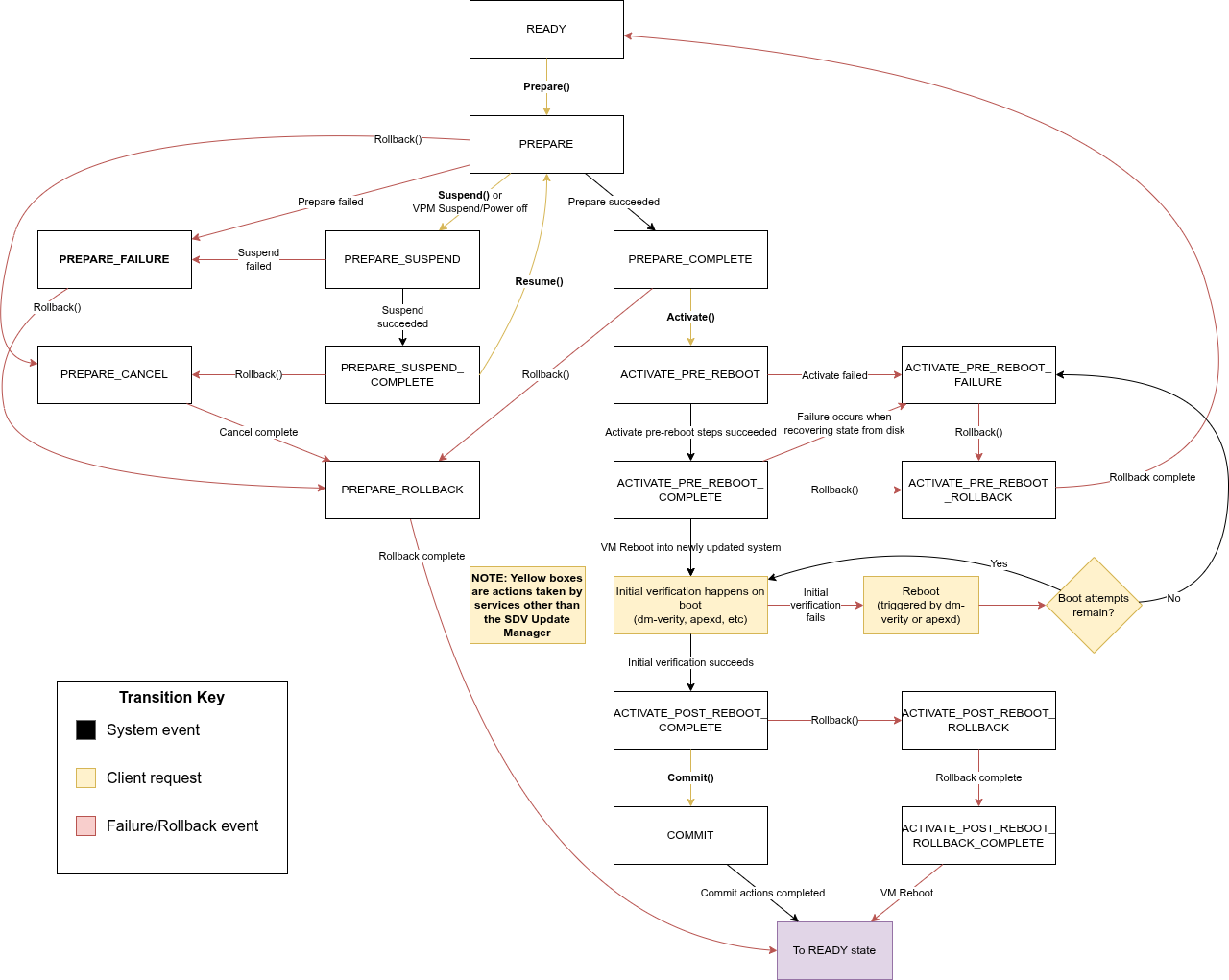
Figure 2. Update Manager state machine.
API
The Update Manager provides an API that drives the update process through the state machine. The API uses VSIDL, which supports clients residing in any VM supporting SDV Comms and provides request failure notification.
Security and access
The system restricts API access using authorization policies. Only the authorized client can make calls to the Update Manager.
Status updates
Because update operations can be long-running, the Update Manager provides asynchronous status updates. Clients must monitor the state by subscribing to status updates.
Subscription management
Subscribing: Clients subscribe to status updates by calling the
SubscribeToStatusUpdates()method:rpc SubscribeToStatusUpdates(SubscribeToStatusUpdatesRequest) returns (SubscribeToStatusUpdatesResponse) {} message SubscribeToStatusUpdatesRequest {} message SubscribeToStatusUpdatesResponse {}Before calling
SubscribeToStatusUpdates(), the client must start an RPC interface that implementsUpdateManagerListenerService.Unsubscribing: Clients can stop receiving status updates by calling
UnsubscribeFromStatusUpdates():rpc UnsubscribeFromStatusUpdates(UnsubscribeFromStatusUpdatesRequest) returns (UnsubscribeFromStatusUpdatesResponse) {} message UnsubscribeFromStatusUpdatesRequest {} message UnsubscribeFromStatusUpdatesResponse {}
UpdateManagerListenerService
Clients that call SubscribeToStatusUpdates() on UpdateManagerService must
implement the following service to receive status updates:
service UpdateManagerListenerService {
  /* Called when there is a status update from the Update Manager. */
  rpc OnStatusUpdate(OnStatusUpdateRequest) returns (OnStatusUpdateResponse) {}
}

message OnStatusUpdateRequest {
  oneof status_update {
    UpdateManagerStatus update_manager_status = 1;
    UpdateProgress update_progress = 2;
  }
}

message OnStatusUpdateResponse {}
OnStatusUpdateRequest delivers one of two possible messages using the
status_update field:
UpdateManagerStatus: Sent when the Update Manager's state changes.UpdateProgress: Sent to indicate the update progress during thePREPAREandACTIVATE_PRE_REBOOTstates because the process can take a significant amount of time.
Status and error messages
The status messages include details about the state and any failures:
UpdateManagerStatus: Reports the current phase of the update and any reason for failure:message UpdateManagerStatus { /* The current state of the update */ UpdateState update_state = 1; /* The reason for the failure, if the update failed */ FailureReason failure_reason = 2; } enum UpdateState { /* The Update Manager is ready to accept a new update. */ READY = 0; /* An update is being prepared. */ PREPARE = 1; /* The update failed during the prepare step. Roll back the update to start a * new update. */ PREPARE_FAILURE = 2; /* The update was prepared successfully. */ PREPARE_COMPLETE = 3; /* A rollback has started from the prepare step. When complete, transitions * to READY. */ PREPARE_ROLLBACK = 4; /* The prepared update is being activated. */ ACTIVATE_PRE_REBOOT = 5; /* The update failed during the activate step before the reboot. Roll back the * update to start a new update. */ ACTIVATE_PRE_REBOOT_FAILURE = 6; /* The update was activated successfully. Reboot to complete activation. */ ACTIVATE_PRE_REBOOT_COMPLETE = 7; /* A rollback has started from the activate pre-reboot step. When complete, * transitions to READY. */ ACTIVATE_PRE_REBOOT_ROLLBACK = 8; /* An update was successfully activated after the reboot. The update needs to * be committed or rolled back to be completed. */ ACTIVATE_POST_REBOOT_COMPLETE = 9; /* A rollback has started from the activate post-reboot step. */ ACTIVATE_POST_REBOOT_ROLLBACK = 10; /* The rollback was completed successfully. Reboot to complete the * rollback. */ ACTIVATE_POST_REBOOT_ROLLBACK_COMPLETE = 11; /* The update is being committed. When complete, transitions to READY */ COMMIT = 12; /* The prepare request is being cancelled */ PREPARE_CANCEL = 13; /* The system update has started suspending */ PREPARE_SUSPEND = 14; /* The system update has finished suspending */ PREPARE_SUSPEND_COMPLETE = 15; } message FailureReason { /* The original error that triggered the failure */ ErrorCode error_code = 1; /* Binder error message for most ErrorCodes. */ string error_message = 2; } enum ErrorCode { Unspecified = 0; /* Error from UpdateEngine service */ UpdateEngineError = 1; // Error from the ApexService ApexServiceError = 2; // Error from the BootControlService BootControlServiceError = 3; // Error from the VoldService VoldServiceError = 4; }UpdateProgress: Reports the current status from Update Engine during system updates:message UpdateProgress { /* Matches the enum UpdateStatus from the UpdateEngine service. */ int32 status_code = 1; /* A value ranging from 0.0 to 1.0, 1.0 representing the process is complete. */ float percentage = 2; }
Get immediate status
You can retrieve the current state and payload at any time by calling
GetStatus(). The SystemUpdatePayload and ServiceBundleUpdatePayload
messages are described in Prepare.
rpc GetStatus(GetStatusRequest) returns (GetStatusResponse) {}

message GetStatusRequest {}

message GetStatusResponse {
  /* The status of the Update Manager */
  UpdateManagerStatus update_manager_status = 1;
  /* The current update payload, if one has been set through the Prepare() request */
  oneof payload {
    SystemUpdatePayload system_update_payload = 2;
    ServiceBundleUpdatePayload service_bundle_update_payload = 3;
  }
}
Prepare
The Prepare request starts the update process by staging the payload, but the
system waits to activate the update:
rpc Prepare(PrepareRequest) returns (PrepareResponse) {}

message PrepareRequest {
  oneof payload {
    SystemUpdatePayload system_update_payload = 1;
    ServiceBundleUpdatePayload service_bundle_update_payload = 2;
  }
}

message PrepareResponse {}
If the request is valid, the state transitions to PREPARE, and the Update
Manager starts the update.
The type of the payload determines the update type.
System update payload
A system update uses the SystemUpdatePayload data, which requires a path to an
over-the-air (OTA) update image. The other parameters are parsed from the image,
but you can specify them to override the parsed values.
message SystemUpdatePayload {
  /* Absolute path to the update image (e.g., /updates/ota_update.zip) */
  string payload = 1;

  /* Offset (in bytes) into the payload where the payload binary starts. */
  optional int64 payload_offset = 2;

  /* The amount of data (in bytes) to read from "payload" as the update payload. */
  optional int64 payload_size = 3;

  /* The header key value pairs to apply with the payload. */
  map<string, string> header_key_value_pairs = 4;
}
The Update Manager processes the OTA image (provided by the client in the
/data/ota_package directory) to run post-install steps, but it doesn't switch
the active boot slot. It then transitions to the PREPARE_COMPLETE state on
success or the PREPARE_FAILURE state on failure.
System update suspension
You can pause the update process for system updates only. This request is valid
only when in the PREPARE state.
Suspend: Pauses the update, transitioning the state through
PREPARE_SUSPEND.rpc Suspend(SuspendRequest) returns (SuspendResponse) {} message SuspendRequest {} message SuspendResponse {}On success, the state transitions to
PREPARE_SUSPEND_COMPLETE. On failure, the state transitions toPREPARE_FAILURE.Resume: Continues the paused update. This is valid only in the
PREPARE_SUSPEND_COMPLETEstate.rpc Resume(ResumeRequest) returns (ResumeResponse) {} message ResumeRequest {} message ResumeResponse {}The state transitions back to the
PREPAREstate.
Service bundle update payload
A service bundle update uses the ServiceBundleUpdatePayload, which contains
the paths to the APEX files and sets the activation attempt limit.
message ServiceBundleUpdatePayload {
  /* Absolute path to an .apex file. Multiple .apex files can be included. */
  repeated string apex_path = 1;

  /* Number of boots to attempt activation before aborting. Must be > 0. */
  int32 boot_attempts = 2;
}
The Update Manager verifies that the APEX files are signed correctly and stages
them in a session. On success, the state transitions to PREPARE_COMPLETE. On
failure, the state transitions to PREPARE_FAILURE.
Activate
The Activate request activates the prepared update on the next reboot.
rpc Activate(ActivateRequest) returns (ActivateResponse) {}

message ActivateRequest {}

message ActivateResponse {}
Pre-reboot
The Update Manager transitions to the ACTIVATE_PRE_REBOOT state while
activating the update. The Update Manager also creates a user data
checkpoint that takes effect when the system is rebooted.
The activation actions differ depending on the update type:
- System update: The system runs post-install steps and sets the boot slot to switch on the next reboot.
- Service bundle update: The system marks the staged APEX session as ready for activation.
If the system activates the update successfully, the state transitions to
ACTIVATE_PRE_REBOOT_COMPLETE, which indicates that the VM is ready for reboot.
Otherwise, the state transitions to ACTIVATE_PRE_REBOOT_FAILURE.
Post-reboot
After the reboot, the system starts in checkpoint mode. In this mode, the system doesn't commit any changes to the user data partition to permanent storage. If the system doesn't commit the update successfully, it reverts these changes to the initial state.
Boot limit
The system reverts the changes to the user data partition in either of these conditions:
- The client sends an explicit
Rollback()request and reboots the system. - The system boots too many times without the client calling
Commit()orRollback(). The boot limit differs for each update type:- System update: The
BootControlimplementation sets this. For example, the default limit in the implementation used by Cuttlefish devices is seven boots. - Service bundle update: The
boot_attemptsfield of theServiceBundleUpdatePayloadprovided by the client sets this when thePrepare()request is made.
- System update: The
Verification
The system then verifies the update:
- System update: dm-verity checks the updated slot for corruption.
- Service bundle update:
apexdchecks each APEX's signature and mounts the APEX's image to the file system.
If verification succeeds, the state transitions to
ACTIVATE_POST_REBOOT_COMPLETE. The Update Manager waits for either Commit()
or Rollback().
If verification fails, the system reboots. When the system reaches the boot limit, the system reverts to the original state:
- System update: The system reverts to the original slot.
- Service bundle update: The updated APEXes are dropped, and the original APEXes are reactivated.
If verification fails for any update type, the state transitions to
ACTIVATE_PRE_REBOOT_FAILURE after the original state is restored.
Rollback
The Rollback request starts returning the system to its pre-update state.
rpc Rollback(RollbackRequest) returns (RollbackResponse) {}

message RollbackRequest {}

message RollbackResponse {}
You can make the Rollback() request during many states. Depending on the
initial state, the system takes different actions, and different states follow:
| State when rollback is issued | State transition | System action |
|---|---|---|
(System update only) PREPARE, PREPARE_SUSPEND_COMPLETE |
→ PREPARE_CANCEL → PREPARE_ROLLBACK →
READY |
System update: Cancels the system update. |
PREPARE_FAILURE, PREPARE_COMPLETE |
→ PREPARE_ROLLBACK → READY |
System update: Cancels the system update. Service bundle update: Aborts staged APEX session. |
ACTIVATE_PRE_REBOOT_COMPLETE, ACTIVATE_PRE_REBOOT_FAILURE |
→ ACTIVATE_PRE_REBOOT_ROLLBACK → READY |
Disables the user data
checkpoint. System update: Cancels boot slot switch. Service bundle update: Removes staged APEX. |
ACTIVATE_POST_REBOOT_COMPLETE |
→
ACTIVATE_POST_REBOOT_ROLLBACK → ACTIVATE_POST_REBOOT_ROLLBACK_COMPLETE |
Disables the user data checkpoint. System update: Switches the boot slot back. Service bundle update: Reverts the active APEX sessions. A final reboot is required for the rollback to take effect, after which the state transitions to READY.
|
Commit
This request indicates that the update completed successfully and applies all changes permanently.
rpc Commit(CommitRequest) returns (CommitResponse) {}

message CommitRequest {}

message CommitResponse {}
The state transitions to COMMIT while performing the commit actions:
- System update: The Update Manager marks the boot as successful, which prevents future rollback and selects this slot on subsequent boots.
- Service bundle update: The Update Manager marks the staged APEX session as successful, closing the update session and making the bundles permanently active.
After the system commits the update, the Update Manager commits the user data
checkpoint. The system commits all new user data written during this boot to
permanent storage. The Update Manager transitions back to READY, indicating
that the update is complete.
Uninstall APEXes
The UninstallApex request removes the /data version of service bundles. You
can call UninstallApex during any state, but the VM must reboot for the
uninstall to take effect. Therefore, avoid calling UninstallApex while an
update is in progress. UninstallApex doesn't remove preinstalled APEXes, wipe
APEX data, or remove inactive APEX versions.
rpc UninstallApex(UninstallApexRequest) returns (UninstallApexResponse) {}

message UninstallApexRequest {
  message ApexInfo {
    string module_name = 1;
    int64 version_code = 2;
  }
  repeated ApexInfo apexes = 1;
}

message UninstallApexResponse {}