
Virtual machines (VMs) can be suspended, resumed, rebooted, and shut down. When any of these events occur, publishers, subscribers, RPC clients, and RPC servers are affected. Figure 1 shows the lifecycle of a service bundle:
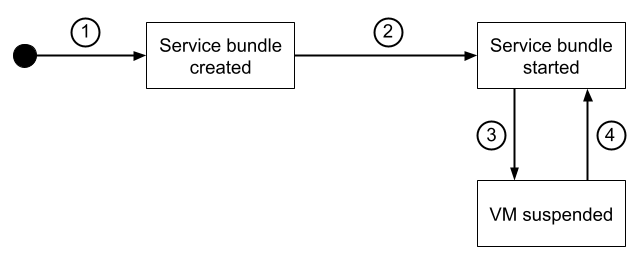
Figure 1. Lifecycle of a service bundle.
The service bundle lifecycle follows this sequence:
- The
newmethod is called to create the service bundle. - The lifecycle manager starts the service bundle and, depending on settings
in the orchestration configuration, calls
on_start. - When the VM stops or suspends and, depending on settings in the
orchestration configuration, lifecycle manager calls
on_stop. Theon_stopfunction should stop the threads for publishers, subscribers, RPC clients, and RPC servers. - When the VM is resumed,
on_startcan recreate the threads if the service bundle is configured to be started again by the orchestration configuration.
Create a configuration to handle suspend and resume
The following example shows a configuration to handle suspend and resume:
# Start `auto_start` service bundles when system is started.
state {
    condition {
        or {
            power_state: "ON"
            power_state: "POWER_OFF_EXIT"
            power_state: "SUSPEND_TO_RAM_EXIT"
        }
    }
    groups_states { started: "auto_start" }
}

# Stop `auto_start` service bundles when system is suspending to RAM.
state {
    condition {
        or {
            power_state: "SUSPEND_TO_RAM_ENTER"
            power_state: "WAIT_FOR_FINISH"
            power_state: "SUSPEND_TO_RAM_POST_FINISH"
        }
    }
    groups_states { created: "auto_start" }
}
Where:
WAIT_FOR_FINISHis the last power state in which the service bundle should expect software defined vehicle (SDV) agents to be responsive.SUSPEND_TO_RAM_POST_FINISHindicates that SDV agents might be closing or suspending connection to be able to restore them reliably on resume. It's important not to rely onSUSPEND_TO_RAM_POST_FINISHorPOWER_OFF_POST_FINISHto callonStopin the service bundle implementation and, instead, rely onSUSPEND_TO_RAM_ENTER,POWER_OFF_ENTER, andWAIT_FOR_FINISH.
Determine service availability
The following example shows how to use the middleware API in your service bundle to determine if a service unit is available:
let mut registration_event_stream =  sdv::mw::clientlib::create_server_registration_event_stream(
        sdv_comms,
        // Descriptor of type sdv::mw::clientlib::rpc_descriptor::client::Descriptor
        // that binds a specific RPC client type to a communication channel.
        client_descriptor,
    )
    .await
    .expect("unable to generate a registration event");

match registration_event_stream.next().await {
            Some(sdv::mw::Availability::Available) => {
                info!("{unit_name} became Available.");
                // Create client/subscriber
            }
            Some(sdv::mw::Availability::Unavailable) => {
                info!("{unit_name} became Unavailable.");
                // Destroy client/subscriber
            }
            None => {
                warn!("Registration event stream for {unit_name} terminated.
                Stopping monitoring for this variant.");
            }
        }
The create_server_registration_event_stream is a middleware API used to
create a event called unit_name. This registration event stream is notified
when a service unit becomes available.