
The Health Monitor (HM) is an SDV agent that runs on each virtual machine (VM) to track the state of service bundles, determine the health of the VM, and periodically generate a VM health report.
OEM-defined service bundles must listen to the various health signals reported by the HM, and based on the data, perform recovery actions. For example, an SDV instance with crashing service bundles might need to be restarted or updated.
You can configure the HM agent to track the following:
- Aliveness status of entities performing periodic tasks, by monitoring
aliveness heartbeats. This monitoring can be configured for both service
bundle instances and custom OEM agents.
- Recovery state of service bundle instances. You can configure service bundles for automatic restarting when crashing. The HM provides signals to monitor this recovery process.
- Communication QoS
- Aliveness of SDV and OEM custom agents
For reference, the full VSIDL catalog, including proto definitions, is available
at
//system/software_defined_vehicle/health_monitor/catalog/health_monitor.vsidl.
Terminology
These terms are used on this page.
Work with the HM subsystem
To use HM features, an OEM implementation needs to:
- Configure the health monitoring system by providing configuration files as detailed in Configure the HM system.
- Use an OEM-defined HM Listener service bundle to listen to HM output and take appropriate action.
- Develop service bundles that actively publish signals, as per their health configuration. This publication lets the HM assess their health state. For more information, see Service bundle dev guides.
Configure the HM system
Any HM related configuration resides in one of these configuration types:
- A global, per VM Health configuration
- A per service bundle health configuration, defining health parameters for all instances of the bundle
Per VM health configuration
At run time, the HM agent expects a VM-wide health configuration: this is a
textproto file (with a .textproto extension) of type VMHealth defined at
//system/software_defined_vehicle/health_monitor/catalog/health_monitoring_config.proto.
The VM Health configuration should be located at the path specified using boot
time system property androidboot.sdv.health_monitor.config_path.
Alternatively, you can configure this dynamically at run time by setting the
persist.sdv.health_monitor.config_path system property to a custom path. The
persist.* setting takes precedence over the androidboot.* setting. You must
reboot the device for the new configuration to take effect.
The VM health configuration lets you set the following:
Periodicity of the VM health report through
period_ms. Setting it is a tradeoff between faster signalling that health violations are detected, and HM subsystem performance. We recommend a value of 100 ms.What agents are to be crash monitored (see Agent crash monitoring).
Configuration file examples are present in
//system/software_defined_vehicle/health_monitor/src/prod_configs/. Here is an
example configuration file:
period_ms: 100
monitored_agent {
  agent_name: "sdv_dt_agent"
  binder_interface_name: "google.sdv.data_tunnel.IAgentService/default"
}
monitored_agent {
  agent_name: "sdv_rpc_agent"
  binder_interface_name: "google.sdv.rpc.IRpcAgent/default"
}
In this example, SDV DT and RPC agents are configured for crash monitoring, and the VM health report is configured to be published every 100 ms.
Per service bundle configuration
Health monitoring of service bundle instances is optional. To opt in, store the
health configuration file in the APEX of your service bundle and define a path
to it in the field health_config_path of sdv_service_bundle_metadata in
sdv_service_bundles_manifest.textproto. For more information about service
bundle manifests, see Service bundle metadata.
The health configuration file is a textproto file of the following type:
message ServiceBundleHealthConfiguration {
  // Required: An empty ServiceBundleHealthConfiguration is equivalent to no
   // implicit health monitoring or QoS monitoring configured.
  //
  // Key should contain the instance name that the `InstanceConfiguration` applies to.
  map<string, InstanceConfiguration> instance_config = 1;
}
For each instance, you can specify both aliveness heartbeat configuration and QoS configuration:
// Service bundle *instance* configuration.
message InstanceConfiguration {
  // Optional.
  //
  // Instance health monitoring configuration. Monitors instance
  // general health. Well suited for bundles executing periodic tasks.
  optional HealthConfiguration health_config = 1;

  // Optional.
   //
   // Map defining the QoS monitoring profile of the instance.
   // The key (string) is the topic name of the specific QoS heartbeat
   // publication. Choose a meaningful topic name for
   // expressive HM reporting.
   //
   // Only one publisher should publish on this topic. The HM
   // agent ignores all publishers except the first one registered
   // by the service bundle instance configured for QoS monitoring.
   map<string, QosMonitoringConfiguration> qos_config = 2;
}
For more information about per-feature configuration, see Aliveness heartbeats monitoring and QoS monitoring.
Listen to HM output
You can listen to the HM through either periodic reports or an RPC API.
VM health report
Health monitoring generates a high-frequency periodic VM health report, providing concise information on the health state of the monitored entities.
The type syntax of VmHealth is defined in
//system/software_defined_vehicle/health_monitor/catalog/health_topic.proto:
message VmHealth {
  // Required.
  // Describes if all monitored service bundles are healthy and report heartbeats on time.
  bool all_monitored_service_bundles_healthy = 1;

  // Required.
  // Describes if all service bundles which should be running on the VM are alive.
  bool all_service_bundles_alive = 2;

  // Required.
  // Indicates if QoS requirements for all service bundles which should be running
  // on the VM are satisfied.
  bool qos_violations_detected = 3;
}
An OEM-defined HM listener service bundle should listen for VMHealth reports
and take appropriate action depending on the complete system architecture.
Potential actions include the following:
- Run diagnostic routines on the VM.
- Restart the VM.
- Run a telemetry campaign to determine the cause.
- Update the system or stop an update if the system is malfunctioning.
HM RPC API
The VM health report is a publication optimized for frequency and transmission speed, providing broad information about the system's health status.
The HM RPC API lets the HM listener obtain detailed information about the source
of health violations. The interface is defined in
//system/software_defined_vehicle/health_monitor/catalog/health_monitor_service.proto.
The interface is reproduced here for convenience:
// RPC Interface of the VM Health Monitor Agent for querying details about the current VM
// health.
//
// An OEM-defined service bundle typically monitors the overall health of the SDV instance by listening to
// high-frequency `VMHealth` publication. If violations are detected, this RPC interface can
// be used to retrieve detailed information about the malfunctioning component.
service HealthMonitorService {
  // Returns the list of running SDV service bundles that were created or started
  // by the orchestrator on this VM.
  rpc ListAllServiceBundles(ListAllServiceBundlesRequest) returns (ListAllServiceBundlesResponse) {}

  // Returns the list of crashed SDV service bundles.
  rpc ListCrashingServiceBundles(ListCrashingServiceBundlesRequest)
      returns (ListCrashingServiceBundlesResponse) {}

  // Returns the list of recovering SDV service bundles.
  rpc ListRecoveringServiceBundles(ListRecoveringServiceBundlesRequest)
      returns (ListRecoveringServiceBundlesResponse) {}

  // Returns the list of monitored SDV service bundles, which registered for reporting
  // aliveness heartbeats but failed to report heartbeats on time.
  rpc ListUnhealthyMonitoredServiceBundles(ListUnhealthyMonitoredServiceBundlesRequest)
      returns (ListUnhealthyMonitoredServiceBundlesResponse) {}

  // Returns a list of QoS monitoring violations detected.
  // Provides a snapshot of the current system state.
  rpc ListQosViolations(ListQosViolationsRequest)
      returns (ListQosViolationsResponse) {}
}
Detailed description of features
This section describes various aspects of the HM in greater detail.
Aliveness heartbeats monitoring
When aliveness monitoring is configured for a service bundle instance, the HM expects the instance to publish periodic heartbeats to prove that the business logic is operating correctly. This monitoring is best suited for service bundle instances that perform periodic tasks. Additionally, bundles using asynchronous runtimes can use aliveness monitoring to prove that the thread pool isn't exhausted.
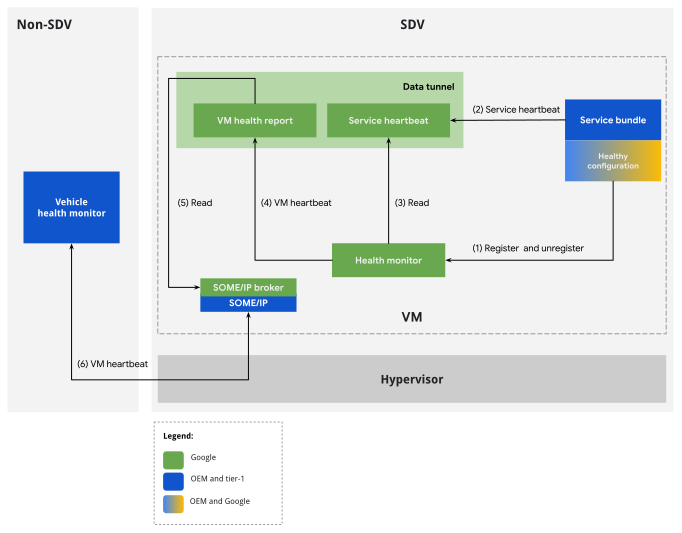
Figure 1. HM aliveness monitoring flow.
Configuration
To enable aliveness HB on a service bundle instance, add an instance of
HealthConfiguration to the health_config field in the
bundle configuration.
An aliveness heartbeat configuration defines a predetermined set of parameters that establish the criteria for assessing a service's periodic heartbeat signal. If the characteristics of the service heartbeat deviate from these parameters, the heartbeat is classified as delayed and the corresponding service bundle as unhealthy, which might indicate a non-optimal operational state.
A service bundle is considered healthy when it reports heartbeats on time
according to its health configuration. In the event of a crash or high system
load, a heartbeat might be missing or delayed, causing the service bundle to be
marked as unhealthy. In this case, a violation appears in the VmHealth report.
Service bundle developers should define the health configuration of a service bundle in the corresponding APEX metadata. The health configuration defines these criteria:
The maximum initial delay allowed between the service start and the first heartbeat detection.
The period during which the SDV service bundle executes business logic, which corresponds to the periodicity of publishing a service heartbeat.
The number of periods to be missed before the HM considers the service bundle to be unhealthy.
The execution time is the amount of time an SDV service bundle needs to perform its business logic before it can publish a service heartbeat.
The service bundle generates a health violation if the service heartbeat is delayed. There are two cases based on the time of the health observation:
Case 1: The initial heartbeat wasn't received. If more than the allowed initial delay has elapsed between service bundle start and the time of observation, the service bundle is considered unhealthy.
Case 2: Heartbeats were already received. If a threshold has elapsed between the last heartbeat and the time of observation, the service bundle is considered unhealthy. This threshold is calculated as the sum of the reporting period (multiplied by the number of periods) and the duration of the task.
The health configuration format is defined in
//system/software_defined_vehicle/health_monitor/catalog/health_config.proto:
package com.android.sdv.health;

// Service Bundle's configuration for health monitoring.
message HealthConfiguration {
  // Required.
  // Initial delay in milliseconds is the time between the service starts and its first heartbeat.
  optional uint64 initial_delay_ms = 2;

  // Required.
  // Period of reporting a heartbeat in milliseconds which corresponds to the periodicity of
  // executing a business logic by the SDV service. This value should be larger than 0.
  optional uint64 period_ms = 3;

  // Required.
  // The number of periods missing a heartbeat before the Health Monitor should consider the
  // service as unhealthy. This value should be larger than 0.
  optional uint64 num_periods = 4;

  // Required.
  // Duration of the business logic the SDV service bundle executes in milliseconds.
  optional uint64 task_duration_ms = 5;
}
Run time considerations
This section provides guidance for publishing aliveness heartbeats and correctly registering for monitoring.
Publish aliveness heartbeats
A service bundle instance generates a service heartbeat message that includes a timestamp. Routinely generate the message, typically directly after the main business logic is executed. The service heartbeat indicates that the service bundle is active.
The bundle instance object to be monitored needs to create a publisher of the
ServiceHeartbeat type, which is available in the libhealth_api library:
 message ServiceHeartbeat {
   // Required.
   // The timestamp.
   .google.protobuf.Timestamp timestamp = 1;
 }
Choose the publication topic arbitrarily. The HM agent uses discovery by message type to detect the publication.
When configuring aliveness monitoring through the health configuration linked in
the corresponding service bundle manifest, the HM agent expects HBs to be
published as soon as the instance has finished its on_start routine. We
recommend keeping on_start short to avoid blocking system startup, so publish
heartbeats in an asynchronous task started in on_start.
Bundle developers can customize the time when the first heartbeat is expected by
using the initial_delay_ms configuration entry.
The bundle instance should continue publishing heartbeats until it's stopped. An
instance is considered stopped when its on_stop routine has finished.
Special use case: Register explicitly to heartbeat monitoring
The behavior described in Aliveness heartbeats monitoring, where heartbeats
are expected between on_start and on_stop, is called implicit aliveness
monitoring. This is the recommended way to use the feature: it simplifies the
bundle's business logic and ensures that the bundle is always monitored.
However, some use cases might exist where the default monitoring period is a restriction:
- A service bundle instance contains business logic that is periodic in a time
interval not linked to
startandstopevents. Aliveness monitoring might be needed only in this custom period. - The HM accurately tracks HBs across suspend and resume periods. Therefore,
the bundle might want to continue being monitored post
on_stop. - Custom OEM agents might not be implemented as service bundles. Thus, they can't benefit from implicit aliveness monitoring. However, they might still require aliveness monitoring.
For these cases, the HM lets you bypass implicit registration to aliveness
monitoring in favor of explicit registration. To use explicit registration, a
bundle instance must opt out of implicit registration by not including an
entry of type HealthConfiguration for the particular instance in the bundle's
manifest. Then, at run time, the bundle instance should use the RPC API defined
in
//system/software_defined_vehicle/health_monitor/catalog/health_monitor_registration_service.proto
to manually register and deregister from monitoring. Published heartbeats are
expected as soon as the registration RPC call succeeds.
For an example implementation, see
//system/software_defined_vehicle/samples/health/stable/health_monitored_service_bundle/.
QoS monitoring
Quality of Service (QoS) is a measurement of communication. The HM monitors whether the message sent spends too much time in flight, or in the case of periodic communication, whether messages aren't received with the chosen frequency.
SDV provides several flavors of Pub/Sub and RPC communication. The common denominator is that all communication schemes contain at least one listener. For the HM to monitor the communication, this listening service bundle instance must publish special QoS heartbeats whenever it receives a message of interest.
Configuration
To enable QoS monitoring of a communication, first identify the communication
listener that will publish the QoS heartbeat. Then, for the identified service
bundle instance, add one or more topic to QosMonitoringConfiguration mappings
in the qos_config field. For more information, see
Per-service bundle configuration.
The topic is a string that defines the publication topic where the HM expects QoS HBs at run time. A listening bundle instance can take part in multiple communications and can report QoS HBs on multiple topics.
Topics should be descriptive, as they're reported back to the HM listener service bundle if QoS violations are detected at run time.
The QosMonitoringConfiguration type is defined in
//system/software_defined_vehicle/health_monitor/catalog/health_config.proto:
message QosMonitoringConfiguration {
  // Optional - If absent, heartbeat frequency monitoring is disabled for this SB.
  //
  // The maximum allowable interval between consecutive heartbeats (in milliseconds).
  // A QoS frequency violation is triggered if the time elapsed between
  // two heartbeats exceeds this threshold.
  optional uint64 qos_period_threshold_ms = 1;

  // Optional - If absent, heartbeat latency monitoring is disabled for this SB.
  //
  // The maximum allowable interval between data publication and data processing timestamps (in milliseconds).
  // A QoS latency violation is triggered if the time elapsed between
  // data publication and data processing timestamps exceeds this threshold.
  optional uint64 qos_latency_threshold_ms = 2;
}
For default use cases, enforce both types of QoS monitoring. A
qos_latency_threshold_ms of 30 is reasonable for in-VM Pub/Sub communication
under normal system loads.
Run time considerations
Similar to aliveness HB monitoring, the communication listening bundle is expected to publish a type of heartbeat. In this case, a QoS HB should be published whenever messages of interest are received, as opposed to at the end of business logic execution.
A QoS HB is of type QosHeartbeat, defined in
//system/software_defined_vehicle/health_monitor/catalog/qos_heartbeat.proto:
message QosHeartbeat {
  option (.sdv.vsidl.v1.publication) = {
    message_count: 2
    model: SINGLE_PUB
  };
  // Required.
  // Current timestamp at heartbeat transmission. The heartbeat should be sent
  // immediately after the listener receives the related QoS-monitored message.
  .google.protobuf.Timestamp timestamp = 1;

  // Required.
  // Timestamp corresponding to the creation time of the underlying data. This
  // implies that, in addition to the data of interest, the monitored message includes
  // a data creation timestamp field. The listener is responsible for routing this
  // timestamp to the QosHeartbeat upon receiving a QoS-monitored message.
  .google.protobuf.Timestamp data_timestamp = 2;
}
The time of registering and deregistering the QoS HB publication is critical for accurate monitoring. The HM expects QoS HBs between these two events. The message listening bundle should register the QoS HB publication when the monitored communication is registered with the SDV communication stack. The HM can use the availability API to do this. For more information, see Determine service availability.
Service bundle recovery monitoring
Recovery of service bundle instances is configured as part of orchestration
agent configuration files. For full treatment of the topic, see Service
bundles. The HM subsystem passively observes the recovery process. When
failure to recover a bundle instance is detected, a violation is added to the
VMHealth report. In contrast to the rest of HM monitoring capabilities,
recovery monitoring is mandatory and nonconfigurable.
Crashes of service bundle instances that aren't configured for recovery generate a health violation on their first crash.
Service bundle instance recovery is designed to integrate with heartbeat aliveness monitoring. The HM system is more lenient when assessing heartbeats when it detects that the bundle is recovering. In practice, this leniency means that service bundles don't need to take any additional monitoring deregistration or registration steps if they crash.
Agent crash monitoring
The HM detects potential crashes of SDV agents using the binder linkToDeath
mechanism.
You can configure crash monitoring as part of the VM health configuration (see
Per-SDV instance (VM) configuration), specifically the monitored_agent
repeated field. This field should contain entries of BinderServiceAgent type:
message BinderServiceAgent {
  // agent_names must be unique across configuration
  // used for HM internal agent identification, and naming entries in HM dumpsys report
  string agent_name = 1;

  // Binder interface name/identifier, e.g: "google.sdv.data_tunnel.IAgentService/default"
  // HM Agent should have appropriate permissions to find the binder interface
  // see also `sdv_crash_monitored_service` selinux attribute
  string binder_interface_name = 2;
}
Custom agents can also be monitored if the agent exposes a binder interface. To monitor a custom agent, grant the HM SELinux permissions to listen to the appropriate binder interface.
The system property ro.boot.sdv.health_monitor.agent_startup_timeout_sec can
override how long the HM waits for agents to register their binder interfaces
once the HM is started. Unless required by custom agents, the default of three
seconds is appropriate.
Service bundle dev guides
This section provides step-by-step guides on how to use HM features from service
bundles, in contrast to the theoretical treatment in previous sections. The
up-to-date reference sample, upon which these guides are based, is the
qos_monitoring sample. Follow the sample's
//system/software_defined_vehicle/samples/health/stable/qos_monitoring/README
for a practical experience.
Add aliveness heartbeat monitoring to a service bundle
This method is the most direct way to enable health monitoring for a service bundle:
Define an instance of
ServiceBundleHealthConfigurationfor the bundle instances in a file namedhealth_configuration.textproto:# health_bundle_configuration.textproto instance_config { key: "instance1" value: { health_config { initial_delay_ms: 1000 period_ms: 500 num_periods: 2 task_duration_ms: 200 } # qos_config entries irrelevant for this dev guide qos_config { ... } } }Add the configuration file to the service bundle APEX. In an
Android.bp:apex { name: "com.android.sdv.sample.oem.health.qos_monitoring", // ... prebuilts: [ // ... "com.android.sdv.sample.oem.health.qos_monitoring.health_config", ], } prebuilt_etc { name: "com.android.sdv.sample.oem.health.qos_monitoring.health_config", src: "health_configuration.textproto", filename: "health.textproto", // ... // Reduce prebuilt visibility to avoid adding it in another APEX. visibility: ["//system/software_defined_vehicle/samples/health/qos_monitoring/apex"], }Store the health configuration in the APEX and set the
health_config_pathin the manifest:# sdv_service_bundles_manifest.textproto sdv_service_bundle_metadata { ... health_config_path: "etc/config/health_configuration.textproto" }In the VSIDL definition, ensure the bundle publishes
com.android.sdv.health.ServiceHeartbeat:sdv_service_bundle { name: "SampleBundle" publisher { message: "com.android.sdv.health.ServiceHeartbeat" topic: "arbitrary-topic" capacity: 2 } }Add SDV permissions to the bundle so that the bundle is authorized to publish HBs:
  publisher {
    type: "com.android.sdv.health.ServiceHeartbeat"
  }
Periodically publish service heartbeats in the code, starting in
on_start:// ... fn on_start(&mut self) { // ... runtime.spawn(business_logic(self.context)) } async fn business_logic(context: ContextRef) -> SdvResult<()>{ // register HB publication let mw_comms = SdvComms { context }; let aliveness_hb_pub = create_publisher::<PublisherDescriptor<ServiceHeartbeat>>( &mw_comms, PublisherDescriptors::<ServiceHeartbeat>::ARBITRARY_TOPIC, ) .await?; loop{ // do business logic // ... // publish hb aliveness_hb_pub.publish(&ServiceHeartbeat { timestamp: MessageField(Some(Box::new(now.into()))), ..Default::default() })?; } }
Special use case: Explicit registration
For more special use cases, where the bundle needs HB monitoring for custom
lifecycles (for example, monitoring starting earlier or ending later than the
standard STARTED state), you can use the explicit registration method:
In the VSIDL definition, add a
com.android.sdv.health.HealthMonitorRegistrationServiceclient:sdv_service_bundle { # ... client { service: "com.android.sdv.health.HealthMonitorRegistrationService" channel: "com-android-sdv-health-health-monitor-registration-service" } }Add SDV permission for using the aliveness HB registration RPC:
  # ...
  client {
    service: "com.android.sdv.health.HealthMonitorRegistrationService"
    channel: "com-android-sdv-health-health-monitor-registration-service"
  }
Register with the HM through RPC, for example, in
on_startornew:let rpc_client = Self::new_client(comms).await?; let _ = rpc_client .RegisterConfiguration(&RegisterConfigurationRequest { config: Some(HealthConfiguration{ initial_delay_ms: 100, period_ms: 200, num_periods: 3, task_duration_ms: 40, special_fields: protobuf::SpecialFields::default(), }).into(), ..Default::default() }) .await .unwrap();Publish HBs.
Unregister from monitoring when no longer needed:
let _ = rpc_client
  .UnregisterConfiguration(&UnregisterConfigurationRequest { ..Default::default() })
  .await
  .unwrap();
Add QoS monitoring to communication
Verify that the service bundle instance is a subscriber of a topic named
fog-light-statusin the VSIDL catalog:subscriber { message: "QosMonitoredFogLightStatus" topic: "left-fog-light-status" }The message format is as follows:
package com.android.sdv.sample.oem.health.qos_monitoring; import "google/protobuf/timestamp.proto"; message QosMonitoredFogLightStatus { // arbitrary fields related to business logic int32 status = 1; // A QoS-monitored message must include a timestamp field .google.protobuf.Timestamp timestamp = 2; }Define an instance of
ServiceBundleHealthConfigurationfor the bundle instances in ahealth_configuration.textprotofile that includes QoS monitoring:# health_bundle_configuration.textproto instance_config { key: "instance1" value: { # aliveness HB monitoring config irrelevant for this dev guide health_config { ... } qos_config { key: "qos-hb-right-fog-light-status" value { qos_period_threshold_ms: 100 qos_latency_threshold_ms: 50 } } } }The topic chosen in the
keyfield illustrates that QoS HBs will be published on this topic, allowing monitoring of a topic calledfog-light-status.Add the configuration file to the service bundle APEX. In an
Android.bp:apex { name: "com.android.sdv.sample.oem.health.qos_monitoring", // ... prebuilts: [ // ... "com.android.sdv.sample.oem.health.qos_monitoring.health_config", ], } prebuilt_etc { name: "com.android.sdv.sample.oem.health.qos_monitoring.health_config", src: "health_configuration.textproto", filename: "health.textproto", // ... // Reduce prebuilt visibility to avoid adding it in another APEX. visibility: ["//system/software_defined_vehicle/samples/health/qos_monitoring/apex"], }Store the health configuration in the APEX and set
health_config_pathin the manifest:# sdv_service_bundles_manifest.textproto sdv_service_bundle_metadata { ... health_config_path: "etc/config/health_configuration.textproto" }In your VSIDL definition, ensure the bundle is a publisher of
com.android.sdv.health.QosHeartbeat:sdv_service_bundle { name: "SampleBundle" publisher { message: "com.android.sdv.health.QosHeartbeat" topic: "qos-hb-right-fog-light-status" capacity: 2 } }Add SDV permissions to the bundle so that the bundle is authorized to publish QoS HBs:
publisher { message: "com.android.sdv.health.QosHeartbeat" topic: "qos-hb-right-fog-light-status" }Register the QoS HB publication only when the monitored communication is registered. Use the availability API from
libsdv_mw_clientlib:// Wait for monitored communication to be available let comms = SdvComms{context}; let registration_stream = create_registration_event_stream( &comms, SubscriberDescriptors::<QosMonitoredFogLightStatus>::LEFT_FOG_LIGHT_STATUS, ).await?; let mut registration_stream = Box::pin(registration_stream.filter(|e|e==Availability::Available)); registration_stream.next().await; // only when available, create QoS HB publication: let qos_hb_pub = create_publisher( &comms, PublisherDescriptors::<QosHeartbeat>::QOS_HB_LEFT_FOG_LIGHT_STATUS, ).await?; // ...Publish QoS HBs every time a message is received:
// ... use tap::Pipe; fn flatten_mw<T: Send>( s: impl Stream<Item = SdvResult<Vec<T>>> + Send + Unpin, ) -> impl Stream<Item = SdvResult<T>> + Send + Unpin { s.flat_map(|v| match v { Ok(v) => v.into_iter().map(Ok).pipe(stream::iter).left_stream(), Err(err) => Err(err).pipe(future::ready).pipe(stream::once).right_stream(), }) } { // ... let data_stream = create_observer( &comms, SubscriberDescriptors::<QosMonitoredFogLightStatus>::LEFT_FOG_LIGHT_STATUS, SubscribeOptions::default() ) .pipe(flatten_mw) .await?; while let Some(data) = data_stream.next().await { // publish QoS HB. Note how data.timestamp is used to populate the field qos_hb_pub.publish( &QosHeartbeat { timestamp: SystemTime::now(), data_timestamp: data.timestamp, ..Default::default() } ) // use data // ... } }To stop QoS monitoring, drop the publisher object:
// ...
drop(qos_hb_pub);
Debug health monitoring
For debug and system overview purposes, use the dumpsys tool to monitor the VM
health monitoring state:
adb shell dumpsys com.google.sdv.ISdvAgent/hm
The report details the VM health reporting configuration, bundle configuration, and monitoring state. The following is a sample of such report:
AGENT NAME: SDV Agent dump - Health Monitor
AGENT FQIN: instance1:com.android.sdv.health.HealthMonitorServiceBundle/instance1
AGENT STATE: Started
----------------
----------------
INTERNAL STATE REPORTERS:

*NAME: VM health report period:
*REPORT:
100----------------
*NAME: Recovery monitor manager
*REPORT:

HEARTBEAT MONITORING:
NO ACTIVE MONITORS

QOS MONITORING:
NO ACTIVE MONITORS
RECOVERY MONITORING:
a. Agent monitoring:
MONITOR 0:
ID: Agent: sdv_vsidl_provider_agent
linked_binder: com.google.sdv.ISdvAgent/vsidl_provider
alive: true

MONITOR 1:
ID: Agent: sdv_someip_broker
linked_binder: com.google.sdv.ISdvAgent/someip_broker
alive: false

b. SB monitoring:
MONITOR 0:
ID: FQIN: instance1:com.android.sdv.test.orchestrator.OrchSampleInitialPowerState/sample-initial-power-state
Recovery State: Normal
Lifecycle State: Started
Health Status: Healthy
MONITOR 1:
ID: FQIN: instance1:com.android.sdv.sample.apex.provider.Provider/sample-provider-v1
Recovery State: Normal
Lifecycle State: Started
Health Status: Healthy
MONITOR 2:
ID: FQIN: instance1:com.sdv.google.display_safety.HarSdvVehicleDataPublisher/instance-1
Recovery State: Normal
Lifecycle State: Started
Health Status: Healthy
----------------
*NAME: Health monitor
*REPORT:
CURR TIMESTAMP(ns): 1775543863756836167
INTERNAL STATE:
background_thread running: true
should_run: true

----------------