

שער ה-Software Defined Vehicle (SDV) במערכות המידע והבידור ברכב (IVI) מאפשר תקשורת בין מערכות IVI לבין שירותי SDV מרחוק. השער מאפשר לאפליקציות Java של יצרני ציוד מקורי ולשירותים מקוריים, כמו VHAL, ליצור אינטראקציה עם שירותי SDV. השער משתמש בשיטות תקשורת מוכרות, כולל רישום שירותים, זיהוי שירותים ו-RPC.
השער הזה עומד בדרישות ספציפיות של פרויקט SDV ב-AAOS, כמו הפעלה של הטמעה לדוגמה של VHAL באמצעות SDV Data Tunnel למידע על נכסים. היא גם מאפשרת לאפליקציות Java ו-Kotlin Android ב-IVI להשתמש במערך התקשורת של SDV, להירשם כשירותים, למצוא שירותי SDV אחרים ולתקשר איתם.
מיקומי הקוד של SDV Gateway ודוגמאות ללקוחות SDV Gateway זמינים במאמר בנושא מיקומי קוד.
מודלים לשילוב של SDV Gateway
שימוש בתקשורת SDV-IVI דרך שער SDV בארכיטקטורת IVI
שער ה-SDV מתקשר עם אפליקציות Java, שירותים מקוריים, מחסנית SDV Comms ורשת הרכב. איור 1 מציג את האינטראקציות האלה:
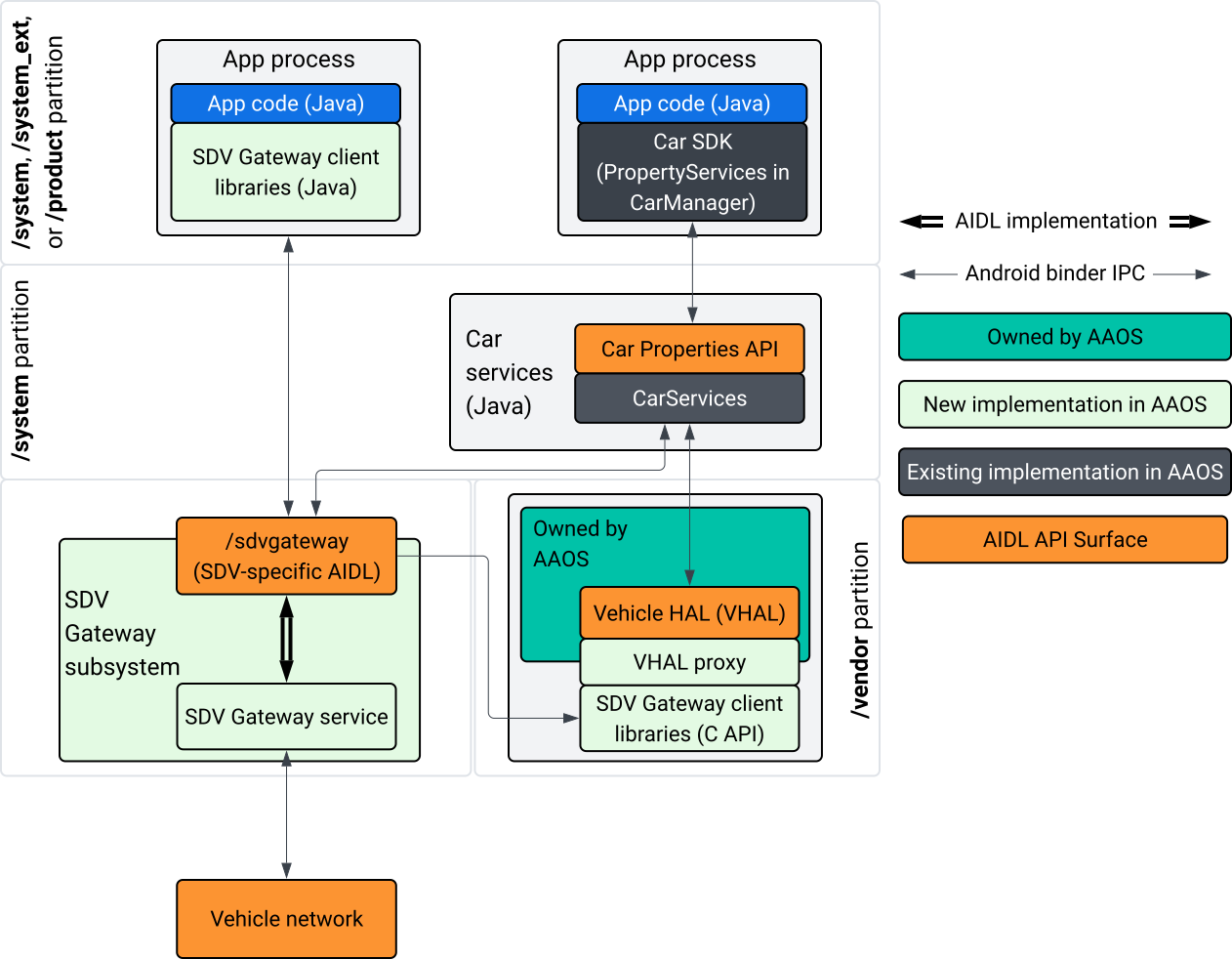
איור 1. אינטראקציות עם שער SDV.
בתרשים המערכת הזה:
- אפליקציות מקיימות אינטראקציה עם SDV Gateway דרך שירותי הלקוח שלו.
- AAOS SDV SDK מספק לכם:
- ISdvGateway AIDL API לתקשורת בין תהליכים.
- ספריות תקשורת לאינטראקציה עם הרשת.
- ממשק C API נוח לשילוב שירותים מקוריים.
- ממשק ה-API של ISdvGateway AIDL מיושם על ידי שירות SDV Gateway ותת-מערכת.
- שירות SDV Gateway מנהל את:
- זיהוי שירותים דו-כיווני.
- תקשורת עם שירותי SDV מרחוק.
- לוגיקה עסקית מרכזית.
- מערכת המשנה של שער SDV מתחברת לרשת הרכב.
- שירותים מקוריים, כולל ההטמעה של VHAL, יכולים להשתמש ב-ISdvGateway AIDL API ישירות או דרך C API של ה-SDK.
- ה-VHAL proxy משמש כהטמעה של VHAL, שכוללת שילוב של מיפוי VSIDL.
מודל שילוב של SDV Gateway בשירות מקורי של IVI
מודל השילוב מוצג באיור 2:
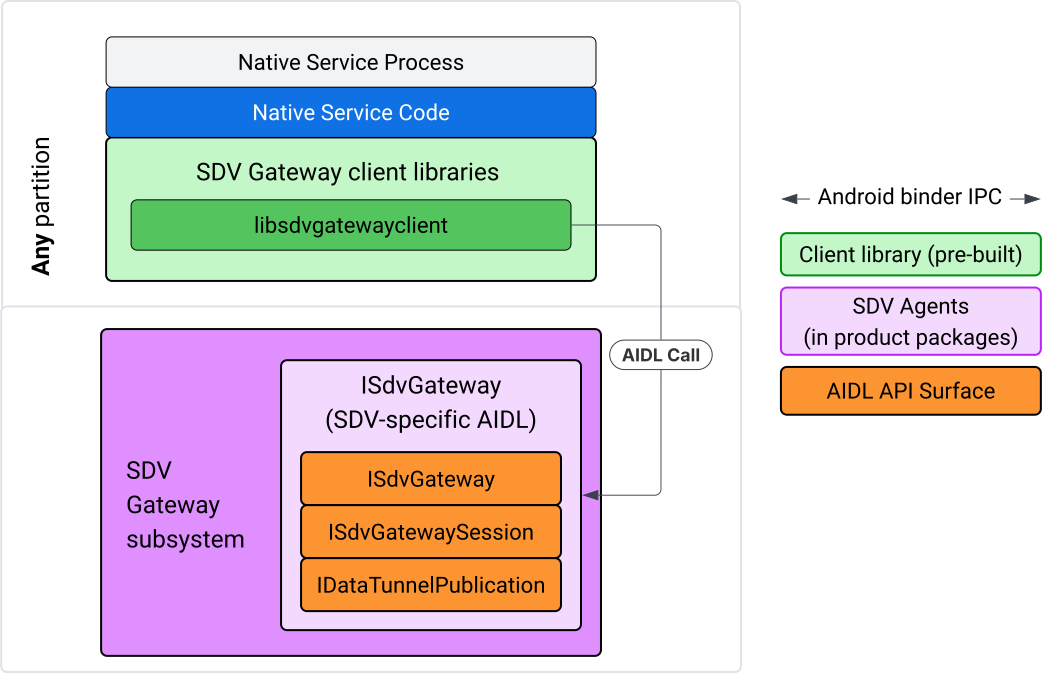
איור 2. מודל השילוב של SDV Gateway.
שימוש בשער SDV בשירות מקורי של IVI
איור 3 מציג את השימוש ב-SDV Gateway ב-IVI:
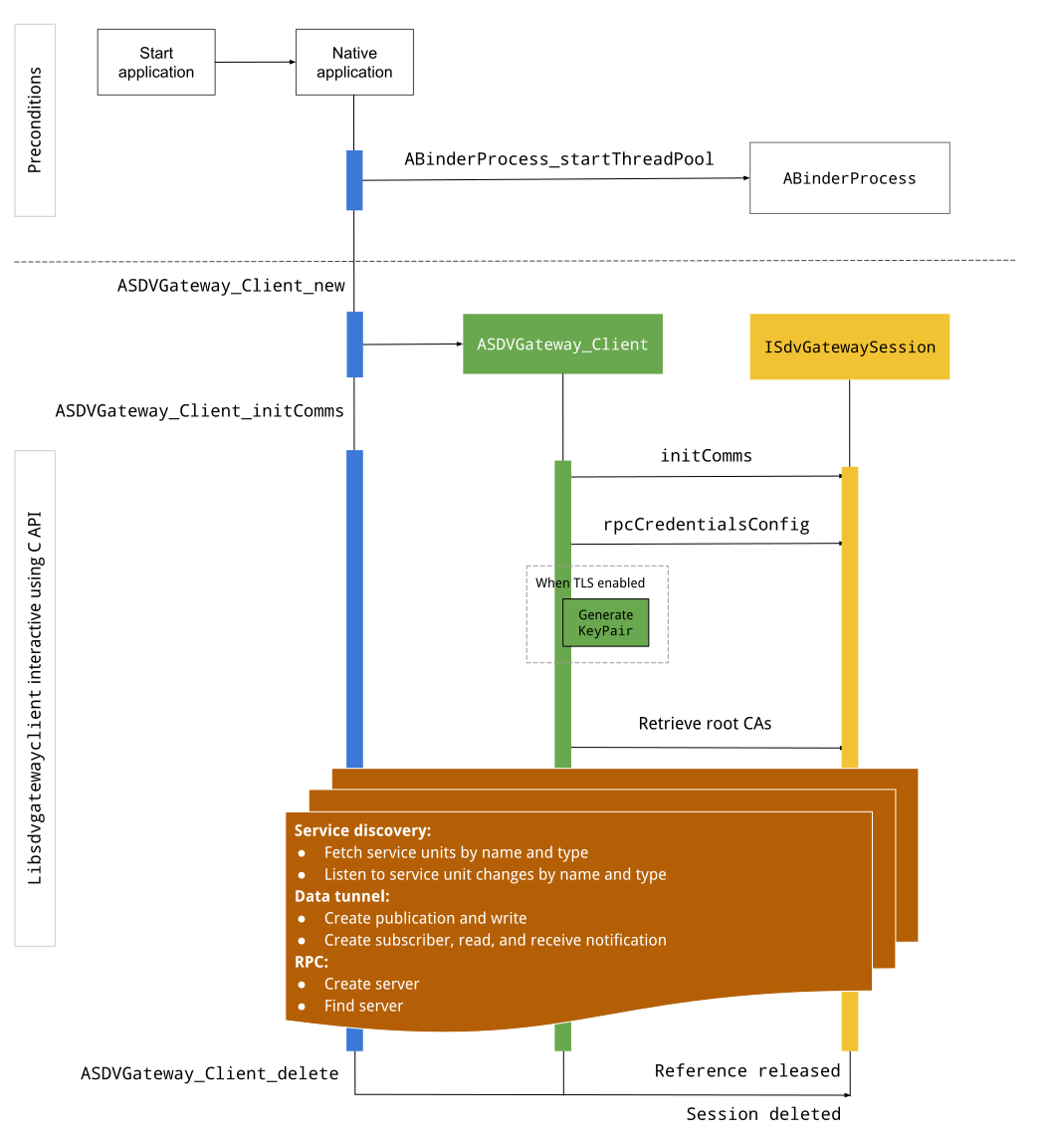
איור 3. SDV Gateway ב-IVI.
תנאים מקדימים
מפעילים את מאגר ה-threads של Binder:
ספריית הלקוח של SDV Gateway דורשת מאגר שרשורים של Binder שהופעל כדי לקבל קריאות חוזרות אסינכרוניות משירותי Binder.
ה-API שנדרש ליצירת לקוח של SDV Gateway נכשל אם לא מופעל מאגר של שרשורי Binder.
הכללת ספריית לקוח של Native Gateway
ספריית הלקוח של Native Gateway חושפת C API. כדי להשתמש ב-C API, מוסיפים מופע של libsdvgatewayclient כתלות:
cc_binary {
    name: "your_binary_name",
    srcs: ["main.cpp"],
    shared_libs: [
        "libsdvgatewayclient",
    ],
}
טעינת לקוח שער מקורי
#include "libsdvgatewayclient.h"
יצירת מופע של לקוח מקורי
ASDVGateway_Client* client;
ASDVGateway_StatusCode_t statusCode = ASDVGateway_Client_new(
     &client, /*outStatus*/nullptr);
אחרי שיוצרים את הלקוח, הלקוח:
שומר את המצב של כל האינטראקציות הבאות עם שירות ה-Gateway.
הוא משמש כהקשר של כל האינטראקציות עם שירותים אחרים שמופעל בהם SDV, והוא מועבר כפרמטרים הראשונים לפונקציות של C API.
קודי סטטוס והודעות שגיאה
לרוב הפונקציות ב-C API יש את ההגדרה הבאה:
ASDVGateway_StatusCode_t ApiFunctionName(..., ASDVGateway_Status_t* outStatus);
כדי להעריך את ההצלחה, אפשר לבדוק את קוד הסטטוס שמוחזר, שהוא מסוג ASDVGateway_StatusCode_t. אפשר גם להעביר מצביע למבנה שבו הפונקציה יכולה למלא את קוד הסטטוס והודעת שגיאה. המצביע מועבר כפרמטר האחרון, שנקרא outStatus. ערך null מציין שלא נעשה שימוש במבנה הפלט.
המתקשר צריך להקצות את מבנה סטטוס הזיכרון להודעת השגיאה. מבנה הסטטוס יכול להכיל גם את קוד הסטטוס וגם הודעת שגיאה. יש דוגמה לאחזור הודעת השגיאה כשיוצרים לקוח חדש.
כדי להעריך את מידת ההצלחה:
בודקים את קוד הסטטוס שמוחזר, שהוא מהסוג
ASDVGateway_StatusCode_t.מעבירים מצביע למבנה שבו הפונקציה יכולה למלא את קוד הסטטוס ואת הודעת השגיאה.
- המצביע מועבר כפרמטר האחרון, שנקרא
outStatus. - ערך null מציין שלא נעשה שימוש במבנה הפלט.
- המתקשר צריך להקצות את מבנה סטטוס הזיכרון להודעת השגיאה.
- מבנה הסטטוס יכול להכיל את קוד הסטטוס והודעת שגיאה.
- המצביע מועבר כפרמטר האחרון, שנקרא
הנה דוגמה שמראה איך לאחזר את הודעת השגיאה של לקוח חדש:
#include <iostream>
#include <array>

struct StatusWithErrorMsg : ASDVGateway_Status_t {
    StatusWithErrorMsg() {
        // Ensure the base struct pointers point to our internal buffer
        errorMessage = errorMessageBuffer.data();
        maxErrorMessageSize = errorMessageBuffer.size();

        // Good practice: Zero-initialize the buffer
        errorMessageBuffer.fill(0);
    }

    std::array<char, 256> errorMessageBuffer;
};

// --- Execution ---

ASDVGateway_Client* client = nullptr;
StatusWithErrorMsg status;

// Initialize the client
ASDVGateway_StatusCode_t statusCode = ASDVGateway_Client_new(&client, &status);

// Log Results
std::cout << "Returned statusCode:    " << statusCode << std::endl;
std::cout << "Status Struct Code:     " << status.statusCode << std::endl;
std::cout << "Status Error Message:   " << status.errorMessage << std::endl;
בדוגמה הזו:
קוד הסטטוס שמופיע במבנה הסטטוס זהה לקוד הסטטוס שמוחזר.
הודעת השגיאה מתמלאת רק עד למגבלת
maxErrorMessageSizeהתווים (כולל תו סיום ה-null\0). אם לא מתרחשת שגיאה (קוד הסטטוס הואOK), הודעת השגיאה היא מחרוזת ריקה.
התחלת תקשורת
הפונקציה Init comms מאתחלת את התקשורת בין אפליקציית המתקשר לאפליקציות אחרות באמצעות SDV Comm Stack ו-SDV Gateway. אפשר לקרוא ל-Init comms בשני ההקשרים האלה::
אחרי יצירת הלקוח.
לפני אינטראקציות של Data Tunnel, RPC או Service Discovery.
הנה דוגמה:
ASDVGateway_InitCommsParams_t params{
.packageName = "android.sdv.samples.gateway.client",
.serviceBundleName = "NativeTestApp",
.serviceInstanceName = "default",
};
// Initialize communications and capture the status code
ASDVGateway_StatusCode_t statusCode = ASDVGateway_Client_initComms(client, ¶ms, &status);
// Recommended check
if (statusCode != ASDVGateway_StatusCode_OK) {
std::cerr << "Failed to init comms: " << status.errorMessage << std::endl;
}
זיהוי שירותים
אתם יכולים לקבל התראות כשנרשמות או מבוטלות יחידות שירות מסוג או שם מסוימים. פונקציית ההתקשרות חזרה מקבלת הודעה בשרשור שנמצא בבעלות של לקוח השער. הקריאה החוזרת הזו מופעלת בהתחלה עם כל יחידות השירות שרשומות מיד אחרי הקריאה ל-API של C. אחרי ההפעלה הראשונית, ההתראות ממשיכות להתעדכן עד שהמאזין מבטל את הרישום שלו באופן מפורש.
class NativeSdvGatewayTestApp {
public:
    static void ServiceUnitChangeListenerCallback(
        const ASDVGateway_ServiceUnitChangeEventType eventType,
        const ASDVGateway_ServiceUnitDefinition* serviceUnitDefinition,
        void* userData
    ) {
        auto* testApp = reinterpret_cast<NativeSdvGatewayTestApp*>(userData);

        if (testApp) {
            // Logic to react when services are registered or unregistered
            // e.g., testApp->handleServiceChange(eventType, serviceUnitDefinition);
        }
    }
};

// --- Listener Registration ---

// Ensure thisApp remains in scope as long as the listener is active
NativeSdvGatewayTestApp* thisApp = get_current_app_context();

ASDVGateway_UnitType_t unitType{
    .sdvPackageName     = "android.sdv.samples.sdv_gateway",
    .serviceBundleName  = "DtPublisher",
    .unitTypeName       = "TirePressure",
};

// Register the listener
ASDVGateway_Client_registerListenerForServiceUnitChangeByType(
    client,
    &unitType,
    NativeSdvGatewayTestApp::ServiceUnitChangeListenerCallback,
    static_cast<void*>(thisApp), // userData
    &listenerHandle,
    &status
);

// --- Cleanup ---

// Unregistering stops all notification to the callback function
ASDVGateway_Client_unregisterListenerForServiceUnitChangeByType(
    client,
    listenerHandle,
    &status
);
כדי לאחזר את יחידות השירות הרשומות בלי לקבל התראות נוספות, משתמשים בממשקי ה-API ASDVGateway_Client_fetchServiceUnitsByType ו-ASDVGateway_Client_fetchServiceUnitsByName.
class NativeSdvGatewayTestApp {
public:
    /**
     * Callback triggered for each service unit found that matches the requested type.
     */
    static void FetchServiceUnitsCallback(
        const ASDVGateway_ServiceUnitDefinition* serviceUnitDefinition,
        void* userData
    ) {
        auto* app = reinterpret_cast<NativeSdvGatewayTestApp*>(userData);

        if (serviceUnitDefinition) {
            // The service unit is registered with service discovery.
            // Example: processServiceUnit(serviceUnitDefinition);
        }
    }
};

// --- Execution ---

ASDVGateway_UnitType_t unitType{
    .sdvPackageName     = "android.sdv.samples.sdv_gateway",
    .serviceBundleName  = "DtPublisher",
    .unitTypeName       = "TirePressure",
};

// Context used to differentiate between various fetchServiceUnits calls
void* userData = static_cast<void*>(thisApp);

ASDVGateway_Client_fetchServiceUnitsByType(
    client,
    &unitType,
    NativeSdvGatewayTestApp::FetchServiceUnitsCallback,
    userData,
    &status
);
הקריאה החוזרת מופעלת באופן סינכרוני בשרשור של הפונקציה שקוראת ל-API במהלך הקריאה ל-API ASDVGateway_Client_fetchServiceUnitsByType. אפשר להשתמש ב-ASDVGateway_Client_fetchServiceUnitsByName כדי לקבל את יחידות השירות הרשומות לפי שם במקום לפי סוג היחידה:
ASDVGateway_StatusCode_t ASDVGateway_Client_fetchServiceUnitsByName(
    // [in]  Opaque pointer to a client object.
    const ASDVGateway_Client* client,

    // [in]  Pointer to a structure containing the package name,
    //       service bundle name, and service unit name.
    const ASDVGateway_UnitNameDiscoveryArgs_t* unitName,

    // [in]  Callback function to be called for each service unit
    //       definition registered. Called synchronously in the
    //       caller's thread before the fetch completes.
    ASDVGateway_FetchServiceUnitsCallback callback,

    // [in]  Optional value passed back as a parameter of the callback.
    void* userData,

    // [out] Optional pointer to status structure for result
    //       codes and error messages.
    ASDVGateway_Status_t* outStatus
);
זרימת RPC
ספריית הלקוח של Gateway מטפלת בהגדרות של אבטחת שכבת התעבורה (TLS) לתקשורת עם אפליקציות אחרות שמופעל בהן SDV. באופן ספציפי, הוא מאחזר את הגדרות ה-TLS שנדרשות לתקשורת. כך נקבע השימוש ב-TLS:
נעשה שימוש ב-TLS כשמצב האתחול של SDV הוא
LOCKED.תקשורת לא מאובטחת משמשת כשמצב האתחול של SDV הוא
UNLOCKED. כשמשתמשים ב-TLS, ספריית הלקוח של Gateway יוצרת צמד מפתחות שמוכר רק לתהליך האפליקציה. הלקוח מאחזר את פרטי הכניסה של ה-RPC כדי ליצור שרת RPC או ערוץ לקוח RPC. פרוטוקול ה-RPC משתמש ב-VLAN ייעודי של SDV-RPC. ספריית הלקוח של Gateway קוראת ל-android_setprocnetwork כדי להחליף את רשת ברירת המחדל של התהליך ל-VLAN של SDV-RPC במהלך הקריאה ל-ASDVGateway_Client_initCommsאו אחריה.
זמינות RPC
יכול להיות שלקוח שהוגדר להתחיל באתחול מוקדם יתחיל לפני ש-SDV-RPC VLAN יהיה זמין. לפני שמנסים ליצור שרת RPC או שקעי לקוח RPC, צריך לוודא ש-RPC זמין:
// Check if the RPC (Remote Procedure Call) service is available
bool isRpcAvailable = ASDVGateway_Client_isRpcAvailable(client);

if (isRpcAvailable) {
    // Proceed with RPC calls
} else {
    // Handle the case where RPC is not yet ready or available
}
או
// Check if the process is correctly bound to the SDV RPC Network Interface/VLAN
bool isRpcNetworkBound = ASDVGateway_Client_isProcessBoundToSdvRpcNetworkInterface(client);

if (!isRpcNetworkBound) {
    // Usually implies the process isn't running on the correct network interface
    // or the VLAN configuration is missing.
    std::cerr << "Warning: Process is not bound to the SDV RPC VLAN." << std::endl;
}
אפשר להגדיר מאזין לאירועים של לקוח באמצעות ASDVGateway_Client_setClientNotificationCallback כדי לקבל התראה כשסטטוס הזמינות של ה-RPC משתנה.
עדיף להשתמש ב-ASDVGateway_Client_isProcessBoundToSdvRpcNetworkInterface אם האפליקציה מחליפה את הרשת של התהליך, כי היא בודקת גם שה-RPC זמין וגם שהתהליך משויך ל-VLAN של SDV-RPC.
החלפת רשת ברירת המחדל של התהליך
יכול להיות שתצטרכו לעבור מ-SDV-RPC VLAN כרשת ברירת המחדל של התהליך כדי לפתוח שקעים לחיבורים שמוגבלים לאינטרנט. מתקשרים אל ASDVGateway_Client_unbindProcessFromSdvRpcNetworkInterface ואל ASDVGateway_Client_bindProcessToSdvRpcNetworkInterface כדי לבטל את הקישור של התהליך ל-VLAN של SDV-RPC ולקשר אותו מחדש. שתי הקריאות פועלות כמו מתגים גלובליים, ומחליפות את ממשק הרשת שאליו השקעים קשורים לכל השרשורים של התהליך.
// 1. Unbind: Sockets return to the "default" network interface (e.g., wlan0, eth0)
ASDVGateway_StatusCode_t unbindStatus =
    ASDVGateway_Client_unbindProcessFromSdvRpcNetworkInterface(client, &status);

// 2. Bind: Sockets are now bound to the dedicated SDV-RPC VLAN
ASDVGateway_StatusCode_t bindStatus =
    ASDVGateway_Client_bindProcessToSdvRpcNetworkInterface(client, &status);

// Validation
if (bindStatus == ASDVGateway_StatusCode_OK) {
    // Sockets are successfully bound to the SDV-RPC VLAN
}
התראות RPC
מגדירים את מאזין הלקוח לקבלת התראות על שינויים בזמינות של ה-RPC ועל עדכונים של אישורי הבסיס שצריכים להיות מאושרים על ידי שרת RPC:
class NativeSdvGatewayTestApp {
public:
    static void ClientNotificationCallback(
        ASDVGateway_ClientNotificationType_t notificationType,
        void* userData
    ) {
        auto* testApp = reinterpret_cast<NativeSdvGatewayTestApp*>(userData);
        if (!testApp) return;

        switch (notificationType) {
            case ASDVGateway_ClientNotificationType_RootCertsChanged:
                std::cout << "onClientNotification: Root Certs Changed" << std::endl;
                // Handle certificate rotation logic here
                break;

            case ASDVGateway_ClientNotificationType_RpcAvailabilityChanged:
                std::cout << "onClientNotification: RPC Availability Changed" << std::endl;
                // Handle reconnection or UI updates here
                break;

            default:
                std::cout << "onClientNotification: Received Unknown Notification ("
                          << notificationType << ")" << std::endl;
                break;
        }
    }
};

// --- Registration ---

NativeSdvGatewayTestApp* thisApp = get_current_app_context();

// Register the notification callback to monitor system-level changes
ASDVGateway_StatusCode_t statusCode = ASDVGateway_Client_setClientNotificationCallback(
    client,
    NativeSdvGatewayTestApp::ClientNotificationCallback,
    static_cast<void*>(thisApp), // userData
    &status
);
תהליך העבודה של שרת RPC
כדי ליצור את שרת ה-RPC, צריך להשתמש בפרטי כניסה:
ASDVGateway_RpcCredentials_t* rpcCredentials = nullptr;

// Retrieve the credentials from the client
ASDVGateway_StatusCode_t statusCode = ASDVGateway_Client_rpcCredentials(client, &rpcCredentials, &status);

// Validation: Differentiating between an error and a deliberate "insecure mode"
if (status.statusCode != ASDVGateway_StatusCode_OK) {
    std::cerr << "Error retrieving credentials: " << status.errorMessage << std::endl;
    return;
}

// Logic for choosing Security Credentials
if (rpcCredentials == nullptr) {
    // If the call succeeded but credentials are null, the system expects insecure communication
    std::cout << "Configuring for Insecure Mode" << std::endl;
} else {
    std::cout << "Configuring for Secure Mode:" << std::endl;
    std::cout << "  Private Key: " << (rpcCredentials->privateKeyPem ? "Present" : "Missing") << std::endl;
    std::cout << "  RootCerts:   " << rpcCredentials->rootCertsPem << std::endl;
    std::cout << "  CertChain:   " << rpcCredentials->certChainPem << std::endl;
    std::cout << "  SAN:         " << rpcCredentials->subjectAlternativeName << std::endl;
}

// --- Cleanup ---

// Release the memory once the RPC server/client is initialized
if (rpcCredentials != nullptr) {
    ASDVGateway_Client_deleteRpcCredentials(client, rpcCredentials);
}
אחרי שיוצרים את שרת ה-RPC ויודעים מהו יציאת ההאזנה שלו, צריך לרשום את שרת ה-RPC כדי שהוא יוכל לגלות אפליקציות אחרות:
ASDVGateway_RegisterRpcServerParams_t params{
.serviceUnitName = "android-sdv-samples-sunroof-sunroof",
.unitType = ASDVGateway_UnitType_t{
.sdvPackageName = "android.sdv.samples.sunroof",
.serviceBundleName = "SunroofServer",
.unitTypeName = "Sunroof",
},
.listeningPort = listeningPort,
.serverUnitMetadata = ASDVGateway_ServerUnitMetadata_t{
.version = 1,
},
};
// Register the RPC server with the SDV Gateway
ASDVGateway_StatusCode_t statusCode = ASDVGateway_Client_registerRpcServer(
client,
¶ms,
&status
);
// Basic error handling
if (statusCode != ASDVGateway_StatusCode_OK) {
std::cerr << "Failed to register RPC server: " << status.errorMessage << std::endl;
}
כשהמערכת מעדכנת את אישורי הבסיס בזמן הריצה (לדוגמה, במהלך שינויים במצב של מכונה וירטואלית), שרתי ה-RPC צריכים לרענן את רשימת האישורים המקובלים שלהם:
אפשר להגדיר מאזין לאירועים של לקוחות באמצעות
ASDVGateway_Client_setClientNotificationCallbackכדי לקבל התראה כשהאישורים הבסיסיים מתעדכנים.כדי לקבל את אישורי הבסיס המעודכנים, צריך להתקשר למספר
ASDVGateway_Client_rpcCredentials.
זרימת לקוח RPC
זהו התהליך של לקוח RPC:
ASDVGateway_FindRpcServerByNameParams_t params{
.packageName = "android.sdv.samples.cluster",
.serviceBundleName = "ClusterServer",
.serviceUnitName = "android-sdv-samples-cluster-cluster",
};
ASDVGateway_SocketAddress_t socketAddress;
ASDVGateway_RpcCredentials_t* rpcCredentials = nullptr;
// Perform the lookup to find the server's location and security requirements
ASDVGateway_StatusCode_t statusCode = ASDVGateway_Client_findRpcServerByName(
mClient,
¶ms,
&socketAddress,
&rpcCredentials,
&status
);
// Mandatory check: Distinguish between system errors and intentional "Insecure Mode"
if (status.statusCode != ASDVGateway_StatusCode_OK) {
std::cerr << "Failed to find RPC server: " << status.errorMessage << std::endl;
return;
}
// Logic for establishing the RPC channel
if (rpcCredentials == nullptr) {
std::cout << "Connecting via Insecure Mode to "
<< socketAddress.address << ":" << socketAddress.port << std::endl;
} else {
std::cout << "Connecting via Secure Mode to "
<< socketAddress.address << ":" << socketAddress.port << std::endl;
std::cout << " RootCerts: " << rpcCredentials->rootCertsPem << std::endl;
std::cout << " SAN: " << rpcCredentials->subjectAlternativeName << std::endl;
// Note: privateKeyPem and certChainPem are typically used if the client
// needs to perform mutual TLS (mTLS).
}
// Cleanup: Release the credential memory once the RPC channel is established
if (rpcCredentials != nullptr) {
ASDVGateway_Client_deleteRpcCredentials(client, rpcCredentials);
}
יצירת מפרסם ופרסום הודעות
ASDVGateway_Client_createPublication API משמש לרישום יחידת שירות של בעל תוכן דיגיטלי ב-SDV Gateway דרך ממשק ה-AIDL שלה, וליצירת תור הודעות מהיר (FMQ) בתהליך האפליקציה. Binder מעורב רק בהגדרת ה-FMQ, ולא בכתיבת הודעות. לאחר מכן משתמשים ב-API ASDVGateway_Client_publishMessages כדי לפרסם הודעות בפרסום שנוצר. התהליך כולל כתיבה ל-FMQ של הפרסום והודעה על כך שההודעות נכתבו.
ASDVGateway_CreatePublicationParams_t params{
.serviceUnitName = "mirror-position-adjust-impl-1",
.unitType = ASDVGateway_UnitType_t{
.sdvPackageName = "android.sdv.samples.sdv_gateway",
.serviceBundleName = "DtPublisher",
.unitTypeName = "MirrorPositionAdjust",
},
.publisherUnitMetadata = ASDVGateway_PublisherUnitMetadata_t{
.version = 1,
.messageSizeBytes = 64,
.messageCount = 16,
},
};
ASDVGateway_PublicationMetadata_t metadata;
// 1. Create the Publication (allocates resources on the gateway)
ASDVGateway_StatusCode_t createStatus = ASDVGateway_Client_createPublication(
client,
¶ms,
&metadata,
&status
);
if (status.statusCode != ASDVGateway_StatusCode_OK) {
std::cerr << "Failed to create publication: " << status.errorMessage << std::endl;
return;
}
// 2. Publish Messages
// Note: serializedMessage should contain your encoded protobuf data
std::vector<uint8_t> serializedMessage;
ASDVGateway_Client_publishMessages(
client,
serializedMessage.data(),
serializedMessage.size(),
metadata.publicationId,
&status
);
יצירת מנוי עם שירות האזנה להתראות
כדי להירשם לפרסום ולקבל התראות על Data Tunnel (למשל, על זמינות הודעות), משתמשים ב-ASDVGateway_Client_subscribeToPublicationByNameAPI. בנוסף, ה-API הזה מגדיר את תור ההודעות המהימן (FMQ) לקריאת הודעות שפורסמו. אפשר להגדיר קריאה חוזרת להתראה במהלך תהליך ההרשמה או אחריו.
#include <map>
#include <memory>
#include <iostream>

class NativeSdvGatewayTestApp {
public:
    struct SubscriptionContext {
        int32_t subscriptionId;
        std::string topicName;
        // Add other context-specific data here (e.g., counters, buffers)
    };

    /**
     * Callback triggered when new data is published to a subscribed topic.
     */
    static void SubscriptionNotificationCallback(
        const ASDVGateway_SubscriptionNotificationData_t* notification,
        void* userData
    ) {
        // The SDV Gateway client passes back the userData pointer.
        // We ensure validity by managing the lifecycle of SubscriptionContext
        // within the mSubscriptions map.
        auto* ctx = reinterpret_cast<SubscriptionContext*>(userData);

        if (ctx && notification) {
            // React to data being available for the subscription.
            // Example: handleIncomingData(notification->data, notification->size);
            std::cout << "Notification received for sub ID: " << ctx->subscriptionId << std::endl;
        }
    }

private:
    // Maps subscription handles/IDs to their respective contexts
    std::map<int32_t, std::unique_ptr<SubscriptionContext>> mSubscriptions;
};

// --- Usage ---
NativeSdvGatewayTestApp app;
כשנרשמים למינוי, אפשר לציין אפשרויות נוספות לצד שם יחידת השירות של בעלי התוכן הדיגיטלי. האפשרויות האלה מאפשרות לכם לאחזר את ההודעה שפורסמה לאחרונה לפני ההרשמה, ולהגדיר את מרווח הזמן המינימלי בין ההתראות.
ASDVGateway_SubscribeToPublicationByNameParams_t params{
.sdvVmName = "vm1",
.packageName = "test.package.impl.name",
.serviceBundleName = "TestBundleImpl",
.serviceUnitName = "GrpcServerImpl",
};
ASDVGateway_Subscriber_Options_t options{
// Ensure we receive the most recent message immediately upon subscribing
.flags = ASDVGATEWAY_SUBSCRIBER_OPTIONS_FLAG_FETCHLASTMESSAGE,
.minIntervalMs = 0, // No rate limiting; receive updates as they happen
};
// 1. Prepare the context for the callback
auto subCtx = std::make_unique<SubscriptionContext>();
ASDVGateway_PublicationMetadata_t metadata{};
// 2. Perform the subscription
ASDVGateway_StatusCode_t statusCode = ASDVGateway_Client_subscribeToPublicationByName(
client,
¶ms,
&options,
NativeSdvGatewayTestApp::SubscriptionNotificationCallback,
static_cast<void*>(subCtx.get()), // Pass the raw pointer as userData
&metadata,
&status
);
// 3. Validation and Lifecycle Management
if (status.statusCode != ASDVGateway_StatusCode_OK) {
// Error handling: subCtx will be automatically deleted here
std::cerr << "Subscription failed: " << status.errorMessage << std::endl;
return;
}
// Store the context using the publicationId as the key.
// Once moved, the map owns the lifetime of subCtx.
app.mSubscriptions.emplace(metadata.publicationId, std::move(subCtx));
משתמשים ב-ASDVGateway_Client_readAvailableMessages API כדי לקרוא הודעות מהפרסום:
uint32_t messagesAvailable = 0;

// 1. Check how many messages are waiting in the queue
ASDVGateway_StatusCode_t availStatus = ASDVGateway_Client_availableToRead(
    client,
    metadata.publicationId,
    &messagesAvailable,
    &status
);

if (status.statusCode != ASDVGateway_StatusCode_OK) {
    // Error handling for availability check
    return;
}

if (messagesAvailable == 0) {
    // No messages available for this publication at this time
    return;
}

// 2. Prepare the buffer
// metadata.messageSizeBytes was provided during the publication/subscription setup
std::vector<uint8_t> bytesForMessages;
bytesForMessages.resize(metadata.messageSizeBytes * messagesAvailable);

// 3. Read the messages from the Gateway into your local buffer
uint32_t actualMessageCount = 0; // Filled by the SDK with the number of messages read
ASDVGateway_StatusCode_t readStatus = ASDVGateway_Client_readAvailableMessages(
    client,
    metadata.publicationId,
    bytesForMessages.data(),
    bytesForMessages.size(),
    &actualMessageCount,
    &status
);

if (status.statusCode == ASDVGateway_StatusCode_OK) {
    // Successfully read 'actualMessageCount' messages
    // Process bytesForMessages...
}
כדי להגדיר את הקריאה החוזרת אחרי ההרשמה, משתמשים ב-API ASDVGateway_Client_setNotificationCallbackForPublicationId:
ASDVGateway_StatusCode_t ASDVGateway_Client_setNotificationCallbackForPublicationId(
    // [in]  Opaque pointer to the client object.
    const ASDVGateway_Client* client,

    // [in]  Identifies the specific publication to monitor.
    const int32_t publicationId,

    // [in]  Function pointer triggered when new data is available
    //       for the specified publication.
    ASDVGateway_SubscriptionNotificationCallback notificationCallback,

    // [in]  Optional user-defined context passed back to the callback.
    void* notificationCallbackUserData,

    // [out] Optional pointer to a status structure for result codes
    //       and error messages.
    ASDVGateway_Status_t* outStatus
);
הגדרת שירות init
נניח שהשירות נקרא native_sdv_gateway_client_service, קובץ ההפעלה נמצא במיקום /vendor/bin/native_sdv_gateway_client_service, ואתם משתמשים ב-vendor_sdv_services כמזהה המשתמש (UID) של Android להפעלת השירות.
אף שירות מקורי לא צריך להשתמש ב-AID עבור אפליקציות ל-Android. כאן צריך להשתמש ב-AID בטווח השמור לשירותי ספקים. אחרי ההגדרה הזו, אפשר להגדיר את שירות ההפעלה הבא:
service native_sdv_gateway_client_service /vendor/bin/native_sdv_gateway_client_service
    class core
    user vendor_sdv_services
    group inet
    disabled
    oneshot
איפה
-
vendor_sdv_servicesהוא מזהה ה-AID שנוצר או נבחר עבור השירות. - נדרש
group inetללקוחות של שער SDV כדי להשתמש בממשק הרשת לתקשורת בין מכונות וירטואליות של SDV. אפשר להוסיף קבוצות אחרות כשצריך. - בדוגמה הזו נשתמש ב-
disabledוב-oneshot. יכול להיות שתצטרכו לשנות את אפשרויות השירות של השירות שלכם. התחלת השירות אחריsdv_gateway.
יצירת כללי SELinux לשירות
כדי להשתמש בממשקי SDV Gateway API, צריך את כללי SELinux הבאים בשביל השירות:
# Define the domain for the service
type native_sdv_gateway_client_service, domain;

# Define the executable file type on the vendor partition
type native_sdv_gateway_client_service_exec, exec_type, file_type, vendor_file_type;

# Macro to transition from 'init' to this service's domain upon execution
init_daemon_domain(native_sdv_gateway_client_service)

# Macro to grant the necessary permissions to communicate with the SDV Gateway
sdv_gateway_client_domain(native_sdv_gateway_client_service)
בכללי SELinux:
אפשר להפעיל את השירות של
init_daemon_domainמ-init.sdv_gateway_client_domainמספק את כל הרשאות SELinux הנדרשות לאינטראקציה עם SDV Gateway. השורה הבאה מעניקה את הכללים האלה לקובץ ההפעלה:/vendor/bin/native_sdv_gateway_client_service u:object_r:native_sdv_gateway_client_service_exec:s0
דוגמת קוד
כדי לקבל מידע נוסף על הפעלת דוגמת הקוד המקורי שממחישה איך מתועדים ממשקי ה-API של C, אפשר לעיין במאמר system/software_defined_vehicle/samples/sdv_gateway/NativeSdvGatewayTestApp/README.md.
שער SDV באפליקציית IVI Java
מודל האינטראקציה של שער SDV ב-IVI מודגם בתרשים הזה:
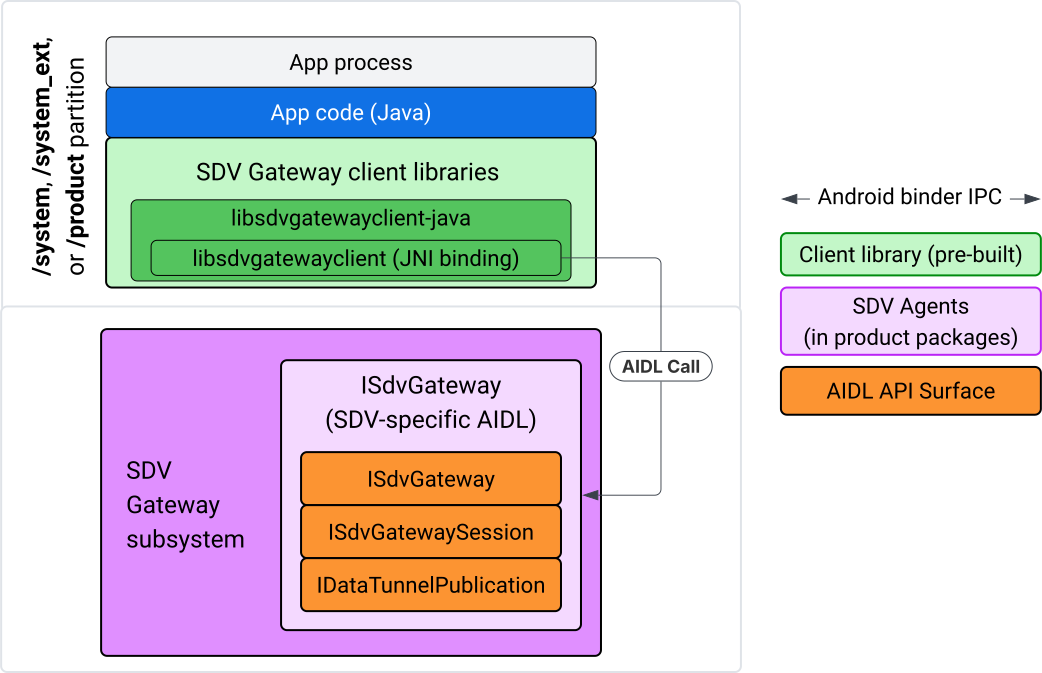
איור 4. שער SDV באפליקציית IVI Java.
באופן ספציפי, המודל:
- כל השיחות מועברות לשכבת ה-JNI.
- מגשר בין Java לבין C API.
- מגדיר אינטראקציות של AIDL עם
ISdvGateway:- התחלת תקשורת
- חיפוש או יצירה של שרת RPC
- יצירת נושא Pub/Sub
- ביצוע אינטראקציות של מנהור נתונים לגילוי שירותים
- קבלת התראות (לדוגמה, נתונים זמינים)
- קריאה וכתיבה של הודעות (FMQ ל-pub/sub) ליצירת זוג מפתחות ואישורים ל-TLS
הכללת ספריות לקוח של Gateway
ספריית Java ועטיפת JNI ל-libsdvgatewayclient C API מותקנות ב-APEX ביעד IVI. מוסיפים תלות בזמן הקומפילציה ל-stub של ספריית Java, לספריית Java שחובה להשתמש בה בזמן הריצה ול-APEX הנדרש שמכיל את ספריית Java.
android_app {
    name: "YourAppName",
    // ...
    static_libs: [
        "libsdvgatewayclient-java",
    ],
    libs: [
        "libsdvgatewayclient-java-sdk.stubs",
    ],
    uses_libs: [
        "libsdvgatewayclient-java-sdk",
    ],
    required: [
        "com.sdv.google.gateway.client",
    ],
    // ...
}
במקרה של אפליקציה לא מאוגדת שנבנתה מחוץ לעץ SDV, התהליך דומה:
מעתיקים את ה-JAR של ה-stub של ספריית Java שנוצר ואת ה-JAR התומך של RPC לתיקיית ספריות האפליקציה. מידע נוסף זמין במאמר
system/software_defined_vehicle/sdv_gateway/libsdvgatewayclient_apex/README.md.מוסיפים את קובץ ה-JAR של ה-stub כתלות רק בזמן ההידור. לדוגמה, כדי לעדכן את ההגדרות של Gradle כך שיהיו תלויות ב-stub, מוסיפים רשומה של
compileOnlyלקטעdependencies:dependencies { // The library supporting functions for SDK RPC. // Statically linked into the app APK. implementation(files("libs/libsdvgatewayclient-java.jar")) // Stub of the SDV-Gateway client library. // Used only for compilation; the real implementation is provided // by the com.sdv.google.gateway.client APEX at runtime. compileOnly(files("libs/libsdvgatewayclient-java-sdk.jar")) }מוסיפים את ספריית Java לקטע [app] בקובץ
AndroidManifest.xml.<manifest xmlns:android="http://schemas.android.com/apk/res/android"> <application> <!-- Declares that this app requires the SDV Gateway client library. The 'android:required="true"' attribute ensures the app won't install/run if the library is missing from the system. --> <uses-library android:name="libsdvgatewayclient-java-sdk" android:required="true" /> </application> </manifest>
טעינת ספריות
יצירת אובייקט SdvGatewayClient (מסופק על ידי ספריית הלקוח):
import google.sdv.gateway.client.SdvGatewayClient;

// --- Inside your Activity, Service, or ViewModel ---

// Initialize the SDV Gateway Client
SdvGatewayClient gatewayClient = new SdvGatewayClient();
התחלת תקשורת
קריאה אל initComms() באמצעות שם אפליקציה כשם חבילת השירות:
// Define a unique name for your service bundle (usually constant)
private static final String SERVICE_BUNDLE_NAME = "MySdvServiceBundle";

// ... inside an Activity or Service context ...

try {
    // Initialize communications with the SDV Gateway
    // context.getPackageName() provides "android.sdv.samples.gateway.client" or similar
    gatewayClient.initComms(context.getPackageName(), SERVICE_BUNDLE_NAME);

    Log.i("SDV_GATEWAY", "Communications initialized successfully");
} catch (Exception e) {
    // Unlike the C API which uses status codes,
    // the Java SDK often throws exceptions for initialization failures.
    Log.e("SDV_GATEWAY", "Failed to initialize communications", e);
}
זיהוי שירותים
Java API מכיל שיטות ל:
קבלת התראה כשמתבצע רישום או ביטול רישום של יחידות שירות עם סוג יחידה ספציפי (או לחלופין, עם שם ספציפי).
צריך לציין את יחידות השירות הנוכחיות עם סוג יחידה ספציפי (או לחלופין להתאים שם ספציפי של סוג יחידת שירות). כדי לקבל התראות על שינויים ביחידת שירות, צריך ליצור מאזין:
import google.sdv.gateway.client.ServiceUnitChangeListener;
import google.sdv.gateway.client.ServiceUnitChangeEventType;
import google.sdv.gateway.client.ServiceUnitDefinition;

// --- Implementation ---

ServiceUnitChangeListener listener = new ServiceUnitChangeListener() {
    @Override
    public void onServiceUnitChanged(
        ServiceUnitChangeEventType eventType,
        ServiceUnitDefinition serviceUnitDefinition
    ) {
        // This is triggered when services matching your criteria
        // are registered or unregistered on the vehicle network.
        if (eventType == ServiceUnitChangeEventType.REGISTERED) {
            // Handle new service discovery
        } else if (eventType == ServiceUnitChangeEventType.UNREGISTERED) {
            // Handle service removal
        }
    }
};
המתודה addListenerForServiceUnitChangeByName ב-Java מודיעה למאזין:
// 1. Register the listener for a specific service unit by name
AutoCloseable handle = gatewayClient.addListenerForServiceUnitChangeByName(
    new UnitNameDiscoveryArgs(
        "",                                   // sdvVmName (empty for local/auto-discovery)
        "android.sdv.samples.cluster",        // sdvPackageName
        "ClusterServer",                      // serviceBundleName
        "android-sdv-samples-cluster-cluster" // serviceUnitName
    ),
    listener
);

// --- Later in the application lifecycle ---

// 2. To stop receiving notifications and clean up resources, close the handle.
try {
    if (handle != null) {
        handle.close();
    }
} catch (Exception e) {
    Log.e("SDV_GATEWAY", "Error while closing the listener handle", e);
}
אפשר גם להשתמש בשיטת addListenerForServiceUnitChangeByType Java כדי להודיע למאזין כששירותים עם סוג היחידה שצוין נרשמים או מבטלים את הרישום:
// 1. Register a listener based on the Service Unit Type
AutoCloseable handle = gatewayClient.addListenerForServiceUnitChangeByType(
    new UnitType(
        "com.android.testapp.sdvcarmonitor", // sdvPackageName
        "SunroofRpcServer",                  // serviceBundleName
        "Sunroof"                            // unitTypeName
    ),
    listener
);

// --- Execution Loop / Lifecycle ---

// 2. To stop receiving notifications and clean up memory, close the handle.
// This effectively unregisters the listener from the SDV Gateway.
try {
    if (handle != null) {
        handle.close();
    }
} catch (Exception e) {
    Log.e("SDV_GATEWAY", "Failed to close the service unit listener handle", e);
}
ב-addListenerForServiceUnitChangeByName וב-addListenerForServiceUnitChangeByType, אחרי שמוסיפים את המאזין, הוא מקבל הודעה על כל יחידות השירות הרשומות. כדי לקבל רק יחידות שירות רשומות לפי שם או סוג, משתמשים בממשקי Java API listServiceUnitsByName ו-listServiceUnitsByType:
import google.sdv.gateway.client.ServiceUnitDefinition;
import google.sdv.gateway.client.UnitNameDiscoveryArgs;
import google.sdv.gateway.client.UnitType;

// --- 1. Synchronous Lookup by Specific Name ---
ServiceUnitDefinition[] definitionsByName = gatewayClient.listServiceUnitsByName(
    new UnitNameDiscoveryArgs(
        "",                                   // sdvVmName
        "android.sdv.samples.cluster",        // sdvPackageName
        "ClusterServer",                      // serviceBundleName
        "android-sdv-samples-cluster-cluster" // serviceUnitName
    )
);

// --- 2. Synchronous Lookup by Service Type ---
ServiceUnitDefinition[] definitionsByType = gatewayClient.listServiceUnitsByType(
    new UnitType(
        "com.android.testapp.sdvcarmonitor", // sdvPackageName
        "SunroofRpcServer",                  // serviceBundleName
        "Sunroof"                            // unitTypeName
    )
);

// Example processing
if (definitionsByType.length > 0) {
    ServiceUnitDefinition firstSunroof = definitionsByType[0];
    // Proceed to connect...
}
תהליך העבודה של שרת RPC
לקוחות SDV Gateway במערכות IVI משתמשים בקריאה לשירות מרוחק (RPC) של Google (gRPC) לתקשורת עם שירותי SDV. האינטראקציות האלה מסתמכות על הגדרות פרוטו מתוך קטלוג VSIDL, שהן עקביות או דומות לאלה שמשמשות ב-SDV Core. באפליקציות Java, ההטמעה שנבחרה היא gRPC-Java. הגדרת proto לדוגמה של שרת, sunroof.proto, מסופקת לשרת אפליקציות.
service Sunroof {
    /**
     * Retrieves the current state of the sunroof (e.g., position, tilt, status).
     *
     * @param .google.protobuf.Empty - No input parameters required.
     * @return SunroofStateResponse - The current telemetry data for the sunroof.
     */
    rpc GetSunroofState(.google.protobuf.Empty) returns (SunroofStateResponse) {}
}
מקשרים לספריית ה-proto המתאימה ומגדירים את השירות:
import com.android.sdv.sdvgrpclibrary.SunroofGrpc;
import com.android.sdv.sdvgrpclibrary.SunroofStateResponse; // Assuming this is the generated class
import com.google.protobuf.Empty;
import io.grpc.stub.StreamObserver;

/**
 * Implementation of the Sunroof gRPC service.
 * This class handles the logic for the RPCs defined in your .proto file.
 */
static class SunroofGrpcImpl extends SunroofGrpc.SunroofImplBase {

    @Override
    public void getSunroofState(Empty request, StreamObserver<SunroofStateResponse> responseObserver) {
        // 1. Fetch current sunroof data (e.g., from a Hardware Abstraction Layer)
        int currentPosition = 50; // Example value: 50% open

        // 2. Build the Protobuf response message
        SunroofStateResponse response = SunroofStateResponse.newBuilder()
                .setPercentageOpen(currentPosition)
                .build();

        // 3. Send the response to the client using the observer
        responseObserver.onNext(response);

        // 4. Close the stream to signal that the RPC is finished
        responseObserver.onCompleted();
    }
}
רושמים את שרת ה-gRPC עם פרטי כניסה מאובטחים ולא מאובטחים לערוץ:
// 1. Define the type signature for the service
UnitType unitType = new UnitType(
    "com.android.testapp.sdvcarmonitor", // sdvPackageName
    "SunroofRpcServer",                  // serviceBundleName
    "Sunroof"                            // typeName (Unit Type)
);

// 2. Register the RPC server with the Gateway
// The gateway creates a mapping between the ServiceUnitName and your implementation.
server = gatewayClient.registerRpcServer(
    "SunroofRpcServerImpl-1",                       // serviceUnitName (Unique instance name)
    unitType,                                       // unitType defined earlier
    "SUNROOF_GRPC_SERVER_VALUE_HOLDER".getBytes(),  // appMetadataValueHolder (Static discovery data)
    1,                                              // appMetadataVersion
    new SunroofGrpcImpl()                           // The actual gRPC service implementation
);
באופן פנימי, ספריית הלקוח יוצרת את אובייקט השרת gRPC, SdvGatewayClient.java, ומטפלת גם בעדכונים של אישורי הבסיס:
// 1. Initialize credentials (Insecure for dev, TLS for production)
ServerCredentials serverCredentials = InsecureServerCredentials.create();

// 2. Build and start the OkHttp-based gRPC server
final int bindAnyPort = 0;
final Server server = OkHttpServerBuilder
    .forPort(bindAnyPort, serverCredentials)
    .addService(gRpcServerImplementation) // Your SunroofGrpcImpl
    .build()
    .start();

// The assigned port can now be retrieved using server.getPort()
int actualPort = server.getPort();

// 3. Prepare the JNI data structure
// This object mirrors the ASDVGateway_ServiceUnitDefinition_t C struct
JniServiceUnitDefinition definition = new JniServiceUnitDefinition();

// Fill the RPC service definition params (Port, Name, Type, etc.)
definition.setPort(actualPort);
definition.setServiceUnitName("SunroofRpcServerImpl-1");

// 4. Perform the cross-language call
// This jumps from Java -> JNI -> ASDVGateway_Client_registerRpcServer (C API)
mJniClient.nativeRegisterRpcServer(definition);
זרימת לקוח RPC
בדוגמת הקוד הזו מופיעה הגדרת פרוטו של השרת (tpms.proto) עבור השרת שאליו האפליקציה מתחברת כלקוח:
/**
 * The TPMS service provides real-time pressure and temperature
 * data for all tires on the vehicle.
 */
service Tpms {
    /**
     * Returns the full state of all monitored tires.
     */
    rpc GetTpmsState(.google.protobuf.Empty) returns (TpmsStateResponse) {}

    /**
     * A filtered query that returns only the tires
     * below the recommended pressure threshold.
     */
    rpc GetLowTires(.google.protobuf.Empty) returns (LowTiresResponse) {}
}
מקשרים לספריית הפרוטו המתאימה:
import com.android.sdv.sdvgrpclibrary.TpmsGrpc;
import io.grpc.ManagedChannel;

// --- Inside your Client Application ---

// 1. Request a ManagedChannel from the Gateway for a specific service unit
ManagedChannel managedChannel = gatewayClient.connectToRpcServerByName(
    "",                                     // sdvVmName (empty for local/auto-lookup)
    "android.sdv.samples.cluster",          // packageName
    "ClusterServer",                        // serviceBundleName
    "android-sdv-samples-cluster-cluster"  // serviceUnitName
);

// 2. Use the channel to create a gRPC stub (e.g., for the TPMS service)
TpmsGrpc.TpmsBlockingStub tpmsStub = TpmsGrpc.newBlockingStub(managedChannel);

// 3. Now you can call RPC methods directly
// TpmsStateResponse response = tpmsStub.getTpmsState(Empty.getDefaultInstance());
באופן פנימי, מתבצעת קריאה ל-ASDVGateway_Client_findRpcServerByName API כדי למצוא את שרת ה-RPC. אם נמצא שרת RPC, הערוץ המנוהל נוצר במצב לא מאובטח או מיועד לשימוש בהגדרת TLS, בדומה לזרימת שרת ה-RPC, בהתאם להגדרת Service Discovery. האפליקציה יוצרת את ה-stubs באמצעות האובייקט ManagedChannel ושולחת קריאה לשיטות של השרת:
import com.android.sdv.sdvgrpclibrary.TpmsGrpc;
import com.android.sdv.sdvgrpclibrary.TpmsStateResponse;
import com.google.protobuf.Empty;
import io.grpc.stub.MetadataUtils;

// 1. Create a "Blocking Stub" from the existing ManagedChannel.
// We apply an interceptor to attach mandatory metadata (headers)
// required by the SDV Gateway for authorization.
TpmsGrpc.TpmsBlockingStub tpmsStub = TpmsGrpc.newBlockingStub(managedChannel)
    .withInterceptors(MetadataUtils.newAttachHeadersInterceptor(mMetadata));

// 2. Execute the RPC call.
// Because this is a "BlockingStub," the thread will wait here until
// the vehicle service responds or times out.
TpmsStateResponse tpmsStateResponse = tpmsStub.getTpmsState(Empty.getDefaultInstance());

// 3. Extract the domain-specific state object from the Protobuf response.
// 'newState' can now be used to update your UI or application logic.
newState = tpmsStateResponse.getTpmsState();
החלפת רשת ברירת המחדל של התהליך
יכול להיות שתצטרכו לעבור מ-SDV-RPC VLAN כרשת ברירת המחדל של התהליך כדי לפתוח שקעים לחיבורים שמוגבלים לאינטרנט. מתקשרים אל unbindProcessFromSdvRpcNetworkInterface ואל bindProcessToSdvRpcNetworkInterface כדי לבטל את הקישור של התהליך ל-VLAN של SDV-RPC ולקשר אותו מחדש. שתי הקריאות פועלות כמתגים גלובליים, ומחליפות את ממשק הרשת שאליו השקעים קשורים לכל השרשורים של התהליך.
// 1. Redirect all socket traffic from this process to the SDV-RPC VLAN.
// This call is required for making RPC calls or hosting RPC services for SDV.
gatewayClient.bindProcessToSdvRpcNetworkInterface();

// --- Process is now communicating over the SDV-RPC interface ---

// 2. Revert the process network binding back to the "default" interface.
// This allows the app to access internet resources again.
gatewayClient.unbindProcessFromSdvRpcNetworkInterface();
יצירת מפרסם ופרסום הודעות
// 1. Define the interface and type for the publication
UnitType unitType = new UnitType(
    "android.sdv.samples.tires.interface", // sdvPackageName
    "TirePressurePublisherInterface",      // serviceBundleName
    "TirePressure"                         // typeName
);

// 2. Configure the Publisher's buffer and message constraints
PublisherUnitMetadata publisherUnitMetadata = new PublisherUnitMetadata(
    1,   // version
    64,  // message size in bytes (fixed size for performance)
    128  // max message count (buffer depth)
);

// 3. Create the Publication instance through the Gateway
Publisher tirePublisher = gatewayClient.createPublication(
    "tire-pressure-service-unit-name",
    unitType,
    publisherUnitMetadata
);

// 4. Prepare and publish a message
// In a real app, you would encode your sensor data into this byte array
byte[] msg = new byte[publisherUnitMetadata.messageSizeBytes];

// ... fill msg with data ...

tirePublisher.publish(msg);
באופן פנימי, ממשקי ה-API של Java createPublication ו-publish מסתמכים על ממשקי ה-API המקוריים של ASDVGateway_Client_createPublication ו-ASDVGateway_Client_readAvailableMessages. מידע מפורט על C API זמין במאמר שימוש ב-SDV Gateway בשירות מקורי של IVI. אובייקט Publisher מספק הקשר לכתיבת הודעות ולניהול מחזור החיים של הפרסום.
יצירת מנוי עם שירות האזנה להתראות
ב-Java API אפשר להעביר מאזין כפרמטר לשיטה subscribe to publication, והשיטה מחזירה אובייקט Subscription.
Listenerמקבל התראה כשהנתונים זמינים לפרסום שאליו הוא נרשם.
Subscriptionפועל כאובייקט הקשר ואפשר להשתמש בו כדי לקרוא הודעות ולסגור את המינוי.
// 1. Define the Listener to handle incoming data notifications
SubscriptionNotificationListener listener = new SubscriptionNotificationListener() {
    @Override
    public void onSubscriptionNotification(
        Subscription subscription,
        SubscriptionNotificationType notificationType
    ) {
        // Only process if the notification indicates new data is ready
        if (notificationType != SubscriptionNotificationType.DataAvailable) {
            return;
        }

        // Read the message from the subscription buffer
        byte[] content = subscription.readMessage();

        // Note: This callback often runs on a background thread provided by the SDK.
        // If you need to update the UI, use a Handler or View.post().
        processTireData(content);
    }
};

// 2. Subscribe to the publication by its unique name
Subscription tireSubscription = gatewayClient.subscribeToPublicationByName(
    "",                                  // sdvVmName (empty for auto-lookup)
    "android.sdv.samples.dt_publisher",  // packageName
    "SdvGatewayDtPublisher",             // serviceBundleName
    "tire",                              // serviceUnitName
    listener
);

// 3. Read Messages
// You can poll or register callbacks for new messages.
// When polling the message, call this method in a loop.
// When registering callbacks, call this method to get the message payload.
byte[] manualContent = tireSubscription.readMessage();
דוגמת קוד
הפונקציות החוזרות (callback) של מאזינים מופעלות בשרשור יחיד שמנוהל על ידי הלקוח, כדי למזער את העיבוד בתוך המאזינים ולמנוע עיכובים בקבלת הודעות על מינויים אחרים. שכבת Java משתמשת ב-C API לניהול מינויים, לטיפול בהתראות ולאחזור הודעות. דוגמה לשימוש ב-API מופיעה באפליקציית Java לדוגמה שמופיעה בקובץ הבינארי בכתובת system/software_defined_vehicle/samples/sdv_gateway/README.md.
ההרשאות הנדרשות
אין צורך בהרשאות מיוחדות כדי להפעיל את SDV Gateway client API, אבל צריך להחיל כללי SELinux מתאימים על האפליקציות.
- לגבי מינויים ופרסומים של מנהרות נתונים, לא נדרשות הרשאות.
- כדי להשתמש ב-SDV RPC, אתם צריכים את ההרשאות הבאות:
android.permission.INTERNETandroid.permission.CONNECTIVITY_USE_RESTRICTED_NETWORKS
במקרה של android.permission.CONNECTIVITY_USE_RESTRICTED_NETWORKS, צריך גם קובץ של רשימת ההיתרים בתיקייה etc/permissions באותה מחיצה כמו האפליקציה. לדוגמה, עבור SdvCarMonitorTestApp (שם החבילה com.android.testapp.sdvcarmonitor), הקובץ נראה כך:
<?xml version="1.0" encoding="utf-8"?>

<permissions>
    <privapp-permissions package="com.android.testapp.sdvcarmonitor">
        <permission name="android.permission.CONNECTIVITY_USE_RESTRICTED_NETWORKS"/>
    </privapp-permissions>
</permissions>
כללי SELinux
כדי להשתמש בממשקי ה-API של SDV Gateway, אפליקציות Java צריכות את אותן הרשאות כמו השירותים המקוריים. כדי לתת את ההרשאות האלה, משתמשים בפקודת המאקרו sdv_gateway_client_domain()
SELinux:
sdv_gateway_client_domain(my_oem_sdv_gateway_client_app)
יצרן הציוד המקורי מגדיר את הדומיין my_oem_sdv_gateway_client_app עבור אפליקציות Java שמורשות להשתמש בשער SDV. אפשר להשתמש ב-SDV Gateway רק מאפליקציות מערכת ומאפליקציות עם הרשאות מיוחדות.
מיקומי קוד
אפשר לקבל את קוד המקור של SDV Gateway בכתובת
system/software_defined_vehicle/sdv_gateway/. אפשר לקבל דוגמאות ל-SDV Gateway עבור:
- Client C API:
system/software_defined_vehicle/samples/sdv_gateway/NativeSdvGatewayTestApp/ - Client Java API:
system/software_defined_vehicle/samples/sdv_gateway/SdvCarMonitorTestApp/