

政府監管機構實施多項規定,確保間接後方視野提供足夠資訊,讓駕駛人能準確及時地操控車輛。這會影響駕駛人對周遭環境的認知。
如果是以攝影機監控系統 (CMS) 為基礎的後方視野系統,美國國家公路交通安全管理局 (NHTSA) 規定您必須符合下列要求 (UNECE46 參照的 S6.6.2.3):
S5.5.3 回應時間。根據 S14.2 測試時,符合 S5.5.1 (視野) 和 S5.5.2 (大小) 規定的後視影像,會在倒車事件開始後 2.0 秒內顯示。
S5.5.4 停留時間。倒車事件結束後,符合 S5.5.1 和 S5.5.2 規定的後視影像不會顯示。
S5.5.5 停用。在倒車事件期間,符合 S5.5.1 和 S5.5.2 規定的後視影像會持續顯示,直到駕駛人修改檢視畫面,或車輛方向選擇器離開倒車位置為止。
S6.6.2.3.3.5 構件。操作人員手冊應提及可能的構件,以及這些構件對視野和物體局部遮蔽的影響,這可能需要駕駛人特別警覺和專注。
S6.2.2.3.4.1 影格率。鏡頭前物體的動作會呈現平滑流暢的影像。系統的最低影格率至少為 30 Hz (相當於 30 FPS)。在低光源環境或低速行駛時,系統的最低畫面更新率至少為 15 Hz。
S6.2.2.3.4.2 影像形成時間。在攝氏 22 度 ± 攝氏 5 度的溫度下,螢幕的影像形成時間少於 55 毫秒。
S6.2.2.3.4.3 系統延遲。攝影機監控系統 (CMS) 的延遲時間夠短,可幾乎同時算繪風景。在攝氏 22 度 ± 攝氏 5 度的溫度下,延遲時間低於 200 毫秒。
我們推出了 Android Automotive OS (AAOS) 擴充檢視系統 (EVS),以符合裸機 AAOS 的這些規定。我們為 AAOS 裝置導入了類似的虛擬化服務,並搭配高可用性渲染器 (HAR),同樣符合這些需求。
攝影機預覽管道
這五個階段構成相機預覽管道:

圖 1. 相機預覽管道階段。
攝影機服務封鎖是指攝影機服務平台及其抽象層,可讓應用程式存取及使用可用的攝影機。顯示服務功能會向使用者顯示圖像資料。應用程式會透過 Camera 服務和 Display 服務,實作目標使用者歷程。
主要後方視野使用者歷程如下:
駕駛人將方向選擇器 (齒輪) 設為「倒車」,觸發倒車事件。
系統會廣播返回事件。應用程式會接收廣播,並初始化影像辨識輸入區塊 (攝影機服務) 和轉譯器 (顯示器服務)。
攝影機輸入區塊會初始化 Camera Service 平台,並將服務控制代碼傳回應用程式。
Renderer 會初始化步驟 4 中影像辨識輸入內容的檢視視窗。
應用程式要求影像辨識輸入區塊開始傳送影格緩衝區和事件。
應用程式會透過回呼 (非同步) 將傳送的影格緩衝區加入佇列。 影格緩衝區由攝影機輸入區塊擁有,因此應用程式無法修改。
應用程式會將影格緩衝區出列 (如果佇列不是空白),並組合使用者檢視畫面。使用者可以複製內容並加以修改。
應用程式將緩衝區傳送至轉譯器。
Renderer 會在螢幕上繪製收到的緩衝區內容。
如果備份事件仍處於進行中狀態,請前往步驟 7。支援事件完成後,應用程式會要求影像辨識輸入區塊停止傳送影格緩衝區和事件,然後向使用者隱藏檢視畫面。
應用程式可選擇關閉攝影機並釋放算繪器。
圖 1 說明流程。這張圖片使用 QNX Camera Library API 的元素,以使用 Camera Service 平台。
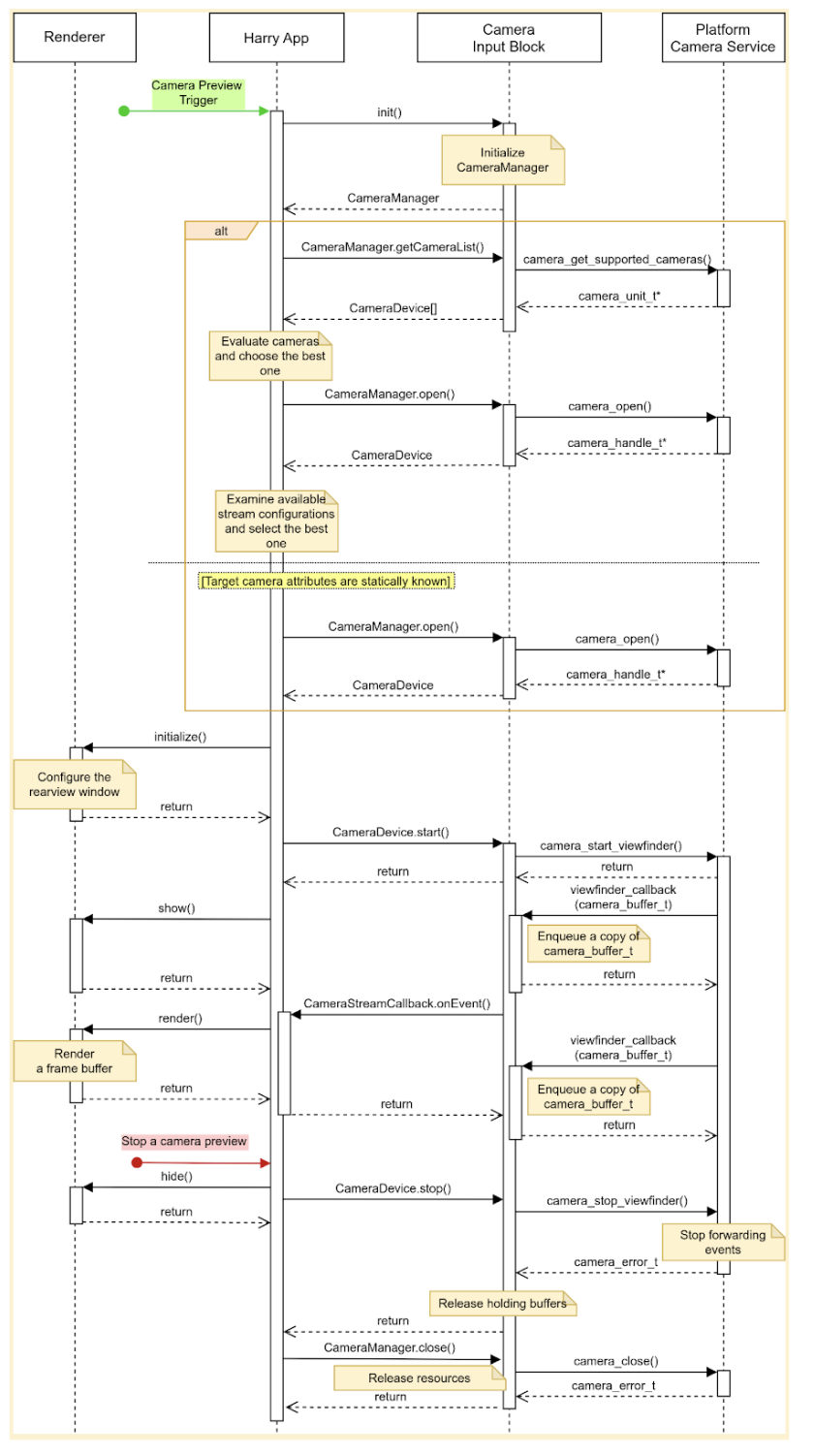
圖 2. HAR 主要使用者歷程。
影像辨識輸入區塊會宣告三個介面:
CameraManager,宣告管理攝影機裝置的方法;舉例來說,應用程式會使用這個介面開啟 (預留) 目標攝影機裝置。CameraDevice宣告用來控制攝影機裝置的方法,例如啟動或停止資料串流。CameraStreamListener宣告單一方法,可接收目標攝影機的各種事件。
設計
本節將詳細說明系統設計。
使用者體驗
駕駛人將檔位切換至倒車時,儀表板螢幕會顯示後置鏡頭的預覽畫面。駕駛人將檔位從倒車檔移開時,螢幕會停止預覽攝影機畫面。
可啟用其他使用者歷程。舉例來說,駕駛人啟動方向燈時,可以預覽後視鏡看不到的區域。
啟動相機預覽畫面
使用相機時,應用程式會列舉並評估可用的相機,找出最適合預期用途的相機。舉例來說,為了提供後方視野,應用程式會從可用攝影機清單中,尋找可顯示車輛後方的攝影機。
應用程式會檢查每個攝影機的特性 (例如位置、鏡頭朝向、影格率、輸出解析度和輸出格式),如果多部攝影機具有相同的必要特徵,應用程式可能會檢查其他特徵,例如視野和焦距。
這張圖片顯示使用靜態攝影機設定啟動攝影機預覽畫面的順序:
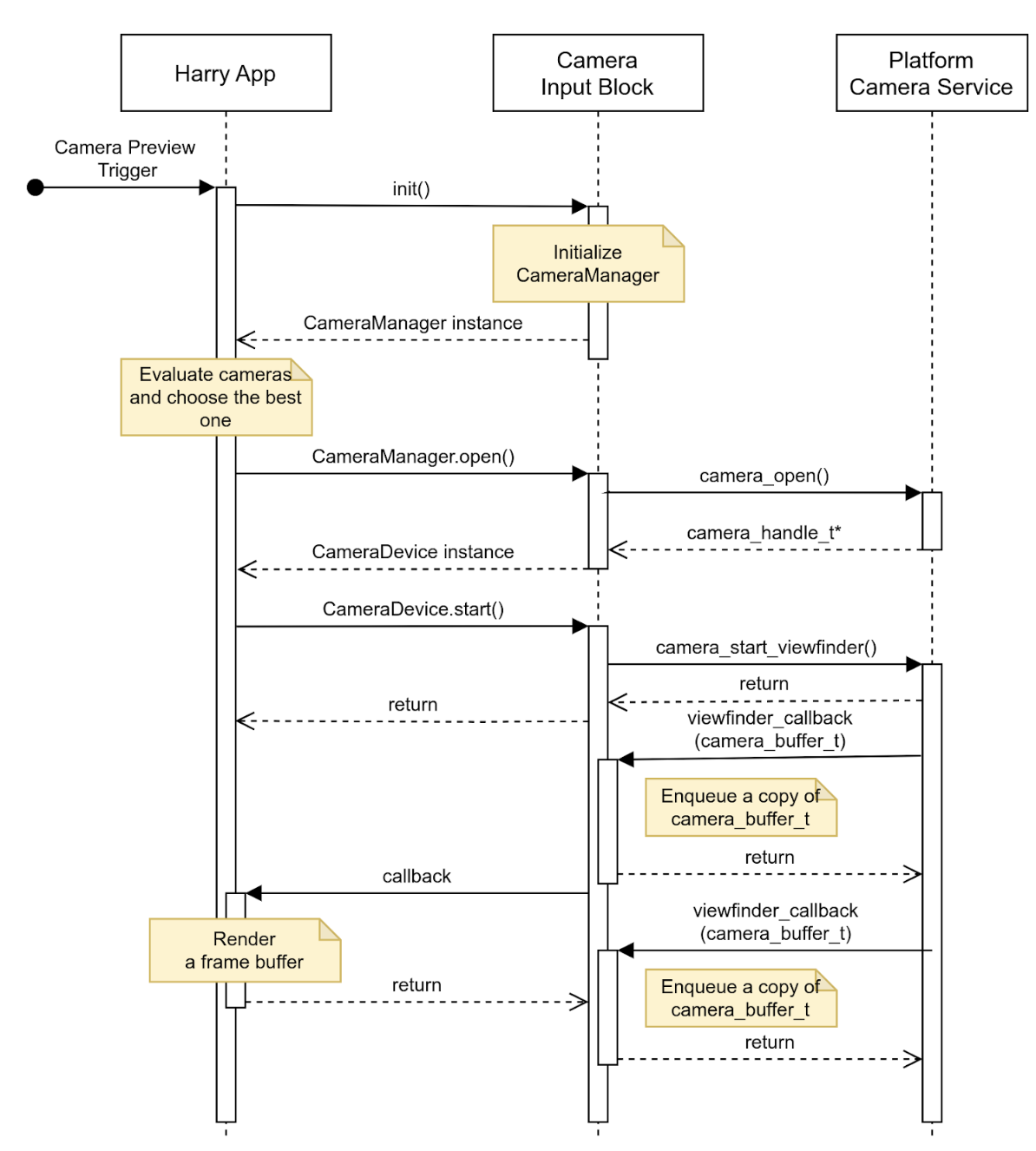
圖 3. 使用靜態攝影機設定啟動攝影機預覽畫面。
停止顯示攝影機預覽畫面
倒車事件結束後,應用程式會停止提供後方視野。為避免顯示空白畫面或靜態圖片,應用程式會先對使用者隱藏檢視畫面,然後要求攝影機輸入區塊停止傳送事件。
這張圖片顯示停止目標攝影機裝置資料串流的順序:
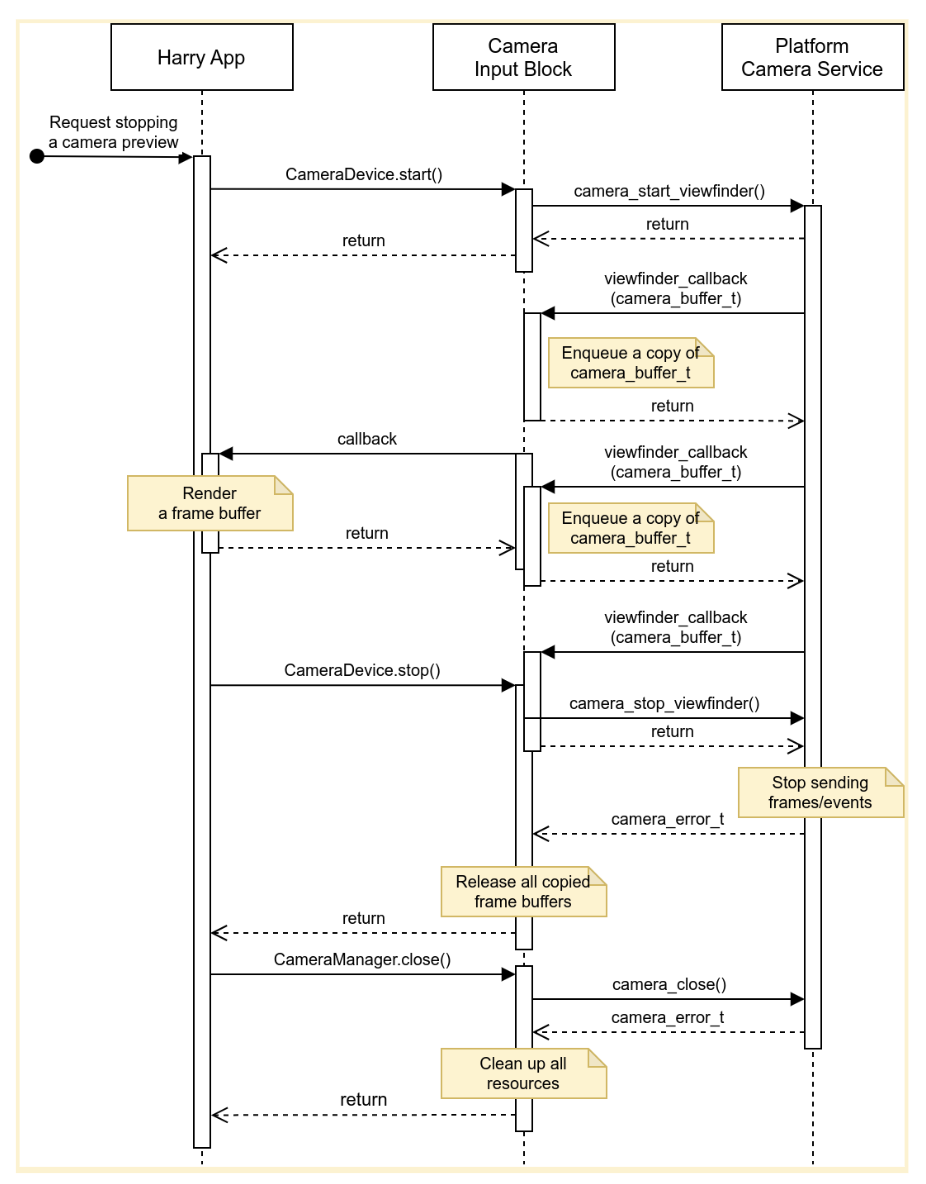
圖 4. 停止從目標攝影機裝置串流資料。
錯誤
攝影機裝置可能會意外停止傳送新的影格緩衝區。為偵測這類事件,攝影機輸入區塊可能會實作計時器,在收到新影格時到期,並在計時器到期時傳送通知。
應用程式收到通知時,會通知使用者相機預覽畫面已停止即時顯示,並嘗試關閉相機裝置再重新開啟,藉此還原相機預覽畫面。圖 5 顯示應用程式如何處理逾時:
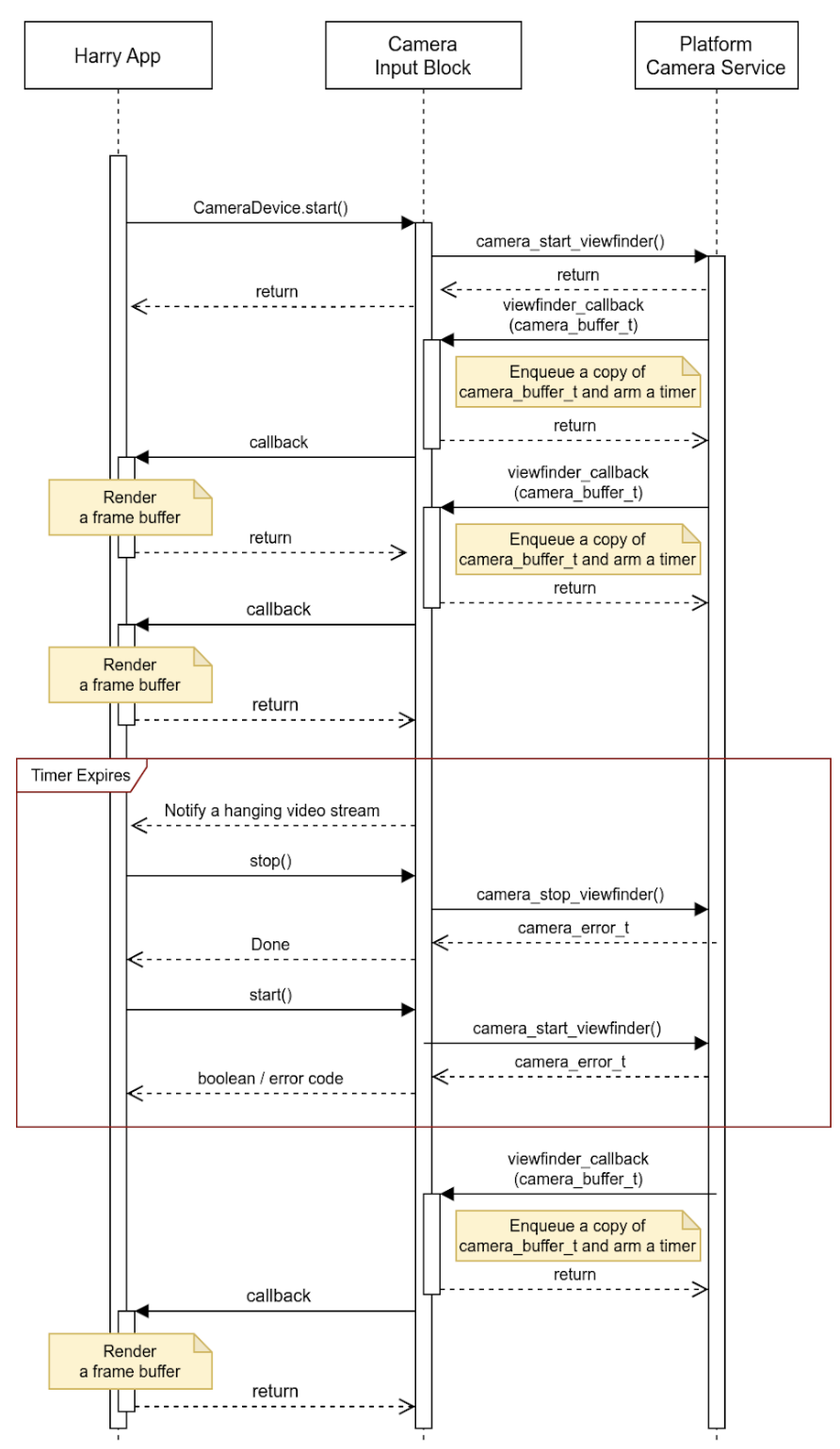
圖 5. 處理逾時 (資料串流停止)。
影像辨識輸入區塊可以回報資料串流停止以外的事件,並在緩衝區中嵌入更多詳細資料。原始設備製造商 (OEM) 可使用這項事件中繼資料,處理平台上的事件。
活動
這個 API 供主機上執行的應用程式使用,可透過 HAR (下圖中的藍色方塊) 管理儀表板螢幕。
圖 5 顯示系統架構圖:
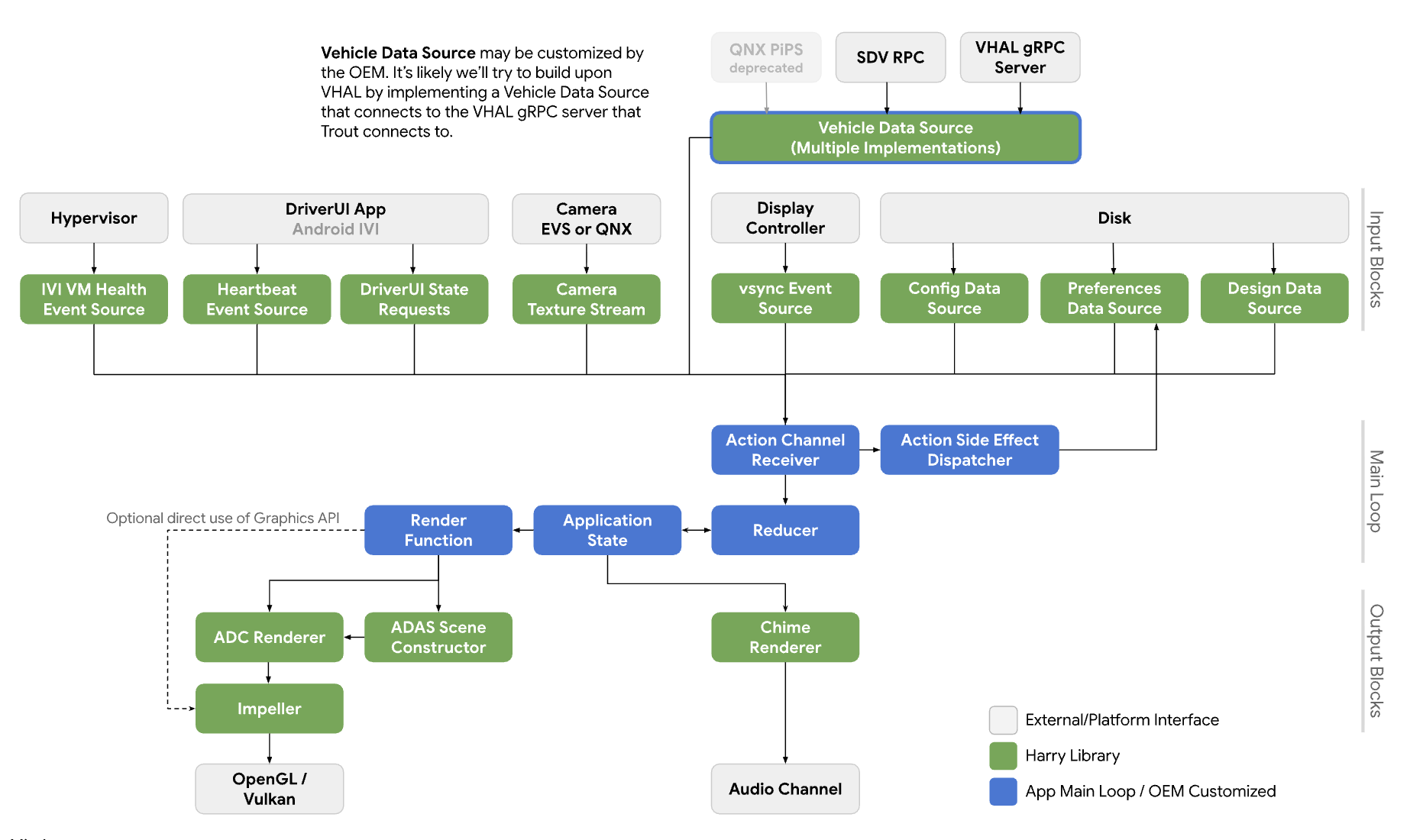
圖 6. 系統圖。
服務
API 呼叫預計會在呼叫程序的環境中執行。
API
這項新版 API 僅適用於透過 HAR 管理儀表板螢幕上攝影機預覽畫面的應用程式。您可以透過平台抽象層存取 API,並動態連結。
CameraInputBlock 介面會宣告方法,用於初始化攝影機功能及取得輸入區塊管理工具。應用程式會使用傳回的 CameraManager 執行個體管理攝影機裝置。
// This class represents a camera input block for the application that manages the
// instrument cluster display with Harry.
public class CameraInputBlock : public InputBlock {
    public:
        // Clean up the resources.
        virtual ~CameraInputBlock();

        // A method inherited from InputBlock class. This method initializes
        // CameraInputBlock instance; e.g. checking the platform camera service
        // is live.
        //
        // @return CAMERA_EPERM if the platform camera service is not
        //                      available.
        //         CAMERA_OK otherwise.
        virtual CameraError init() override;

        // A method inherited from InputBlock class. This method release all
        // resources held by this CameraInputBlock instance.
        virtual void release() override;

        // This method returns a CameraManager instance. The caller uses
        // this instance to manage camera devices.
        //
        // @param out If this method is successful, this points to a valid
        //            CameraManager instance.
        // @return CAMERA_EACCESS when we fail to create CameraManager instance
        //         to return.
        //         CAMERA_OK otherwise.
        virtual CameraError getCameraManager(
            std::shared_ptr<CameraManager>* out) = 0;

    private:
        // Handle to manage camera devices.
        std::shared_ptr<CameraManager> mMgr;

        // Handle to manage camera devices that have been opened by clients.
        std::set<CameraDevice> mCameras;
};
CameraManager 類別會宣告開啟 (或擁有) 攝影機的方法,並在應用程式完成攝影機作業時釋出攝影機。應用程式可以開啟多部攝影機,並使用攝影機的串流建立更廣闊的視野或多重檢視畫面體驗。
// This pure virtual class declares methods to manage camera devices.
public class CameraManager {
    public:
        // This method returns a list of CameraDescriptor objects representing
        // available cameras.
        //
        // @param out A list of CameraDescriptor instances. This list may be
        //            empty if the platform camera service does not list any
        //            camera.
        // @return CAMERA_EACCESS if we failed to build a camera list.
        //         CAMERA_OK otherwise.
        virtual CameraError getCameraList(
            std::vector<CameraDescriptor>* out) = 0;

        // Open a camera device associated with a given string identifier.
        //
        // @param ID A string identifier of a camera device to request.
        // @param out A pointer to CameraDevice shared pointer object. This
        //            is null when we fail to open a target device.
        // @return CAMERA_ENODEV if no camera is associated with a given id.
        //         CAMERA_EACCESS if it fails to open a target device.
        //         CAMERA_OK otherwise.
        virtual CameraError open(
            std::string ID, std::shared_ptr<CameraDevice>* out) = 0;

        // Close a camera device associated with a given string identifier.
        // This method is assumed to be always successful.
        //
        // @param id A string identifier of a camera device to close.
        virtual void close(std::string id) = 0;
};
如果應用程式無法偵測要使用的攝影機,可以選擇最適合當下情境的攝影機。CameraManager::getCameraList() 會傳回 CameraDescriptor 執行個體清單,其中提供每部攝影機的特徵。
CameraDevice 類別代表單一攝影機裝置,並宣告啟動及停止資料串流的方法。如果攝影機特性不是靜態已知,用戶端會從描述元取得並剖析這些特性。
舉例來說,用戶端可以從目標攝影機裝置的中繼資料取得串流設定清單,並選擇屬性最佳的設定 (例如影格速率、解析度和輸出格式)。
// This class represents a single camera device.
public class CameraDevice {
    public:
        // Start a data stream that attributes are matching to given
        // configuration best.
        // If a selected configuration is not given (null), a data stream is
        // initiated in its default configuration and return.
        //
        // @param configuration Selected attributes of the imagery data stream.
        // @param listener An object to listen to an active data stream.
        // @param effective Actual attributes of started data stream.
        // @return CAMERA_EINVAL if a listener object is invalid.
        //         CAMERA_EIO if we failed to start a video stream.
        //         CAMERA_OK otherwise.
        virtual CameraError start(
                std::shared_ptr<CameraStreamConfiguration>& configuration,
                std::shared_ptr<CameraStreamListener>& listener,
                std::shared_ptr<CameraStreamConfiguration>* effective) = 0;

        // Stop a data stream.
        virtual void stop() = 0;

        // Get a camera descriptor.
        //
        // @param desc A set of attributes that defines this camera device.
        // @return CAMERA_ENODATA if a descriptor is not available.
        //         CAMERA_OK otherwise.
        CameraError getDescriptor(std::shared_ptr<CameraDescriptor>* desc) = 0;

        // Return a consumed buffer to the camera device. A client of active
        // stream must return a frame buffer explicitly by calling this method.
        virtual void doneWithFrame(std::shared_ptr<FrameBuffer>& buffer) = 0;

    private:
        // Describe this camera device.
        CameraDescriptor mDescriptor;

        // A weak reference to a listening client.
        std::weak_ptr<CameraStreamListener> mClient;
};

// This class declares attributes that characterize a camera device.
public class CameraDescriptor {
    public:
        // Unique std::string object to identify a single camera device.
        std::string mId;

        // A set of stream configurations this camera device is capable of. A
        // camera must have at least one stream configuration.
        std::set<CameraStreamConfiguration> mConfigurations;

        // Are more attributes needed to exist, such as locations, lens
        // facing directions, and intrinsic/extrinsic parameters?
};

// This class declares attributes that characterize an imagery data stream.
public class CameraStreamConfiguration {
    public:
        // Width of output of this stream in pixels.
        unsigned int mWidthInPixels;

        // Height of output of this stream in pixels.
        unsigned int mHeightInPixels;

        // An average number of frames per second.
        double mFrameRate;

        // A format of this stream's output. A client could calculate a
        // byte-per-pixel (bpp) from this.
        CameraColorFormat mFormat;
};

// This class represents a listener/callback object to listen to frames and
// events.
public class CameraStreamListener {
    public:
        // A listener method to receive various stream events including a new
        // frame buffer.
        //
        // @param event CameraStreamEvent object that represents a single event
        //              such as an arrival of a new frame buffer, camera stream
        //              is terminated, and so forth.
        virtual void onEvent(std::shared_ptr<CameraStreamEvent>* event) = 0;
};
CameraDevice::start() 會使用三個引數:
呼叫端選擇的串流設定。
用來接收串流事件的監聽器。
指向有效串流設定的指標。強烈建議呼叫端檢查這個值,以便按照預期方式處理即將到來的影格緩衝區。
當 CameraDevice::start() 使用 Camera Service 平台啟動資料串流時,會保留對呼叫端監聽器物件的弱參照,以偵測呼叫端是否意外終止。
用戶端完成緩衝區的作業後,必須呼叫 CameraDevice::doneWithFrame() 方法,通知攝影機裝置不再需要緩衝區。
串流開始時,用戶端會收到事件訊息。常見的訊息是新的訊框緩衝區。透過已註冊的回呼函式,用戶端會收到 kNewFrameBuffer 事件,其中包含圖像資料和影格緩衝區中繼資料。StreamEventType 宣告更多型別,以處理其他串流事件。例如停止或暫停資料串流。
// This class lists events possibly occurring while a data stream is active.
enum class CameraStreamEventType {
    // A delivery of a new frame buffer.
    kNewFrameBuffer,
    // A data stream has been stopped.
    kStreamStopped,
    // No new frame buffer arrives for a while.
    kStreamHang,
    // Add more.
    ...
};

// This class represents a single instance of StreamEventType.
public class CameraStreamEvent {
    public:
        // Return a type of this event.
        //
        // @return CameraStreamEventType enum value.
        CameraStreamEventType getType() { return mType; }

        // Return a pointer to data associated with this event.
        //
        // @return A shared pointer object of the buffer that contains data for
        //         this event.
        std::shared_ptr<void> getData() { return mData; }

    private:
        // Describe a type of this event.
        CameraStreamEventType mType;

        // A pointer to the data buffer.
        std::shared_ptr<void> mData;
};

// This class inherits StreamEvent class and has additional fields to represent
// the frame buffer.
public class FrameBufferEvent : public CameraStreamEvent {
    public:
        // Return an identifier of this frame buffer.
        //
        // @return A unique integer value to identify this frame buffer.
        int getBufferID() { return mBufferID; }

        // Give access to frame buffer metadata.
        //
        // @return A shared pointer to the buffer that contains data besides
        //         the imagery data.
        std::shared_ptr<void> getMetadata() { return mMetadata; }

    private:
        // Unique integer to identify this buffer.
        int mBufferID;

        // A pointer to metadata of this frame buffer.
        std::shared_ptr<void> mMetadata;
};
這個範例會顯示 CameraInputBlock 介面及其應用程式的實作方式:
CameraError getCameraManager(std::shared_ptr<CameraManager>* out) {
    // During an instantiation, CameraManager will retrieve a list of camera
    // devices from the platform camera service and identify their attributes.
    *out = std::make_shared<CameraManager>();
    return CAMERA_OK;
}

// This method returns a list of CameraDescriptor objects representing available
// cameras.
CameraError CameraManager::getCameraList(std::vector<CameraDescriptor>* out) {
    if (mCameraList.size() < 1) {
        // Query a list of cameras and get their attributes.
    }
    *out = mCameraList;
    return CAMERA_OK;
}

// Open a camera device associated with a given string identifier.
CameraError CameraManager::open(std::string id, std::shared_ptr<CameraDevice>* out) {
    if (!mCameraList.contains(id)) {
        // We cannot identify any camera with a given value.
        return CAMERA_NODEV;
    }

    // During a construction, CameraDevice will obtain a handle of a target
    // camera device from the platform camera service.
    std::shared_ptr<CameraDevice> h = std::make_shared<CameraDevice>(id);
    if (!h) {
        // We fail to open a camera device.
        return CAMERA_EACCESS;
    }

    *out = h;
    return CAMERA_OK;
}

// Close a camera device associated with a given string identifier. This method
// is assumed to be always successful.
void CameraManager::close(std::string id) {
    if (!mCameraList.contains(id)) {
        // We ignore calls with unknown identifiers.
        return;
    }

    // mCameraList.remove() returns an object removed from the list.
    std::shared_ptr<CameraDevice> device = mCameraList.remove(id);

    // Ensure a device stops streaming.
    device->stop();
}

// Start a data stream that attributes are matching to given configuration
// best.
// If a selected configuration is not given (null), a data stream will be
// initiated in its default configuration and return.
CameraError CameraDevice::start(
        std::shared_ptr<CameraStreamConfiguration>& configuration,
        std::shared_ptr<CameraStreamListener>& listener,
        std::shared_ptr<CameraStreamConfiguration>* effective) {
    if (!listener) {
        return CAMERA_EINVAL;
    }

    // selectStreamConfiguration examines this camera's stream configurations
    // and returns the one closest to the selected configuration.
    CameraStreamConfiguration config = selectStreamConfiguration(configuration);

    // mDevice refers to the camera handle for the platform camera service. We
    // may need to translate CameraStreamConfiguration for the platform service.
    mDevice->configure(
        configuration.mWidth, configuration.mHeight, configuration.mFormat);

    // Start a data stream with a callback object.
    if (!mDevice->startStream(mCallback)) {
        // We failed to start a data stream.
        return CAMERA_EIO;
    }

    return CAMERA_OK;
}

// Stop a data stream.
void CameraDevice::stop() {
    if (!mDevice) {
        // Nothing to do if we don't have a valid camera handle for the
        // platform camera service.
        return;
    }

    mDevice->stopStream();
}

// Get a camera descriptor.
CameraError CameraDevice::getDescriptor(std::shared_ptr<CameraDescriptor>* desc) {
    if (!mDescriptor) {
        return CAMERA_ENODATA;
    }

    *desc = *mDescriptor;
    return CAMERA_OK;
}

// Return a consumed buffer to the camera device. A client of active stream
// must return a frame buffer explicitly by calling this method.
void CameraDevice::doneWithFrame(std::shared_ptr<FrameBuffer>& buffer) {
    if (!mBufferRecords.contains(buffer.getId())) {
        // Ignore a call with unknown frame buffer.
        return;
    }

    // Simply remove from the record.
    (void)mBufferRecords.remove(buffer.getId());
}

// This method handles gear-shift events.
void Application::handleGearShift(GearSelection selection) {
    switch (selection) {
        case GEAR_SELECTION_REVERSE:
            // Upon the reverse gear selection, we are going to start a video
            // stream and show its preview on the instrument cluster display.
            (void)startStream(mCameraInputBlock);

            // FIXME: Exact method to control the camera preview window on the
            // instrument display is to be determined.
            show(mRearVisibilityWindow);
            break;

        default:
            // Upon all other gear selection, we are going to stop a video
            // stream (if it's running) and hide the preview.
            stopStream(mCameraInputBlock);

            // FIXME: Exact method to control the camera preview window on the
            // instrument display is to be determined.
            hide(mRearVisibilityWindow);
            break;
    }
}

bool Application::startStream(std::shared_ptr<CameraInputBlock> handle) {
    return handle->start(std::bind(&Application::handleStreamCallback, this);
}

void Application::stopStream(std::shared_ptr<CameraInputBlock> handle) {
    handle->stop();
}

// This method handles a stream callback.
void Application::handleStreamCallback(StreamEvent& event) {
    switch (event.getType()) {
        case StreamEventType::kNewFrameBuffer:
            // Handle a new frame buffer. We may just enqueue it for the
            // future or forward to CameraInputBlock client.
            break;

        case StreamEventType::kStreamStopped:
            // Handle as an incident if this event is not expected.
            break;

        // More cases to be added.
    }
}

void Application::handleNewFrameBuffer(StreamEvent& event) {
    // Enqueue a new frame buffer for the further processing. A buffer
    // must be returned explicitly by calling
    // CameraDevice.doneWithFrame(FrameBuffer&) method.
}

void Application::handleStreamEvent(StreamEvent& event) {
    // Handle a received stream event except a new frame buffer's
    // arrival; e.g. a video stream is terminated unexpectedly.
}
效能
後方視野符合政府法規。
| 值 | 法規 |
|---|---|
| 回覆時間 | CFR 571.111 S5.5.3 |
| 影格速率 | UNECE R46 6.2.2.3.4 |
| 影像形成時間 | UNECE R46 6.2.2.3.4.2 |
| 系統延遲時間 | UNECE R46 6.2.2.3.4.3 |
隱私權
隱私權相關規定:
API 不會要求實作項目收集、記錄或儲存個人識別資訊 (PII)。不過,由於擷取的圖像資料 (或相關聯的中繼資料) 可能含有 PII,因此使用 API 的應用程式必須取得使用者的明確同意聲明。
由於攝影機涉及安全關鍵角色,因此使用者無法控制攝影機裝置,在儀表板螢幕上預覽畫面。OEM 會在設定期間或向駕駛人取得使用者同意聲明。
這項 API 不支援背景攝影機用戶端。因此,隱私權指標 (可讓使用者瞭解攝影機裝置正在擷取資料) 不在適用範圍內。