

政府規制機関は、間接的な後方視界が車両を正確かつタイムリーに操作するのに十分な情報を提供することを保証するために、いくつかの要件を実装しています。これにより、ドライバーの周囲の状況に対する認識に影響します。
カメラ モニタリング システム(CMS)に基づく後方視認性システムの場合、米国運輸省道路交通安全局(NHTSA)は、次の要件(UNECE46 から参照される S6.6.2.3)を満たすことを義務付けています。
S5.5.3 応答時間。S14.2 に従ってテストした場合、S5.5.1(画角)および S5.5.2(サイズ)の要件を満たすバックミラー画像は、バックイベントの開始から 2.0 秒以内に表示される。
S5.5.4 滞留時間。S5.5.1 および S5.5.2 の要件を満たすバックミラー画像が、バックイベントの終了後に表示されない。
S5.5.5 無効化。S5.5.1 および S5.5.2 の要件を満たすバックミラーの画像は、ドライバーがビューを変更するか、車両の方向セレクターがバック位置から移動するまで、バックイベント中に表示されたままになります。
S6.6.2.3.3.5 アーティファクト。オペレーターのマニュアルには、考えられるアーティファクトと、画角とオブジェクトの部分的なオクルージョンへの影響について記載する必要があります。これにより、ドライバーは特に警戒し、注意を払う必要が生じる可能性があります。
S6.2.2.3.4.1 フレームレート。カメラの前の被写体の動きがスムーズかつ滑らかにレンダリングされます。システムの最小フレームレートは 30 Hz 以上(30 fps に相当)です。低照度条件または低速での操縦中、システムの最小フレームレートは 15 Hz 以上です。
S6.2.2.3.4.2 画像形成時間。モニターの画像形成時間は、摂氏 22 度 ± 摂氏 5 度の温度で 55 ミリ秒未満です。
S6.2.2.3.4.3 システム レイテンシ。カメラ モニター システム(CMS)は、風景をほぼ同時にレンダリングできるほどレイテンシが十分に短くなっています。レイテンシは、摂氏 22 度 ± 摂氏 5 度の温度で 200 ミリ秒未満です。
ベアメタル AAOS でこれらの要件に準拠するために、Android Automotive OS(AAOS)の拡張ビューシステム(EVS)を導入しました。AAOS デバイスの Virtualization 向けに、高可用性レンダラ(HAR)を備えた同様のサービスを導入しました。これも、これらの要件への準拠を実証するものです。
カメラ プレビュー パイプライン
カメラ プレビュー パイプラインは、次の 5 つのステージで構成されています。

図 1. カメラ プレビュー パイプラインのステージ。
カメラ サービス ブロックとは、アプリが利用可能なカメラにアクセスして使用できるようにするカメラ サービス プラットフォームとその抽象化レイヤを指します。Display Service 関数は、ユーザー向けに画像データを可視化します。アプリは、カメラ サービスとディスプレイ サービスを使用して、ターゲット ユーザー ジャーニーを実装します。
後方視認性の主なユーザー ジャーニーは次のとおりです。
ドライバーが方向セレクタ(ギア)をリバースに入れると、バックアップ イベントがトリガーされます。
システムがバッキング イベントをブロードキャストします。アプリはブロードキャストを受信し、カメラ入力ブロック(カメラ サービス)とレンダラ(ディスプレイ サービス)を初期化します。
カメラ入力ブロックは、カメラ サービス プラットフォームを初期化し、サービス ハンドルをアプリに返します。
レンダラは、ステップ 4 のカメラ入力のビュー ウィンドウを初期化します。
アプリがカメラ入力ブロックにフレーム バッファとイベントの送信を開始するようリクエストします。
アプリは、コールバックを通じて配信されたフレーム バッファをキューに登録します(非同期)。フレーム バッファはカメラ入力ブロックが所有しているため、アプリは変更できません。
アプリはフレーム バッファをデキューし(キューが空でない場合)、ユーザービューを合成します。ユーザーはコピーを作成して内容を変更できます。
アプリがレンダラにバッファを送信します。
レンダラは、受信したバッファの内容をディスプレイに描画します。
支援イベントが進行中のままの場合は、ステップ 7 に進みます。バッキング イベントが完了すると、アプリはカメラ入力ブロックに、ユーザーからビューを非表示にした後、フレーム バッファとイベントの送信を停止するようリクエストします。
アプリは必要に応じてカメラを閉じ、レンダラを解放します。
図 1 はこのフローを示しています。この画像は、QNX カメラ ライブラリ API の要素を使用して、カメラ サービス プラットフォームを使用します。
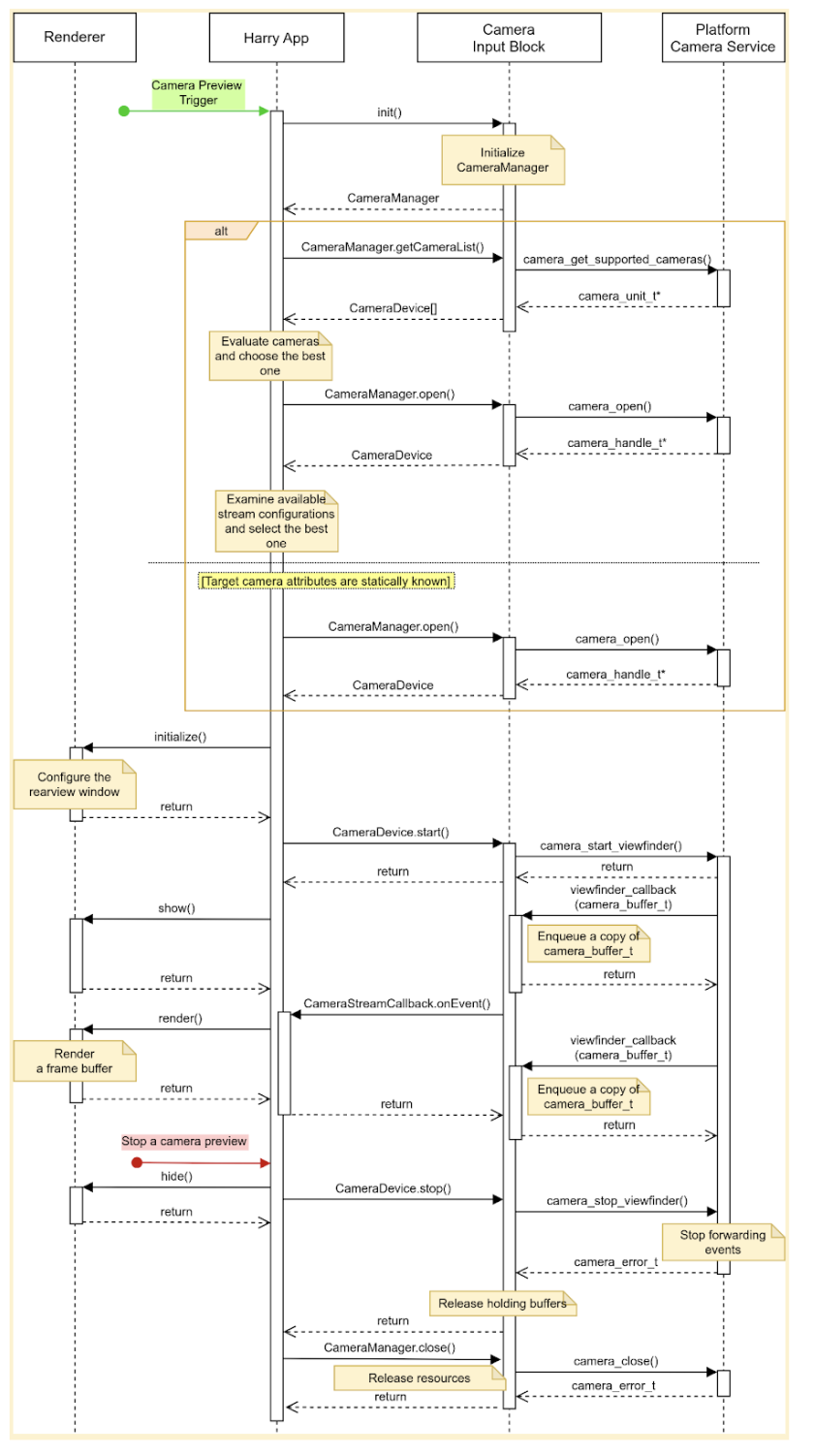
図 2. HAR のメインユーザー ジャーニー。
カメラ入力ブロックは、次の 3 つのインターフェースを宣言します。
CameraManagerは、カメラデバイスを管理するメソッドを宣言します。たとえば、アプリはこのインターフェースを使用して、ターゲット カメラデバイスを開きます(予約します)。CameraDeviceは、カメラ デバイスを制御するメソッド(データ ストリームの開始や停止など)を宣言します。CameraStreamListenerは、ターゲット カメラからさまざまなイベントを受け取るための単一のメソッドを宣言します。
デザイン
このセクションでは、システム設計について詳しく説明します。
ユーザー エクスペリエンス
ギアをバックに入れると、運転手はインストルメント クラスタ ディスプレイで背面カメラのプレビューを確認できます。ドライバーがギアをリバースから外すと、ディスプレイでのカメラのプレビューが停止します。
追加のユーザー ジャーニーを有効にできます。たとえば、ドライバーは、方向指示器が作動しているときに、ミラーに映らないエリアをプレビューできます。
カメラ プレビューを開始する
カメラを使用する場合、アプリは利用可能なカメラを列挙して評価し、目的の用途に最適なカメラを見つけます。たとえば、後方視認性の場合、アプリは利用可能なカメラのリストから、車両の後方側面を表示するカメラを探します。
アプリは、各カメラの特性(位置、レンズの向き、フレームレート、出力解像度、出力形式など)を調べることで、これを評価します。複数のカメラに同じ必要な特性がある場合、アプリは視野や焦点距離などの追加の特性を調べる可能性があります。
この画像は、静的カメラ構成でカメラ プレビューを開始するシーケンスを示しています。
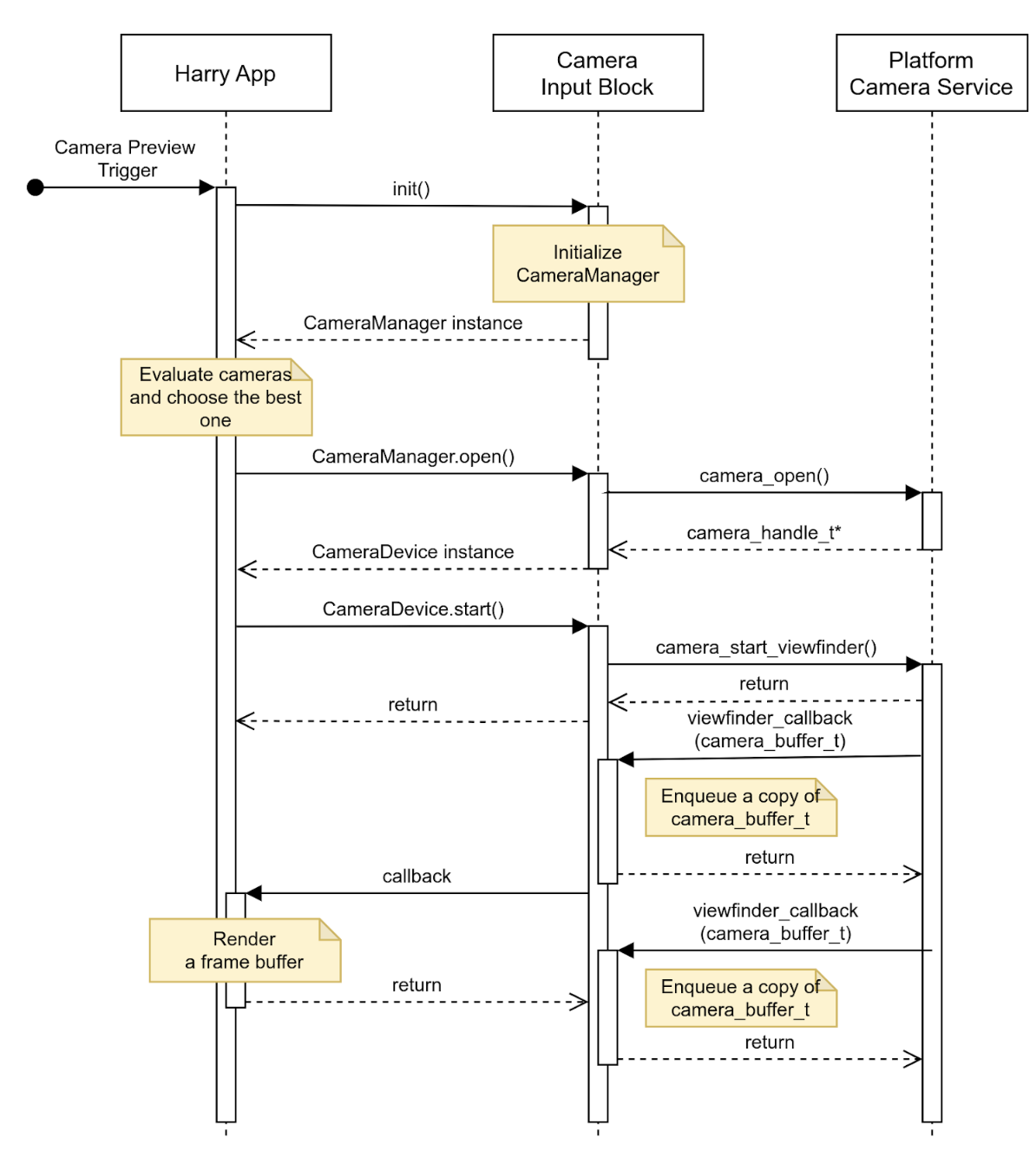
図 3. 静的カメラ構成でカメラ プレビューを開始します。
カメラ プレビューを停止する
バックアップ イベントが終了すると、アプリは後方視界の提供を停止します。空白の画面や静止画が表示されないように、アプリはまずユーザーからビューを非表示にし、カメラ入力ブロックにイベントの送信を停止するようリクエストします。
この画像は、ターゲット カメラ デバイスからのデータ ストリームを停止するシーケンスを示しています。
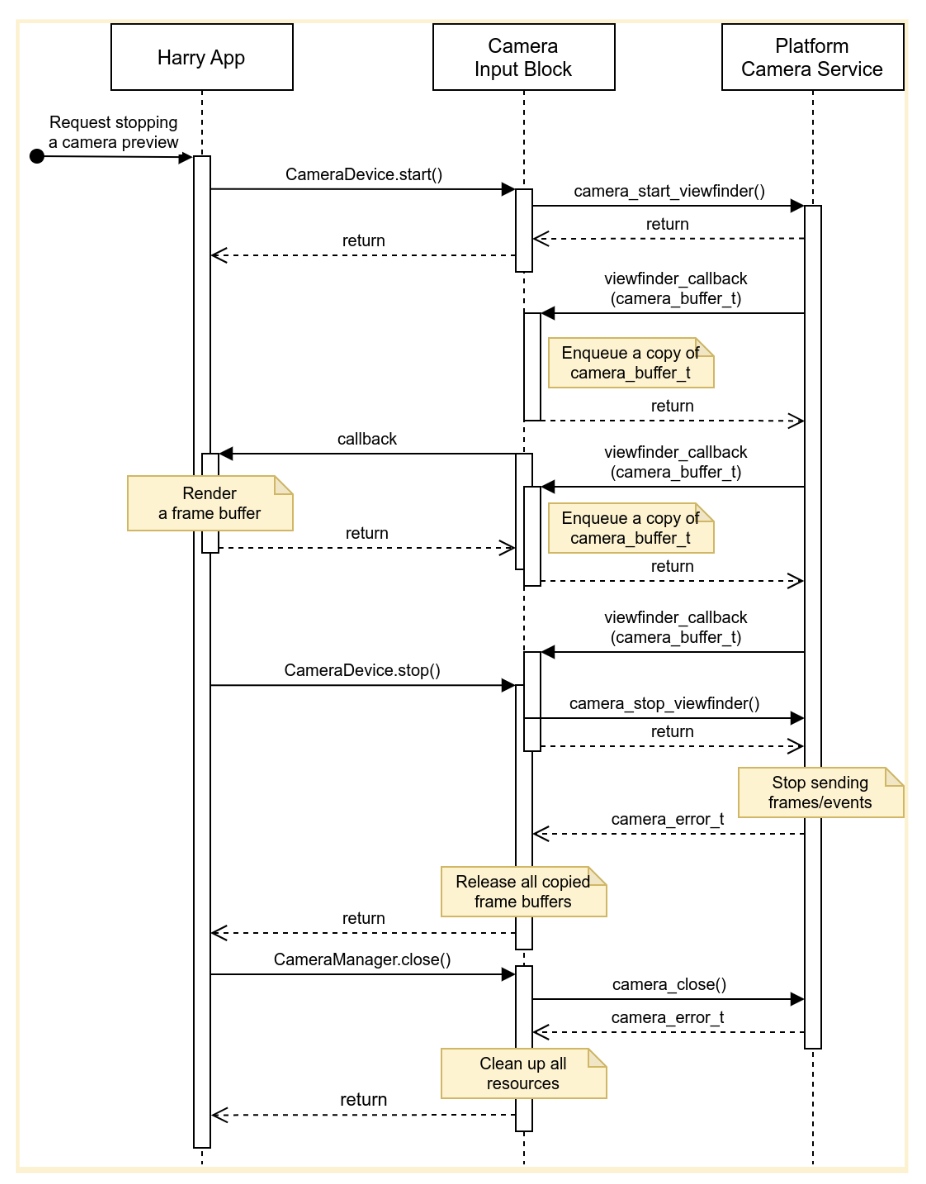
図 4. ターゲット カメラ デバイスからのデータ ストリームを停止します。
エラー
カメラ デバイスが新しいフレーム バッファの送信を予期せず停止することがあります。このようなインシデントを検出するために、カメラ入力ブロックは、新しいフレームの到着時に期限切れになるタイマーを実装し、このタイマーが期限切れになったときに通知を送信する場合があります。
アプリが通知を受け取ると、カメラのプレビューがライブではなくなったことをユーザーに通知し、カメラデバイスを閉じてから再び開くことでカメラのプレビューを復元しようとします。図 5 は、アプリがタイムアウトを処理する方法を示しています。
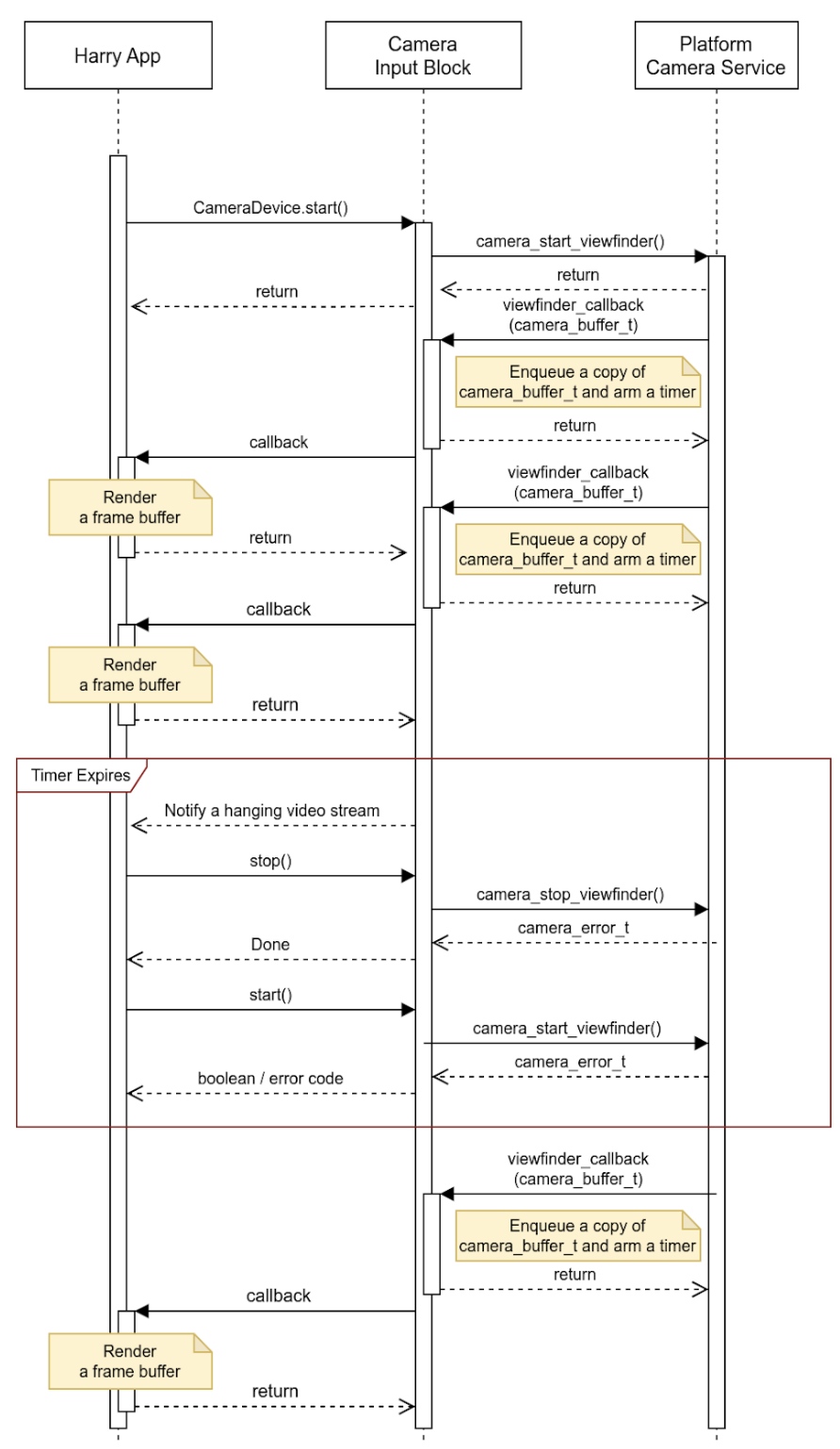
図 5. タイムアウト(データ ストリームのハング)を処理します。
カメラ入力ブロックは、ハングしたデータ ストリーム以外のインシデントを報告し、バッファに詳細情報を埋め込むことができます。OEM は、このイベント メタデータを使用して、プラットフォームでインシデントを処理できます。
アクティビティ
この API は、ホストで実行され、HAR(下の図の青いブロック)を介してインストルメント クラスタのディスプレイを管理するアプリで使用されます。
システム図を図 5 に示します。
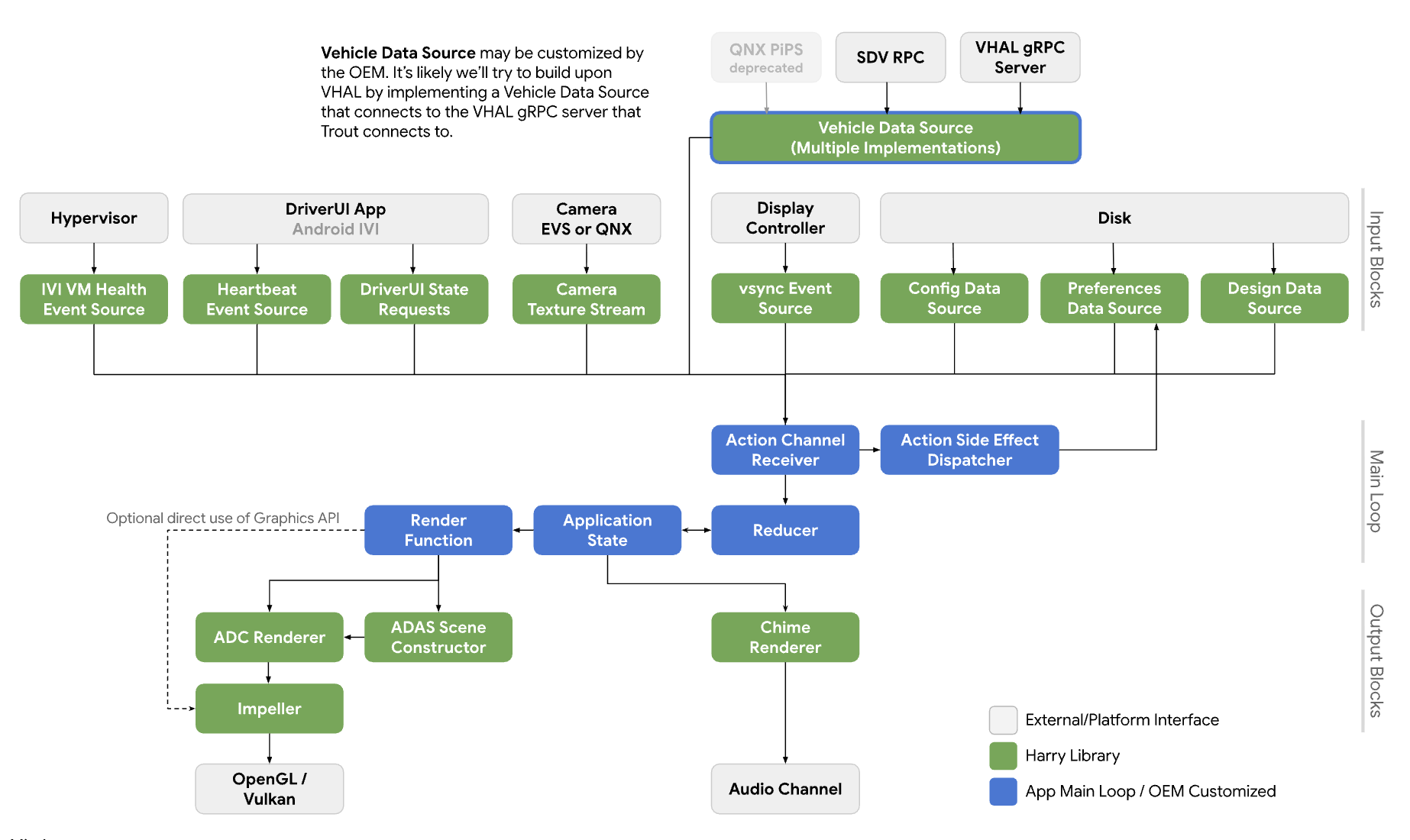
図 6. システム図。
サービス
API 呼び出しは、呼び出し元プロセスのコンテキストで実行されることが想定されています。
API
この新しい API は、HAR を介してインストルメント クラスタ ディスプレイのカメラ プレビューを管理するアプリ専用です。この API は、プラットフォーム抽象化レイヤを介して利用でき、動的にリンクされます。
CameraInputBlock インターフェースは、カメラ機能を初期化して入力ブロック マネージャーを取得するメソッドを宣言します。アプリは、返された CameraManager インスタンスを使用してカメラデバイスを管理します。
// This class represents a camera input block for the application that manages the
// instrument cluster display with Harry.
public class CameraInputBlock : public InputBlock {
    public:
        // Clean up the resources.
        virtual ~CameraInputBlock();

        // A method inherited from InputBlock class. This method initializes
        // CameraInputBlock instance; e.g. checking the platform camera service
        // is live.
        //
        // @return CAMERA_EPERM if the platform camera service is not
        //                      available.
        //         CAMERA_OK otherwise.
        virtual CameraError init() override;

        // A method inherited from InputBlock class. This method release all
        // resources held by this CameraInputBlock instance.
        virtual void release() override;

        // This method returns a CameraManager instance. The caller uses
        // this instance to manage camera devices.
        //
        // @param out If this method is successful, this points to a valid
        //            CameraManager instance.
        // @return CAMERA_EACCESS when we fail to create CameraManager instance
        //         to return.
        //         CAMERA_OK otherwise.
        virtual CameraError getCameraManager(
            std::shared_ptr<CameraManager>* out) = 0;

    private:
        // Handle to manage camera devices.
        std::shared_ptr<CameraManager> mMgr;

        // Handle to manage camera devices that have been opened by clients.
        std::set<CameraDevice> mCameras;
};
CameraManager クラスは、カメラを開く(または所有する)メソッドを宣言し、アプリがそのカメラの使用を終了したときにカメラを解放します。アプリは複数のカメラを開き、それらのストリームを使用して、より広い視野またはマルチビュー エクスペリエンスを作成できます。
// This pure virtual class declares methods to manage camera devices.
public class CameraManager {
    public:
        // This method returns a list of CameraDescriptor objects representing
        // available cameras.
        //
        // @param out A list of CameraDescriptor instances. This list may be
        //            empty if the platform camera service does not list any
        //            camera.
        // @return CAMERA_EACCESS if we failed to build a camera list.
        //         CAMERA_OK otherwise.
        virtual CameraError getCameraList(
            std::vector<CameraDescriptor>* out) = 0;

        // Open a camera device associated with a given string identifier.
        //
        // @param ID A string identifier of a camera device to request.
        // @param out A pointer to CameraDevice shared pointer object. This
        //            is null when we fail to open a target device.
        // @return CAMERA_ENODEV if no camera is associated with a given id.
        //         CAMERA_EACCESS if it fails to open a target device.
        //         CAMERA_OK otherwise.
        virtual CameraError open(
            std::string ID, std::shared_ptr<CameraDevice>* out) = 0;

        // Close a camera device associated with a given string identifier.
        // This method is assumed to be always successful.
        //
        // @param id A string identifier of a camera device to close.
        virtual void close(std::string id) = 0;
};
使用するカメラをアプリが検出できない場合、アプリはコンテキストで最適なカメラを選択できます。CameraManager::getCameraList() は、各カメラの特性を提供する CameraDescriptor インスタンスのリストを返します。
CameraDevice クラスは単一のカメラ デバイスを表し、データ ストリームを開始および停止するメソッドを宣言します。カメラの特性が静的にわかっていない場合、クライアントは記述子から特性を取得して解析します。
たとえば、クライアントは、ターゲット カメラ デバイスがメタデータから提供するストリーム構成のリストを取得し、最適な属性(フレームレート、解像度、出力形式など)を持つものを選択できます。
// This class represents a single camera device.
public class CameraDevice {
    public:
        // Start a data stream that attributes are matching to given
        // configuration best.
        // If a selected configuration is not given (null), a data stream is
        // initiated in its default configuration and return.
        //
        // @param configuration Selected attributes of the imagery data stream.
        // @param listener An object to listen to an active data stream.
        // @param effective Actual attributes of started data stream.
        // @return CAMERA_EINVAL if a listener object is invalid.
        //         CAMERA_EIO if we failed to start a video stream.
        //         CAMERA_OK otherwise.
        virtual CameraError start(
                std::shared_ptr<CameraStreamConfiguration>& configuration,
                std::shared_ptr<CameraStreamListener>& listener,
                std::shared_ptr<CameraStreamConfiguration>* effective) = 0;

        // Stop a data stream.
        virtual void stop() = 0;

        // Get a camera descriptor.
        //
        // @param desc A set of attributes that defines this camera device.
        // @return CAMERA_ENODATA if a descriptor is not available.
        //         CAMERA_OK otherwise.
        CameraError getDescriptor(std::shared_ptr<CameraDescriptor>* desc) = 0;

        // Return a consumed buffer to the camera device. A client of active
        // stream must return a frame buffer explicitly by calling this method.
        virtual void doneWithFrame(std::shared_ptr<FrameBuffer>& buffer) = 0;

    private:
        // Describe this camera device.
        CameraDescriptor mDescriptor;

        // A weak reference to a listening client.
        std::weak_ptr<CameraStreamListener> mClient;
};

// This class declares attributes that characterize a camera device.
public class CameraDescriptor {
    public:
        // Unique std::string object to identify a single camera device.
        std::string mId;

        // A set of stream configurations this camera device is capable of. A
        // camera must have at least one stream configuration.
        std::set<CameraStreamConfiguration> mConfigurations;

        // Are more attributes needed to exist, such as locations, lens
        // facing directions, and intrinsic/extrinsic parameters?
};

// This class declares attributes that characterize an imagery data stream.
public class CameraStreamConfiguration {
    public:
        // Width of output of this stream in pixels.
        unsigned int mWidthInPixels;

        // Height of output of this stream in pixels.
        unsigned int mHeightInPixels;

        // An average number of frames per second.
        double mFrameRate;

        // A format of this stream's output. A client could calculate a
        // byte-per-pixel (bpp) from this.
        CameraColorFormat mFormat;
};

// This class represents a listener/callback object to listen to frames and
// events.
public class CameraStreamListener {
    public:
        // A listener method to receive various stream events including a new
        // frame buffer.
        //
        // @param event CameraStreamEvent object that represents a single event
        //              such as an arrival of a new frame buffer, camera stream
        //              is terminated, and so forth.
        virtual void onEvent(std::shared_ptr<CameraStreamEvent>* event) = 0;
};
CameraDevice::start() は次の 3 つの引数を取ります。
呼び出し元が選択したストリーム構成。
ストリーム イベントを受信するリスナー。
有効なストリーム構成へのポインタ。呼び出し元がこの値を調べて、次のフレーム バッファを意図したとおりに処理することを強く推奨します。
CameraDevice::start() が Camera Service プラットフォームでデータ ストリームを開始すると、呼び出し元のリスナー オブジェクトへの弱参照を保持して、呼び出し元の予期しない終了を検出します。
クライアントがフレーム バッファを使い終わったら、CameraDevice::doneWithFrame() メソッドを呼び出して、フレーム バッファが不要になったことをカメラデバイスに通知する必要があります。
ストリームが開始されると、クライアントはイベント メッセージを受信します。一般的なメッセージは新しいフレーム バッファです。登録されたコールバック関数を介して、クライアントは画像データとフレームバッファ メタデータを含む kNewFrameBuffer イベントを受け取ります。StreamEventType は、他のストリーム イベントを処理するための型を宣言します。データ ストリームの停止やハングアップなど。
// This class lists events possibly occurring while a data stream is active.
enum class CameraStreamEventType {
    // A delivery of a new frame buffer.
    kNewFrameBuffer,
    // A data stream has been stopped.
    kStreamStopped,
    // No new frame buffer arrives for a while.
    kStreamHang,
    // Add more.
    ...
};

// This class represents a single instance of StreamEventType.
public class CameraStreamEvent {
    public:
        // Return a type of this event.
        //
        // @return CameraStreamEventType enum value.
        CameraStreamEventType getType() { return mType; }

        // Return a pointer to data associated with this event.
        //
        // @return A shared pointer object of the buffer that contains data for
        //         this event.
        std::shared_ptr<void> getData() { return mData; }

    private:
        // Describe a type of this event.
        CameraStreamEventType mType;

        // A pointer to the data buffer.
        std::shared_ptr<void> mData;
};

// This class inherits StreamEvent class and has additional fields to represent
// the frame buffer.
public class FrameBufferEvent : public CameraStreamEvent {
    public:
        // Return an identifier of this frame buffer.
        //
        // @return A unique integer value to identify this frame buffer.
        int getBufferID() { return mBufferID; }

        // Give access to frame buffer metadata.
        //
        // @return A shared pointer to the buffer that contains data besides
        //         the imagery data.
        std::shared_ptr<void> getMetadata() { return mMetadata; }

    private:
        // Unique integer to identify this buffer.
        int mBufferID;

        // A pointer to metadata of this frame buffer.
        std::shared_ptr<void> mMetadata;
};
このサンプルは、CameraInputBlock インターフェースとそのアプリの実装を示しています。
CameraError getCameraManager(std::shared_ptr<CameraManager>* out) {
    // During an instantiation, CameraManager will retrieve a list of camera
    // devices from the platform camera service and identify their attributes.
    *out = std::make_shared<CameraManager>();
    return CAMERA_OK;
}

// This method returns a list of CameraDescriptor objects representing available
// cameras.
CameraError CameraManager::getCameraList(std::vector<CameraDescriptor>* out) {
    if (mCameraList.size() < 1) {
        // Query a list of cameras and get their attributes.
    }
    *out = mCameraList;
    return CAMERA_OK;
}

// Open a camera device associated with a given string identifier.
CameraError CameraManager::open(std::string id, std::shared_ptr<CameraDevice>* out) {
    if (!mCameraList.contains(id)) {
        // We cannot identify any camera with a given value.
        return CAMERA_NODEV;
    }

    // During a construction, CameraDevice will obtain a handle of a target
    // camera device from the platform camera service.
    std::shared_ptr<CameraDevice> h = std::make_shared<CameraDevice>(id);
    if (!h) {
        // We fail to open a camera device.
        return CAMERA_EACCESS;
    }

    *out = h;
    return CAMERA_OK;
}

// Close a camera device associated with a given string identifier. This method
// is assumed to be always successful.
void CameraManager::close(std::string id) {
    if (!mCameraList.contains(id)) {
        // We ignore calls with unknown identifiers.
        return;
    }

    // mCameraList.remove() returns an object removed from the list.
    std::shared_ptr<CameraDevice> device = mCameraList.remove(id);

    // Ensure a device stops streaming.
    device->stop();
}

// Start a data stream that attributes are matching to given configuration
// best.
// If a selected configuration is not given (null), a data stream will be
// initiated in its default configuration and return.
CameraError CameraDevice::start(
        std::shared_ptr<CameraStreamConfiguration>& configuration,
        std::shared_ptr<CameraStreamListener>& listener,
        std::shared_ptr<CameraStreamConfiguration>* effective) {
    if (!listener) {
        return CAMERA_EINVAL;
    }

    // selectStreamConfiguration examines this camera's stream configurations
    // and returns the one closest to the selected configuration.
    CameraStreamConfiguration config = selectStreamConfiguration(configuration);

    // mDevice refers to the camera handle for the platform camera service. We
    // may need to translate CameraStreamConfiguration for the platform service.
    mDevice->configure(
        configuration.mWidth, configuration.mHeight, configuration.mFormat);

    // Start a data stream with a callback object.
    if (!mDevice->startStream(mCallback)) {
        // We failed to start a data stream.
        return CAMERA_EIO;
    }

    return CAMERA_OK;
}

// Stop a data stream.
void CameraDevice::stop() {
    if (!mDevice) {
        // Nothing to do if we don't have a valid camera handle for the
        // platform camera service.
        return;
    }

    mDevice->stopStream();
}

// Get a camera descriptor.
CameraError CameraDevice::getDescriptor(std::shared_ptr<CameraDescriptor>* desc) {
    if (!mDescriptor) {
        return CAMERA_ENODATA;
    }

    *desc = *mDescriptor;
    return CAMERA_OK;
}

// Return a consumed buffer to the camera device. A client of active stream
// must return a frame buffer explicitly by calling this method.
void CameraDevice::doneWithFrame(std::shared_ptr<FrameBuffer>& buffer) {
    if (!mBufferRecords.contains(buffer.getId())) {
        // Ignore a call with unknown frame buffer.
        return;
    }

    // Simply remove from the record.
    (void)mBufferRecords.remove(buffer.getId());
}

// This method handles gear-shift events.
void Application::handleGearShift(GearSelection selection) {
    switch (selection) {
        case GEAR_SELECTION_REVERSE:
            // Upon the reverse gear selection, we are going to start a video
            // stream and show its preview on the instrument cluster display.
            (void)startStream(mCameraInputBlock);

            // FIXME: Exact method to control the camera preview window on the
            // instrument display is to be determined.
            show(mRearVisibilityWindow);
            break;

        default:
            // Upon all other gear selection, we are going to stop a video
            // stream (if it's running) and hide the preview.
            stopStream(mCameraInputBlock);

            // FIXME: Exact method to control the camera preview window on the
            // instrument display is to be determined.
            hide(mRearVisibilityWindow);
            break;
    }
}

bool Application::startStream(std::shared_ptr<CameraInputBlock> handle) {
    return handle->start(std::bind(&Application::handleStreamCallback, this);
}

void Application::stopStream(std::shared_ptr<CameraInputBlock> handle) {
    handle->stop();
}

// This method handles a stream callback.
void Application::handleStreamCallback(StreamEvent& event) {
    switch (event.getType()) {
        case StreamEventType::kNewFrameBuffer:
            // Handle a new frame buffer. We may just enqueue it for the
            // future or forward to CameraInputBlock client.
            break;

        case StreamEventType::kStreamStopped:
            // Handle as an incident if this event is not expected.
            break;

        // More cases to be added.
    }
}

void Application::handleNewFrameBuffer(StreamEvent& event) {
    // Enqueue a new frame buffer for the further processing. A buffer
    // must be returned explicitly by calling
    // CameraDevice.doneWithFrame(FrameBuffer&) method.
}

void Application::handleStreamEvent(StreamEvent& event) {
    // Handle a received stream event except a new frame buffer's
    // arrival; e.g. a video stream is terminated unexpectedly.
}
パフォーマンス
後方視界は、これらの政府規制を満たしています。
| 値 | 規制 |
|---|---|
| 応答時間 | CFR 571.111 S5.5.3 |
| フレームレート | UNECE R46 6.2.2.3.4 |
| 画像形成時間 | UNECE R46 6.2.2.3.4.2 |
| システム レイテンシ | UNECE R46 6.2.2.3.4.3 |
プライバシー
プライバシーに関する具体的な内容は次のとおりです。
この API では、個人情報(PII)の収集、ログ記録、保存を実装する必要はありません。ただし、キャプチャされた画像データ(または関連するメタデータ)に PII が含まれる可能性があるため、API を使用するアプリはユーザーの明示的な同意を得る必要があります。
カメラは安全上重要な役割を担っているため、ユーザーはカメラ デバイスを制御してインストルメント クラスタのディスプレイでプレビューすることはできません。OEM は、セットアップ中またはドライバからユーザーの同意を得ます。
この API は、バックグラウンドのカメラ クライアントをサポートしていません。そのため、カメラ デバイスがデータをキャプチャしていることをユーザーに知らせるプライバシー インジケーターは対象外です。