

רשויות רגולטוריות ממשלתיות מטילות כמה דרישות כדי לוודא שהראות האחורית העקיפה מספקת מספיק מידע לתמרון הרכב בצורה מדויקת ובזמן. ההגדרה הזו משפיעה על המודעות של הנהג לסביבה.
לגבי מערכות לשיפור הראות לאחור שמבוססות על מערכת ניטור מצלמה (CMS), מנהל הבטיחות בכבישים המהירים הפדרלי (NHTSA) דורש לעמוד בדרישות הבאות (S6.6.2.3 בהתייחס ל-UNECE46):
S5.5.3 זמן תגובה. התמונה ממצלמת הרוורס שעומדת בדרישות של סעיפים S5.5.1 (שדה ראייה) ו-S5.5.2 (גודל), כשנבדקת בהתאם לסעיף S14.2, מוצגת תוך 2.0 שניות מתחילת אירוע נסיעה לאחור.
S5.5.4 זמן השהייה. התמונה ממראה אחורית שעומדת בדרישות של סעיפים S5.5.1 ו-S5.5.2 לא מוצגת אחרי שהאירוע של הגיבוי הסתיים.
S5.5.5 השבתה. התמונה ממצלמת הרוורס שעומדת בדרישות של S5.5.1 ו-S5.5.2 נשארת גלויה במהלך אירוע הנסיעה לאחור עד שהנהג משנה את התצוגה, או עד שהבורר של כיוון הנסיעה של הרכב עובר ממצב רוורס.
S6.6.2.3.3.5 Artifacts. במדריך למשתמש של המפעיל צריך להיות מידע על חפצים אפשריים וההשפעות שלהם על ההסתרה החלקית של שדה הראייה ושל האובייקטים, שעשויים לדרוש מהנהג להיות ערני וקשוב במיוחד.
S6.2.2.3.4.1 קצב פריימים. תנועות של אובייקטים מול המצלמה מוצגות בצורה חלקה וזורמת. קצב הפריימים המינימלי של המערכת הוא לפחות 30 Hz (שווה ל-30 fps). בתנאי תאורה חלשה או בזמן תמרון במהירות נמוכה, קצב הפריימים המינימלי של המערכת הוא לפחות 15 הרץ.
S6.2.2.3.4.2 זמן יצירת התמונה. זמן יצירת התמונה במסך הוא פחות מ-55 אלפיות השנייה בטמפרטורה של 22 מעלות צלזיוס ± 5 מעלות צלזיוס.
S6.2.2.3.4.3 זמן האחזור של המערכת. למערכת ניטור מצלמות (CMS) יש זמן אחזור קצר מספיק כדי להציג את הנוף כמעט באותו הזמן. זמן האחזור נמוך מ-200 אלפיות השנייה בטמפרטורה של 22 מעלות צלזיוס ± 5 מעלות צלזיוס.
השקנו את מערכת התצוגה החיצונית (EVS) של Android Automotive OS (AAOS) כדי לעמוד בדרישות האלה ב-AAOS bare metal. השקנו שירות דומה לוירטואליזציה במכשירי AAOS עם רכיב הרינדור לזמינות גבוהה (HAR), שגם הוא עומד בדרישות האלה.
צינור של תצוגה מקדימה של המצלמה
חמשת השלבים האלה מרכיבים את צינור התצוגה המקדימה של המצלמה:

איור 1. שלבים בפייפליין של התצוגה המקדימה של המצלמה.
חסימת שירות המצלמה מתייחסת לפלטפורמת שירות המצלמה ולשכבת ההפשטה שלה, שמאפשרת לאפליקציות לגשת למצלמות הזמינות ולהשתמש בהן. הפונקציה Display Service מציגה למשתמשים את נתוני התמונות. האפליקציה מטמיעה את המסלולים להמרת משתמשים עם שירות המצלמה ושירות התצוגה.
תהליך השימוש העיקרי בראייה לאחור הוא:
הנהג מעביר את בורר ההילוכים (ההילוך) להילוך אחורי כדי להפעיל אירוע של נסיעה לאחור.
המערכת משדרת את אירוע הגיבוי. האפליקציה מקבלת את השידור ומפעילה את בלוק קלט המצלמה (שירות המצלמה) ואת שירות העיבוד (שירות התצוגה).
בלוק הקלט של המצלמה מאתחל את פלטפורמת שירות המצלמה ומחזיר את נקודת האחיזה של השירות לאפליקציה.
רכיב ה-Renderer מאתחל את חלון התצוגה לקלט המצלמה משלב 4.
האפליקציה מבקשת את בלוק הקלט של המצלמה כדי להתחיל לשלוח מאגרי מסגרות ואירועים.
האפליקציה מוסיפה למאגר את מאגרי המסגרות שמועברים דרך הקריאות החוזרות (אסינכרוני). מאגרי המסגרות הם בבעלות בלוק הקלט של המצלמה, ולכן האפליקציה לא יכולה לשנות אותם.
האפליקציה מוציאה מאגר מסגרות מהתור (אם התור לא ריק) ומרכיבה את תצוגת המשתמש. המשתמשים יכולים ליצור עותק כדי לשנות את התוכן.
האפליקציה שולחת מאגר ל-renderer.
רכיב ה-Renderer מצייר את התוכן של מאגר נתונים זמני שהתקבל על המסך.
אם האירוע המקורי עדיין מתקיים, עוברים לשלב 7. כשהאירוע שברקע מסתיים, האפליקציה מבקשת מבלוק הקלט של המצלמה להפסיק לשלוח מאגרי מסגרות ואירועים אחרי שהתצוגה מוסתרת מהמשתמש.
האפליקציה סוגרת את המצלמה ומשחררת את הרכיב שמעבד את התמונה.
איור 1 מציג את התהליך. בתמונה הזו נעשה שימוש באלמנטים מ-API של QNX Camera Library כדי להשתמש בפלטפורמת Camera Service.
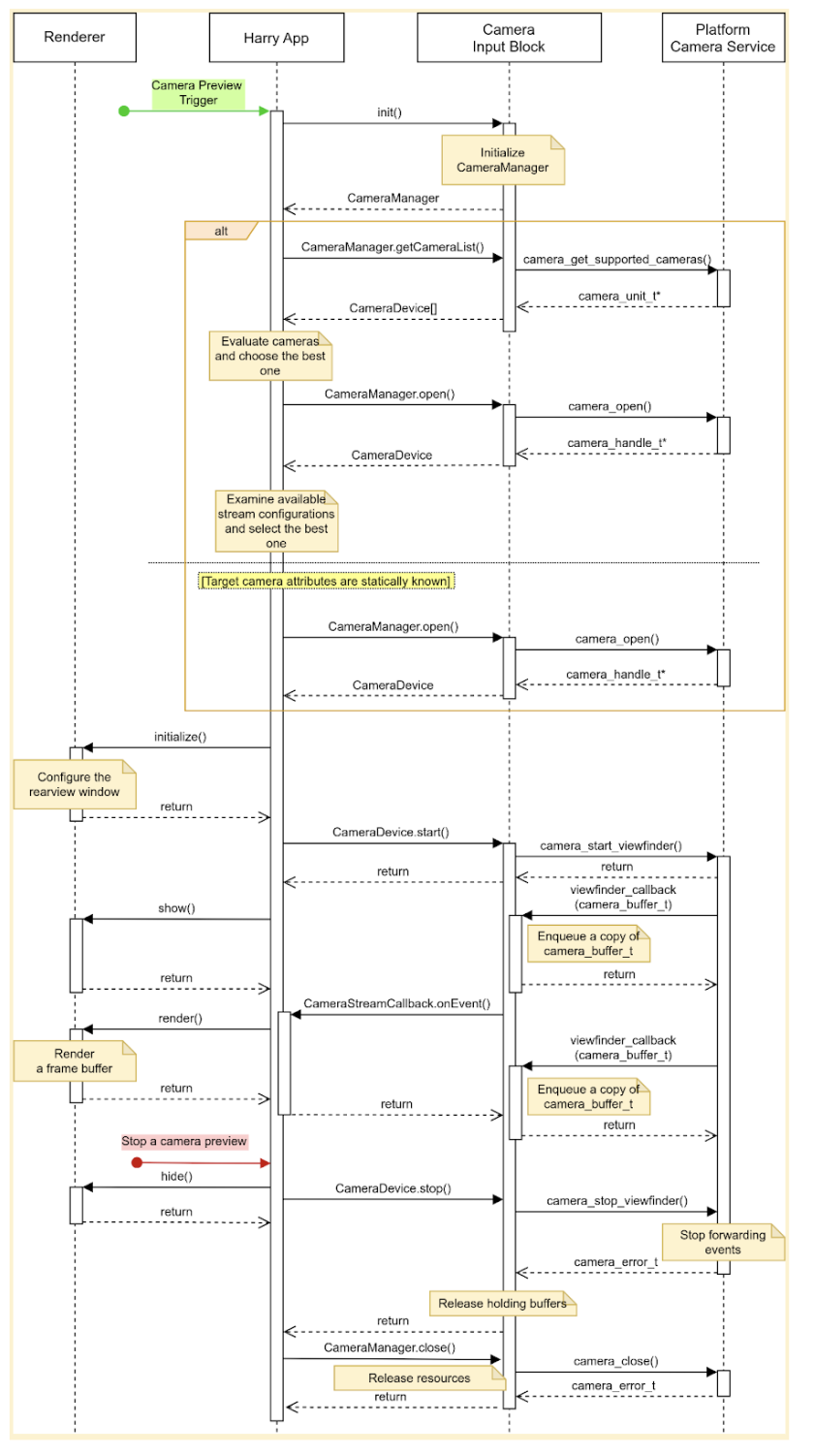
איור 2. חוויית המשתמש העיקרית ב-HAR.
בלוק הקלט של המצלמה כולל שלושה ממשקים:
CameraManager, מצהיר על שיטות לניהול מכשירי מצלמה. לדוגמה, האפליקציה משתמשת בממשק הזה כדי לפתוח (לשריין) מכשיר מצלמה יעד.
CameraDeviceמכריז על שיטות לשליטה במכשיר מצלמה, למשל הפעלה או עצירה של מקור נתונים.
CameraStreamListenerמכריז על שיטה אחת לקבלת אירועים שונים ממצלמה ייעודית.
עיצוב
בקטע הזה מפורט עיצוב המערכת.
חוויית משתמש
הנהג יכול לראות תצוגה מקדימה של המצלמה האחורית במסך לוח המחוונים כשהוא מעביר את ההילוך להילוך אחורי. התצוגה מפסיקה להציג תצוגה מקדימה של המצלמה כשהנהג מעביר את ההילוך למצב אחר מרוורס.
אפשר להפעיל מסלולים נוספים להמרת לקוחות. לדוגמה, הנהג יכול לראות תצוגה מקדימה של האזור שלא נראה במראות כשאות האיתות מופעל.
התחלת התצוגה המקדימה של המצלמה
כשמשתמשים במצלמות, האפליקציה מפרטת ומעריכה את המצלמות הזמינות כדי למצוא את המצלמה הכי טובה למטרה הרצויה. לדוגמה, כדי להציג את מה שקורה מאחורי הרכב, האפליקציה מחפשת ברשימת המצלמות הזמינות את המצלמה שמראה את החלק האחורי של הרכב.
האפליקציה בודקת את זה על ידי בחינת המאפיינים של כל מצלמה, למשל: מיקום, כיוון העדשה, קצב הפריימים, רזולוציית הפלט ופורמט הפלט. אם לכמה מצלמות יש את אותם מאפיינים נדרשים, יכול להיות שהאפליקציה תבדוק מאפיינים נוספים, כמו שדה הראייה והמרחק המוקדי.
תמונה שמציגה רצף של פעולות להפעלת תצוגה מקדימה של המצלמה עם הגדרה סטטית של המצלמה:
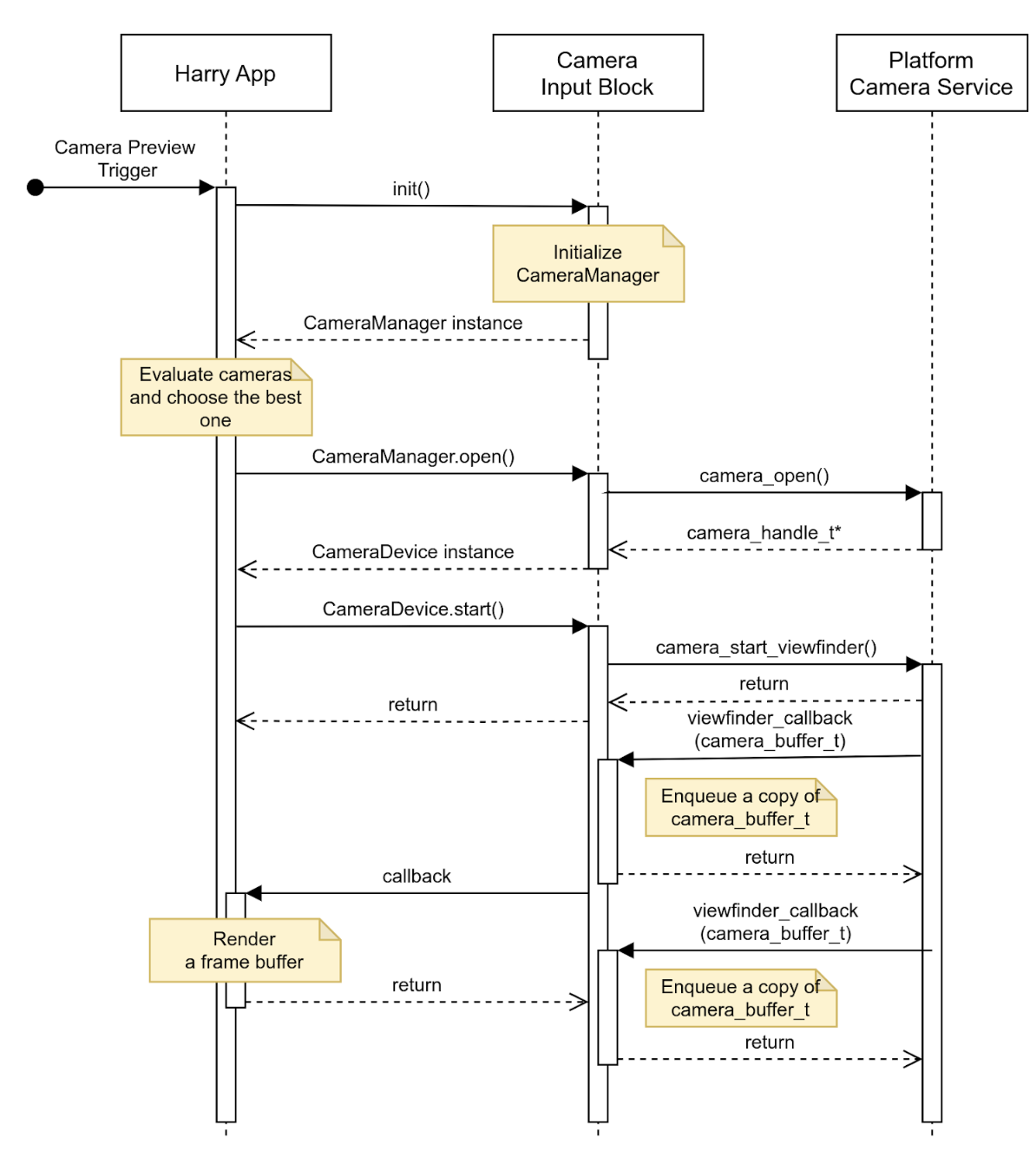
איור 3. הפעלת תצוגה מקדימה של המצלמה עם הגדרת מצלמה סטטית.
הפסקת התצוגה המקדימה של המצלמה
האפליקציה מפסיקה לספק נראות של החלק האחורי של הרכב כשהאירוע של הנסיעה לאחור מסתיים. כדי למנוע הצגה של מסך ריק או תמונה סטטית, האפליקציה מסתירה את התצוגה מהמשתמש ואז מבקשת שבלוק הקלט של המצלמה יפסיק לשלוח אירועים.
בתמונה מוצגת רצף פעולות להפסקת מקור נתונים ממצלמת יעד:
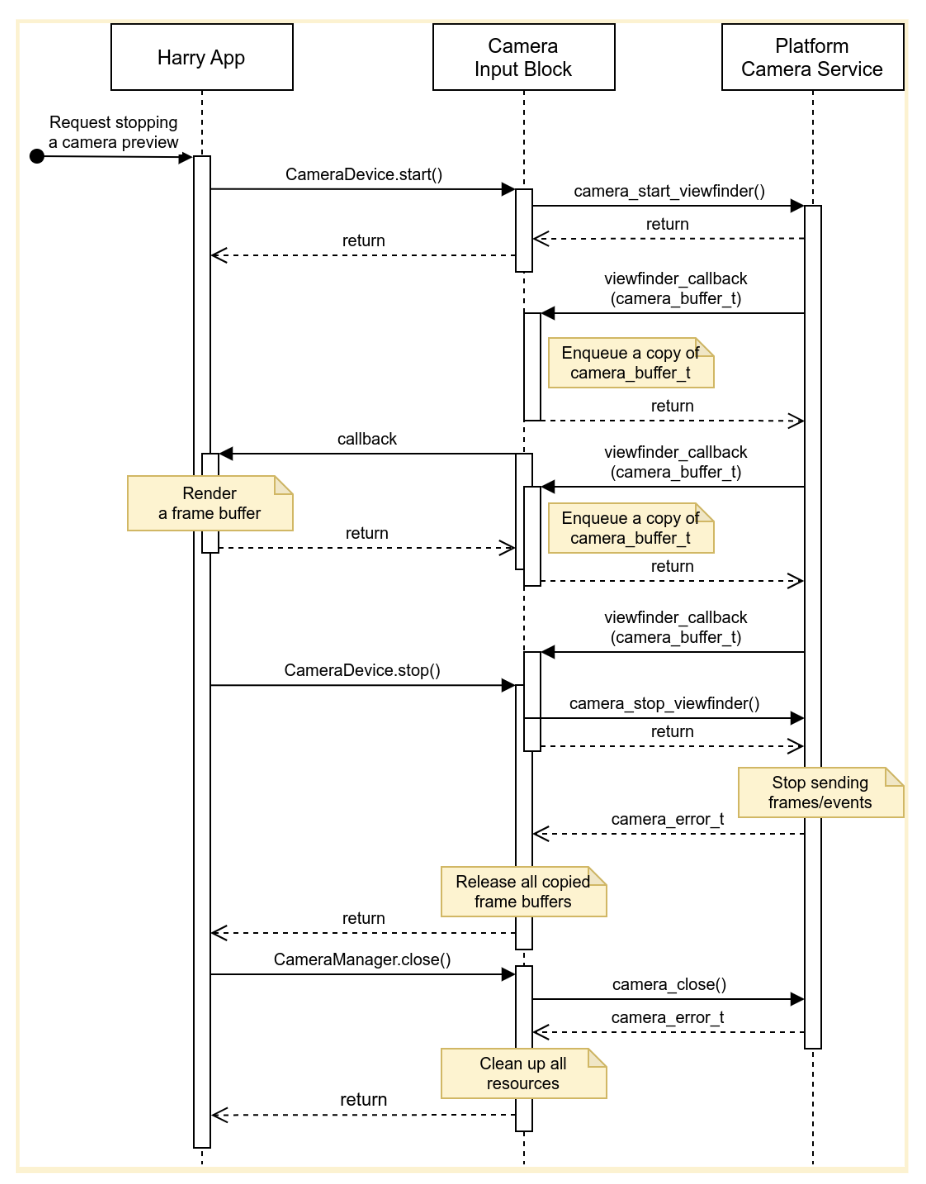
איור 4. הפסקת זרם הנתונים ממכשיר מצלמה של יעד.
שגיאות
מכשיר מצלמה עלול להפסיק באופן בלתי צפוי לשלוח מאגר מסגרות חדש. כדי לזהות אירועים כאלה, יכול להיות שבלוק הקלט של המצלמה יטמיע טיימר שפג התוקף שלו עם הגעת פריים חדש, וישלח התראה כשהטיימר הזה יפוג.
כשהאפליקציה מקבלת התראה, היא מודיעה למשתמש שתצוגה מקדימה של המצלמה כבר לא פעילה, ומנסה לשחזר את התצוגה המקדימה של המצלמה על ידי סגירה של מכשיר המצלמה ופתיחה שלו מחדש. באיור 5 רואים איך האפליקציה מטפלת בפסק זמן:
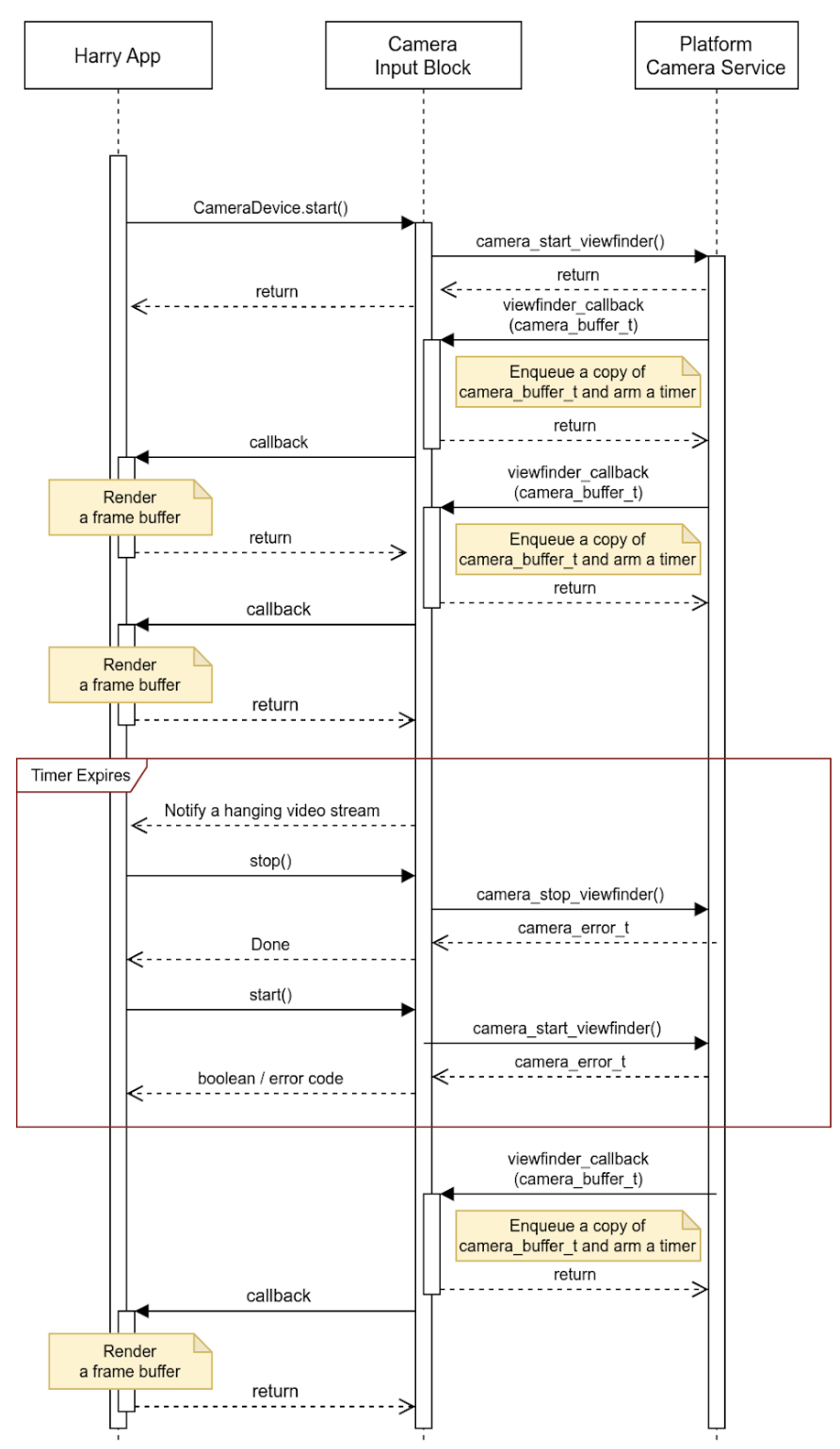
איור 5. טיפול בפסק זמן (מקור נתונים תקוע).
בלוק הקלט של המצלמה יכול לדווח על אירועים אחרים מלבד נתונים תקועים בסטרימינג, ולהטמיע פרטים נוספים במאגרי הנתונים הזמניים. יצרני ציוד מקורי יכולים להשתמש במטא-נתונים של האירוע הזה כדי לטפל בתקריות בפלטפורמה שלהם.
פעילויות
ממשק ה-API משמש אפליקציות שפועלות במארח ומנהלות את התצוגה של לוח המכוונים באמצעות ה-HAR (הבלוקים הכחולים בתרשים שלמטה).
איור 5 מציג דיאגרמה של המערכת:
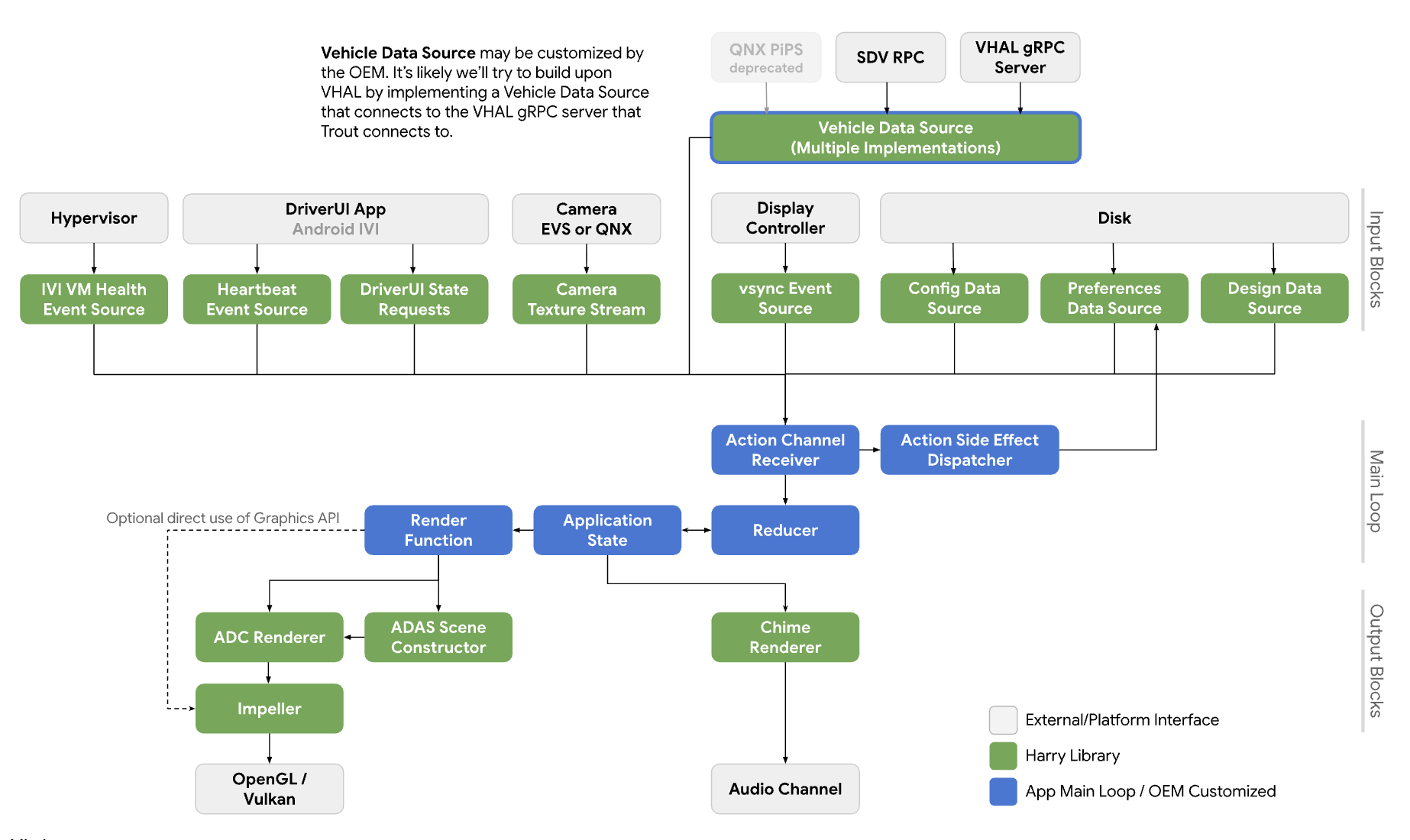
איור 6. תרשים של המערכת.
שירותים
הציפייה היא שהקריאות ל-API יפעלו בהקשר של התהליך ששולח את הקריאה.
ממשקי API
ממשק ה-API החדש מיועד רק לאפליקציות שמנהלות את התצוגה המקדימה של המצלמה במסך של לוח המכוונים דרך HAR. ממשק ה-API זמין דרך שכבת ההפשטה של הפלטפורמה והקישורים מתעדכנים באופן דינמי.
ממשק CameraInputBlock מכריז על שיטות לאתחול הפונקציונליות של המצלמה ולקבלת מנהל בלוק הקלט. האפליקציה משתמשת במופע CameraManager שמוחזר כדי לנהל את מכשירי המצלמה.
// This class represents a camera input block for the application that manages the
// instrument cluster display with Harry.
public class CameraInputBlock : public InputBlock {
    public:
        // Clean up the resources.
        virtual ~CameraInputBlock();

        // A method inherited from InputBlock class. This method initializes
        // CameraInputBlock instance; e.g. checking the platform camera service
        // is live.
        //
        // @return CAMERA_EPERM if the platform camera service is not
        //                      available.
        //         CAMERA_OK otherwise.
        virtual CameraError init() override;

        // A method inherited from InputBlock class. This method release all
        // resources held by this CameraInputBlock instance.
        virtual void release() override;

        // This method returns a CameraManager instance. The caller uses
        // this instance to manage camera devices.
        //
        // @param out If this method is successful, this points to a valid
        //            CameraManager instance.
        // @return CAMERA_EACCESS when we fail to create CameraManager instance
        //         to return.
        //         CAMERA_OK otherwise.
        virtual CameraError getCameraManager(
            std::shared_ptr<CameraManager>* out) = 0;

    private:
        // Handle to manage camera devices.
        std::shared_ptr<CameraManager> mMgr;

        // Handle to manage camera devices that have been opened by clients.
        std::set<CameraDevice> mCameras;
};
במחלקה CameraManager מוצהרות שיטות לפתיחה (או לבעלות) של מצלמות ולשחרור שלהן כשהאפליקציה מסיימת את השימוש במצלמה. האפליקציה יכולה לפתוח יותר ממצלמה אחת ולצרוך את הזרמים שלהן כדי ליצור שדה ראייה רחב יותר או חוויה של מסך מפוצל.
// This pure virtual class declares methods to manage camera devices.
public class CameraManager {
    public:
        // This method returns a list of CameraDescriptor objects representing
        // available cameras.
        //
        // @param out A list of CameraDescriptor instances. This list may be
        //            empty if the platform camera service does not list any
        //            camera.
        // @return CAMERA_EACCESS if we failed to build a camera list.
        //         CAMERA_OK otherwise.
        virtual CameraError getCameraList(
            std::vector<CameraDescriptor>* out) = 0;

        // Open a camera device associated with a given string identifier.
        //
        // @param ID A string identifier of a camera device to request.
        // @param out A pointer to CameraDevice shared pointer object. This
        //            is null when we fail to open a target device.
        // @return CAMERA_ENODEV if no camera is associated with a given id.
        //         CAMERA_EACCESS if it fails to open a target device.
        //         CAMERA_OK otherwise.
        virtual CameraError open(
            std::string ID, std::shared_ptr<CameraDevice>* out) = 0;

        // Close a camera device associated with a given string identifier.
        // This method is assumed to be always successful.
        //
        // @param id A string identifier of a camera device to close.
        virtual void close(std::string id) = 0;
};
אם האפליקציות לא מצליחות לזהות באילו מצלמות להשתמש, הן יכולות לבחור את המצלמה שהכי מתאימה להקשר. CameraManager::getCameraList() מחזירה רשימה של מופעי CameraDescriptor, שמספקת את המאפיינים של כל מצלמה.
המחלקה CameraDevice מייצגת מכשיר מצלמה יחיד ומצהירה על שיטות להפעלה ולהפסקה של מקור הנתונים שלה. אם מאפייני המצלמה לא ידועים באופן סטטי, הלקוחות מקבלים אותם מהמתאר שלהם ומנתחים אותם.
לדוגמה, לקוח יכול לקבל רשימה של הגדרות מקורות נתונים שמצלמת יעד מציעה מהמטא-נתונים שלה, ולבחור את ההגדרה עם המאפיינים הכי טובים (לדוגמה, קצב פריימים, רזולוציות ופורמט פלט).
// This class represents a single camera device.
public class CameraDevice {
    public:
        // Start a data stream that attributes are matching to given
        // configuration best.
        // If a selected configuration is not given (null), a data stream is
        // initiated in its default configuration and return.
        //
        // @param configuration Selected attributes of the imagery data stream.
        // @param listener An object to listen to an active data stream.
        // @param effective Actual attributes of started data stream.
        // @return CAMERA_EINVAL if a listener object is invalid.
        //         CAMERA_EIO if we failed to start a video stream.
        //         CAMERA_OK otherwise.
        virtual CameraError start(
                std::shared_ptr<CameraStreamConfiguration>& configuration,
                std::shared_ptr<CameraStreamListener>& listener,
                std::shared_ptr<CameraStreamConfiguration>* effective) = 0;

        // Stop a data stream.
        virtual void stop() = 0;

        // Get a camera descriptor.
        //
        // @param desc A set of attributes that defines this camera device.
        // @return CAMERA_ENODATA if a descriptor is not available.
        //         CAMERA_OK otherwise.
        CameraError getDescriptor(std::shared_ptr<CameraDescriptor>* desc) = 0;

        // Return a consumed buffer to the camera device. A client of active
        // stream must return a frame buffer explicitly by calling this method.
        virtual void doneWithFrame(std::shared_ptr<FrameBuffer>& buffer) = 0;

    private:
        // Describe this camera device.
        CameraDescriptor mDescriptor;

        // A weak reference to a listening client.
        std::weak_ptr<CameraStreamListener> mClient;
};

// This class declares attributes that characterize a camera device.
public class CameraDescriptor {
    public:
        // Unique std::string object to identify a single camera device.
        std::string mId;

        // A set of stream configurations this camera device is capable of. A
        // camera must have at least one stream configuration.
        std::set<CameraStreamConfiguration> mConfigurations;

        // Are more attributes needed to exist, such as locations, lens
        // facing directions, and intrinsic/extrinsic parameters?
};

// This class declares attributes that characterize an imagery data stream.
public class CameraStreamConfiguration {
    public:
        // Width of output of this stream in pixels.
        unsigned int mWidthInPixels;

        // Height of output of this stream in pixels.
        unsigned int mHeightInPixels;

        // An average number of frames per second.
        double mFrameRate;

        // A format of this stream's output. A client could calculate a
        // byte-per-pixel (bpp) from this.
        CameraColorFormat mFormat;
};

// This class represents a listener/callback object to listen to frames and
// events.
public class CameraStreamListener {
    public:
        // A listener method to receive various stream events including a new
        // frame buffer.
        //
        // @param event CameraStreamEvent object that represents a single event
        //              such as an arrival of a new frame buffer, camera stream
        //              is terminated, and so forth.
        virtual void onEvent(std::shared_ptr<CameraStreamEvent>* event) = 0;
};
הפונקציה CameraDevice::start() מקבלת שלושה ארגומנטים:
הגדרת השידור שנבחרה על ידי המתקשר.
פונקציית listener לקבלת אירועים של סטרימינג.
הצבעה על הגדרה יעילה של מקור נתונים. מומלץ מאוד שהמתקשר יבדוק את הערך הזה כדי לטפל במאגרי מסגרות שמגיעים כמצופה.
כש-CameraDevice::start() מתחיל שידור נתונים עם פלטפורמת Camera Service, הוא מחזיק בהפניה חלשה לאובייקט המאזין של המתקשר כדי לזהות את הסיום הלא צפוי של המתקשר.
כשלקוח מסיים לעבוד עם מאגר פריים, הוא צריך להודיע למצלמה שהוא כבר לא צריך את מאגר הפריים באמצעות קריאה לשיטה CameraDevice::doneWithFrame().
כשזרם מתחיל, הלקוח מקבל הודעות על אירועים. הודעה נפוצה היא
new frame buffer. באמצעות פונקציית קריאה חוזרת רשומה, הלקוח מקבל אירוע kNewFrameBuffer שמכיל את נתוני התמונות יחד עם המטא-נתונים של מאגר המסגרות. StreamEventType מכריז על סוגים נוספים לטיפול באירועים אחרים של זרם. לדוגמה, מקור נתונים שהופסק או נתקע.
// This class lists events possibly occurring while a data stream is active.
enum class CameraStreamEventType {
    // A delivery of a new frame buffer.
    kNewFrameBuffer,
    // A data stream has been stopped.
    kStreamStopped,
    // No new frame buffer arrives for a while.
    kStreamHang,
    // Add more.
    ...
};

// This class represents a single instance of StreamEventType.
public class CameraStreamEvent {
    public:
        // Return a type of this event.
        //
        // @return CameraStreamEventType enum value.
        CameraStreamEventType getType() { return mType; }

        // Return a pointer to data associated with this event.
        //
        // @return A shared pointer object of the buffer that contains data for
        //         this event.
        std::shared_ptr<void> getData() { return mData; }

    private:
        // Describe a type of this event.
        CameraStreamEventType mType;

        // A pointer to the data buffer.
        std::shared_ptr<void> mData;
};

// This class inherits StreamEvent class and has additional fields to represent
// the frame buffer.
public class FrameBufferEvent : public CameraStreamEvent {
    public:
        // Return an identifier of this frame buffer.
        //
        // @return A unique integer value to identify this frame buffer.
        int getBufferID() { return mBufferID; }

        // Give access to frame buffer metadata.
        //
        // @return A shared pointer to the buffer that contains data besides
        //         the imagery data.
        std::shared_ptr<void> getMetadata() { return mMetadata; }

    private:
        // Unique integer to identify this buffer.
        int mBufferID;

        // A pointer to metadata of this frame buffer.
        std::shared_ptr<void> mMetadata;
};
בדוגמה הזו מוצגת הטמעה של הממשק CameraInputBlock והאפליקציה שלו:
CameraError getCameraManager(std::shared_ptr<CameraManager>* out) {
    // During an instantiation, CameraManager will retrieve a list of camera
    // devices from the platform camera service and identify their attributes.
    *out = std::make_shared<CameraManager>();
    return CAMERA_OK;
}

// This method returns a list of CameraDescriptor objects representing available
// cameras.
CameraError CameraManager::getCameraList(std::vector<CameraDescriptor>* out) {
    if (mCameraList.size() < 1) {
        // Query a list of cameras and get their attributes.
    }
    *out = mCameraList;
    return CAMERA_OK;
}

// Open a camera device associated with a given string identifier.
CameraError CameraManager::open(std::string id, std::shared_ptr<CameraDevice>* out) {
    if (!mCameraList.contains(id)) {
        // We cannot identify any camera with a given value.
        return CAMERA_NODEV;
    }

    // During a construction, CameraDevice will obtain a handle of a target
    // camera device from the platform camera service.
    std::shared_ptr<CameraDevice> h = std::make_shared<CameraDevice>(id);
    if (!h) {
        // We fail to open a camera device.
        return CAMERA_EACCESS;
    }

    *out = h;
    return CAMERA_OK;
}

// Close a camera device associated with a given string identifier. This method
// is assumed to be always successful.
void CameraManager::close(std::string id) {
    if (!mCameraList.contains(id)) {
        // We ignore calls with unknown identifiers.
        return;
    }

    // mCameraList.remove() returns an object removed from the list.
    std::shared_ptr<CameraDevice> device = mCameraList.remove(id);

    // Ensure a device stops streaming.
    device->stop();
}

// Start a data stream that attributes are matching to given configuration
// best.
// If a selected configuration is not given (null), a data stream will be
// initiated in its default configuration and return.
CameraError CameraDevice::start(
        std::shared_ptr<CameraStreamConfiguration>& configuration,
        std::shared_ptr<CameraStreamListener>& listener,
        std::shared_ptr<CameraStreamConfiguration>* effective) {
    if (!listener) {
        return CAMERA_EINVAL;
    }

    // selectStreamConfiguration examines this camera's stream configurations
    // and returns the one closest to the selected configuration.
    CameraStreamConfiguration config = selectStreamConfiguration(configuration);

    // mDevice refers to the camera handle for the platform camera service. We
    // may need to translate CameraStreamConfiguration for the platform service.
    mDevice->configure(
        configuration.mWidth, configuration.mHeight, configuration.mFormat);

    // Start a data stream with a callback object.
    if (!mDevice->startStream(mCallback)) {
        // We failed to start a data stream.
        return CAMERA_EIO;
    }

    return CAMERA_OK;
}

// Stop a data stream.
void CameraDevice::stop() {
    if (!mDevice) {
        // Nothing to do if we don't have a valid camera handle for the
        // platform camera service.
        return;
    }

    mDevice->stopStream();
}

// Get a camera descriptor.
CameraError CameraDevice::getDescriptor(std::shared_ptr<CameraDescriptor>* desc) {
    if (!mDescriptor) {
        return CAMERA_ENODATA;
    }

    *desc = *mDescriptor;
    return CAMERA_OK;
}

// Return a consumed buffer to the camera device. A client of active stream
// must return a frame buffer explicitly by calling this method.
void CameraDevice::doneWithFrame(std::shared_ptr<FrameBuffer>& buffer) {
    if (!mBufferRecords.contains(buffer.getId())) {
        // Ignore a call with unknown frame buffer.
        return;
    }

    // Simply remove from the record.
    (void)mBufferRecords.remove(buffer.getId());
}

// This method handles gear-shift events.
void Application::handleGearShift(GearSelection selection) {
    switch (selection) {
        case GEAR_SELECTION_REVERSE:
            // Upon the reverse gear selection, we are going to start a video
            // stream and show its preview on the instrument cluster display.
            (void)startStream(mCameraInputBlock);

            // FIXME: Exact method to control the camera preview window on the
            // instrument display is to be determined.
            show(mRearVisibilityWindow);
            break;

        default:
            // Upon all other gear selection, we are going to stop a video
            // stream (if it's running) and hide the preview.
            stopStream(mCameraInputBlock);

            // FIXME: Exact method to control the camera preview window on the
            // instrument display is to be determined.
            hide(mRearVisibilityWindow);
            break;
    }
}

bool Application::startStream(std::shared_ptr<CameraInputBlock> handle) {
    return handle->start(std::bind(&Application::handleStreamCallback, this);
}

void Application::stopStream(std::shared_ptr<CameraInputBlock> handle) {
    handle->stop();
}

// This method handles a stream callback.
void Application::handleStreamCallback(StreamEvent& event) {
    switch (event.getType()) {
        case StreamEventType::kNewFrameBuffer:
            // Handle a new frame buffer. We may just enqueue it for the
            // future or forward to CameraInputBlock client.
            break;

        case StreamEventType::kStreamStopped:
            // Handle as an incident if this event is not expected.
            break;

        // More cases to be added.
    }
}

void Application::handleNewFrameBuffer(StreamEvent& event) {
    // Enqueue a new frame buffer for the further processing. A buffer
    // must be returned explicitly by calling
    // CameraDevice.doneWithFrame(FrameBuffer&) method.
}

void Application::handleStreamEvent(StreamEvent& event) {
    // Handle a received stream event except a new frame buffer's
    // arrival; e.g. a video stream is terminated unexpectedly.
}
ביצועים
הראות לאחור עומדת בתקנות הממשלתיות האלה.
| ערך | תקנה |
|---|---|
| בתוך כמה זמן תקבלו תשובה | CFR 571.111 S5.5.3 |
| קצב פריימים | UNECE R46 6.2.2.3.4 |
| זמן יצירת התמונה | UNECE R46 6.2.2.3.4.2 |
| זמן האחזור של המערכת | UNECE R46 6.2.2.3.4.3 |
פרטיות
בנושא פרטיות:
ה-API לא דורש הטמעות לאיסוף, לרישום או לאחסון של פרטים אישיים מזהים (PII). עם זאת, מכיוון שנתוני תמונות שצולמו (או מטא-נתונים שקשורים אליהן) עשויים להכיל פרטים אישיים מזהים (PII), האפליקציה שמשתמשת ב-API חייבת לקבל את ההסכמה המפורשת של המשתמש.
המשתמשים לא יכולים לשלוט במכשירי המצלמה כדי להציג תצוגה מקדימה במסך של לוח המכוונים, כי המצלמות ממלאות תפקידים חשובים לבטיחות. יצרני ציוד מקורי מקבלים הסכמה מהמשתמשים במהלך ההגדרה או מהנהג.
ה-API הזה לא תומך בלקוחות של מצלמות ברקע. לכן, חיווי הפרטיות, שמיידע את המשתמשים שמכשיר מצלמה מצלם נתונים, לא רלוונטי.