

SDV プラットフォームは、OEM 提供の Diagnostics Manager と SDV サービス バンドル間で使用される一連の API と、OEM の診断ユースケースをサポートするユーティリティと一般的なプラットフォーム機能を提供します。診断スタックはあらゆる自動車用オペレーティング システムの不可欠なコンポーネントであるため、診断は SDV の取り組み、自動車サービス、OEM に提供するテクノロジーに不可欠です。
OEM は、Diagnostics Manager インスタンス(通常は ECU ごとに 1 つまたは VM ごとに 1 つ)をデプロイして、システム上の SDV サービス バンドルと通信することで、診断クライアントからのリクエストを処理します。そのため、SDV は、OEM の診断ユースケース向けに、一連の標準診断 API、ユーティリティ、プラットフォーム全体のサポートを提供します。目標は次のとおりです。
- OEM が UDS 標準に従って Diagnostics Manager を実装できるようにする。
- Diagnostics Manager がテスター リクエストを SDV サービス バンドルに委任できるようにする。
- SDV サービス バンドルが車両に依存しない方法で診断データを公開できるようにする。
これを実現するため、SDV は、SDV サービス バンドル(サードパーティによって提供される可能性がある)と OEM の診断スタックの実装間のやり取りを標準化するための一連の API を提供します。
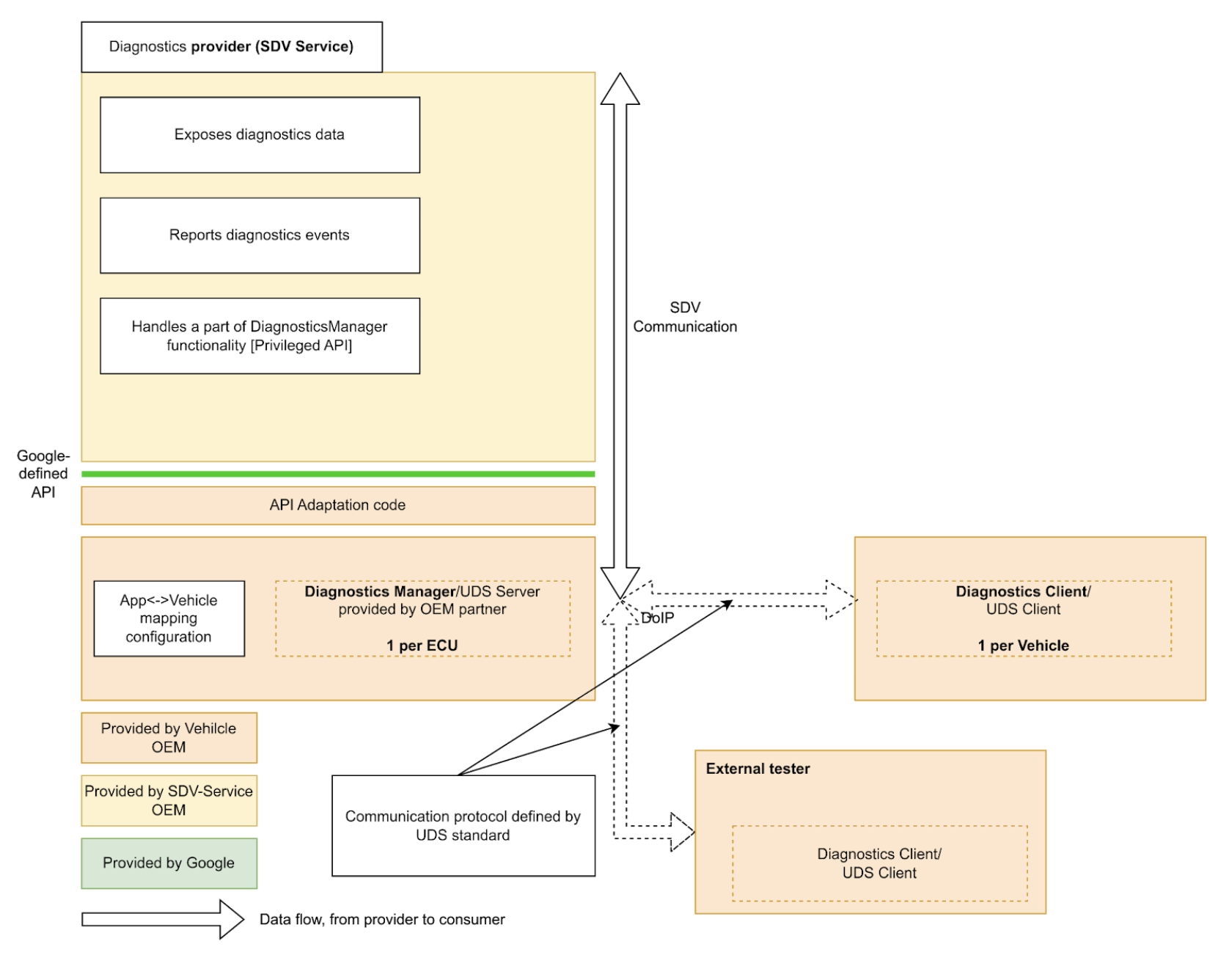
SDV サービス バンドルは、診断データとエンティティを公開し、診断機能を実装して、誤動作を Diagnostics Manager に報告できます。
SDV 全体で標準の診断 API を提供することで、SDV サービス バンドルの実装が簡素化され、さまざまな OEM のさまざまな車両で実行するために診断を再実装する必要がなくなります。
Diagnostics Services API
SDV Diagnostics API は、特定の UDS(ISO 14229-1)サービスに対応する次のサービスを定義します。
service AuthenticationService: 0x29(認証)。クライアントが制限付きのデータまたはサービスにアクセスするために ID を証明するメカニズムを提供します。service DataItemService: 0x22(ReadDataByIdentifier)と 0x2E(WriteDataByIdentifier)。DID で識別されるデータ要素の読み取りと書き込みを可能にします。service EcuResetService: 0x11(ECUReset)。テスターが ECU のリセットをリクエストできるようにします。service FileTransferService: 0x34(RequestDownload)、0x35(RequestUpload)、0x36(TransferData)、0x37(RequestTransferExit)、0x38(RequestFileTransfer)。ファイルのダウンロードとアップロードの開始と処理を処理します。service IoControlService: 0x2F(InputOutputControlByIdentifier)。外部テスターがテスト目的でシステムの入出力を制御できるようにします。service RoutineControlService: 0x31(RoutineControl)。テスターが SDV サービスによって実装された特定のルーティン(関数)を開始、停止し、結果をリクエストできるようにします。service SecurityAccessService: 0x27(SecurityAccess)。特定のセキュリティ レベルのロック解除に必要なシードとキーの交換を管理します。
SDV Diagnostics API は、AUTOSAR の
Diagnostic Event Manager(AUTOSAR_SWS_DiagnosticEventManager)に基づいて
service FaultListenerService と message Event も定義します。これにより、
アプリケーションは診断イベントと誤動作を報告できます。
また、service DiagnosticsManagerService は、他のサービスが現在の診断接続パラメータ(送信元アドレス、ターゲット アドレス)とセッション タイプをクエリできるようにする SDV プラットフォーム サービスを定義します。
サービス バンドル デベロッパー ガイド
サービス バンドル デベロッパーは、対応する .vsidl ファイルで diagnostics_declaration と次のサーバーを定義できます。
service_bundle {
    name: "<BUNDLE-NAME>"
    ...
    server {
        service: "com.sdv.google.diagnostics.data_item.DataItemService"
    }
    server {
        service: "com.sdv.google.diagnostics.routine_control.RoutineControlService"
    }
    server {
        service: "com.sdv.google.diagnostics.io_control.IoControlService"
    }
    server {
        service: "com.sdv.google.diagnostics.fault.FaultListenerService"
    }
    ...
    diagnostics_declaration {
        data_item {
            ...
        }

        routine {
            ...
        }

        event {
            ...
        }

        io_control {
            ...
        }
    }
    ...
}
DiagnosticsDeclaration メッセージは次のように定義されます。
package sdv.diagnostics.v1;

message DiagnosticsDeclaration {
  // Diagnostics data item declaration.
  //
  // See com.sdv.google.diagnostics.data_item.DataItemService service.
  message DataItem {
    // Required. Id of the data item.
    string id = 1;

    // Required. Fully qualified name of the message that defines a structure of
    // the data item.
    string message_name = 2;

    // Flag that indicates whether the data item is writable by the Diagnostics
    // Manager.
    //
    // Effectively, this indicates whether the call to DataItemService::Write,
    // is supported for this data item id.
    bool is_writable = 3;
  }

  // Declaration of diagnostics data for input/output control.
  //
  // See com.sdv.google.diagnostics.io_control.IoControl service.
  message InputOutputControlData {
    // Id of the input/output control data.
    string id = 1;

    // Fully qualified name of the message that defines a structure of the data.
    string message_name = 2;
  }

  // Declaration of diagnostics routine.
  //
  // See com.sdv.google.diagnostics.routine_control.RoutineControl.
  message Routine {
    // Information about routine control method.
    message Method {
      // Fully qualified name of the request message.
      string request = 1;

      // Fully qualified name of the response message.
      string response = 2;
    }

    // Id of the routine.
    string id = 1;

    // Information about routine start method.
    //
    // See com.sdv.google.diagnostics.routine_control.RoutineControl::Start.
    Method start = 2;

    // Information about routine stop method.
    //
    // See com.sdv.google.diagnostics.routine_control.RoutineControl::Stop.
    Method stop = 3;

    // Information about routine result method.
    //
    // See
    // com.sdv.google.diagnostics.routine_control.RoutineControl::RequestResult.
    Method result = 4;
  }

  // Declaration of diagnostics event and corresponding fault listener.
  //
  // See com.sdv.google.diagnostics.event.Event.
  // See com.sdv.google.diagnostics.fault.FaultListener.
  message Event {
    // Id of the event.
    string id = 1;

    // Fully qualified message name of the event's extended data message.
    string extended_data_message_name = 2;

    // Fault status changes which service wants to be notified of.
    //
    // See com.sdv.google.diagnostics.fault.FaultListener.StatusMask.
    uint32 fault_listener_mask = 3;

    // User-defined service unit name of a corresponding event publisher.
    string service_unit_name = 4;
  }

  // Diagnostic data items exposed by the service bundle.
  repeated DataItem data_item = 1;

  // Diagnostic data exposed for input/output control by the service bundle.
  repeated InputOutputControlData io_control = 2;

  // Diagnostic routines exposed by the service bundle.
  repeated Routine routine = 3;

  // Diagnostic events sent by the service bundle.
  repeated Event event = 4;
}
上記の(diagnostics_declaration を含む service_bundle ブロック)がカタログで定義されている場合、vsidl_rc_generator は、上記のサーバーと diagnostics_declaration を宣言するすべてのサービス バンドルに対して prebuilt_etc ターゲットを生成します。
prebuilt_etc {
    name: "<APEX-NAME>.<BUNDLE-NAME>-diag-config.binpb",
    filename: "DiagService-diag-config.binpb",
    sub_dir: "vsidl_provider",
    src: ":generate_vsidl_files_single_bundle_<APEX-NAME>.<BUNDLE-NAME>{diagnostics-config.binpb}",
    installable: false,
}
これらのターゲットは、prebuilt_etc {} ブロックの上の自動生成されたコメントブロックで示されているように、対応する apex 定義ブロックの prebuilts に追加する必要があります。
apex {
    name: "<APEX-NAME>",
    ...
    prebuilts: [
        ...
        "<APEX-NAME>.<BUNDLE-NAME>-diag-config.binpb",
        ...
    ],
    ...
}
また、これらのターゲットは、対応する sdv_service_bundles_manifest.textproto ファイルのバンドルの sdv_service_bundle_metadata エントリの diagnostics_config_path フィールドに追加する必要があります。さらに、サービス バンドルと Diagnostics Manager サービス間の RPC 通信を有効にするには、認可ポリシーを指定する必要があります。
sdv_service_bundle_metadata {
  name: "<BUNDLE-NAME>"
  ...
  diagnostics_config_path: "etc/vsidl_provider/<BUNDLE-NAME>-diag-config.binpb"
  authorization_policy_path: "etc/authz/permissions.textproto"
  ...
}
permissions.textproto ファイルの権限は、クライアントまたはサーバーのロールを定義する必要があります。たとえば、サービス バンドルが診断データ項目を実装する場合、次のようになります。
server {
    service: "com.sdv.google.diagnostics.data_item.DataItemService"
    allow_all_channels: true
}
プラットフォーム デベロッパー ガイド
プラットフォーム デベロッパーとして、OEM は Diagnostics Manager エージェント rust_binary ターゲットを実装する必要があります。
rust_binary {
    name: "<DIAGNOSTICS-AGENT-BINARY-EXECUTABLE-NAME>",
    ...
    product_specific: true,
    ...
}
また、ビルドファイルでは、次の変数を
設定または上書きする必要があります。
SDV_DIAGNOSTICS_AGENT_MODULE := <DIAGNOSTICS-AGENT-BINARY-EXECUTABLE-NAME>
便宜上、libsdv_uds_serde_v1 ライブラリを
Proto ↔ UDS 変換に使用し、VSIDL プロバイダ ライブラリをリフレクションに使用できます。
診断エージェントの .vsidl ファイルには、次の内容が含まれている必要があります。
package: "com.sdv.oem.diagnostics"

service_bundle {
    name: "DiagnosticsAgent"

    server {
        service: "com.sdv.google.diagnostics.DiagnosticsManagerService"
    }

    client {
        service: "com.sdv.google.diagnostics.data_item.DataItemService"
    }

    client {
        service: "com.sdv.google.diagnostics.routine_control.RoutineControlService"
    }

    client {
        service: "com.sdv.google.diagnostics.io_control.IoControlService"
    }

    client {
        service: "com.sdv.google.diagnostics.fault.FaultListenerService"
    }

    client {
        service: "com.sdv.google.diagnostics.ecu_reset.EcuResetService"
    }

    client {
        service: "com.sdv.google.diagnostics.security_access.SecurityAccessService"
    }

    client {
        service: "com.sdv.google.diagnostics.authentication.AuthenticationService"
    }

    client {
        service: "com.sdv.google.diagnostics.file_transfer.FileTransferService"
    }
}
Diagnostics Manager エージェントはバイナリ実行可能ファイルであるため、バンドルの
sdv_service_bundle_metadata は構成のみの宣言として定義されます。
sdv_service_bundle_metadata {
    # This name must match the agent's Bundle Name
    name: "DiagnosticsAgent"
    version_number: 1
    version_name: "1"

    # Reference the manifest itself to mark this as a config-only declaration.
    native_library_path: "etc/sdv_service_bundles_manifest.textproto"

    authorization_policy_path: "etc/authz/permissions.textproto"
}
診断エージェントの認可ポリシーでは、やり取りするサービスの権限を定義する必要があります。たとえば、ファイル転送サービスを呼び出す場合、次のようになります。
client {
    service: "com.sdv.google.diagnostics.file_transfer.FileTransferService"
    allow_all_channels: true
}