

傳統上,叢集 UI 會放在方向盤後方的獨立螢幕上。OEM 會逐步將叢集和 IVI 合併到單一螢幕。這個合併的 UI 就是 DriverUI。
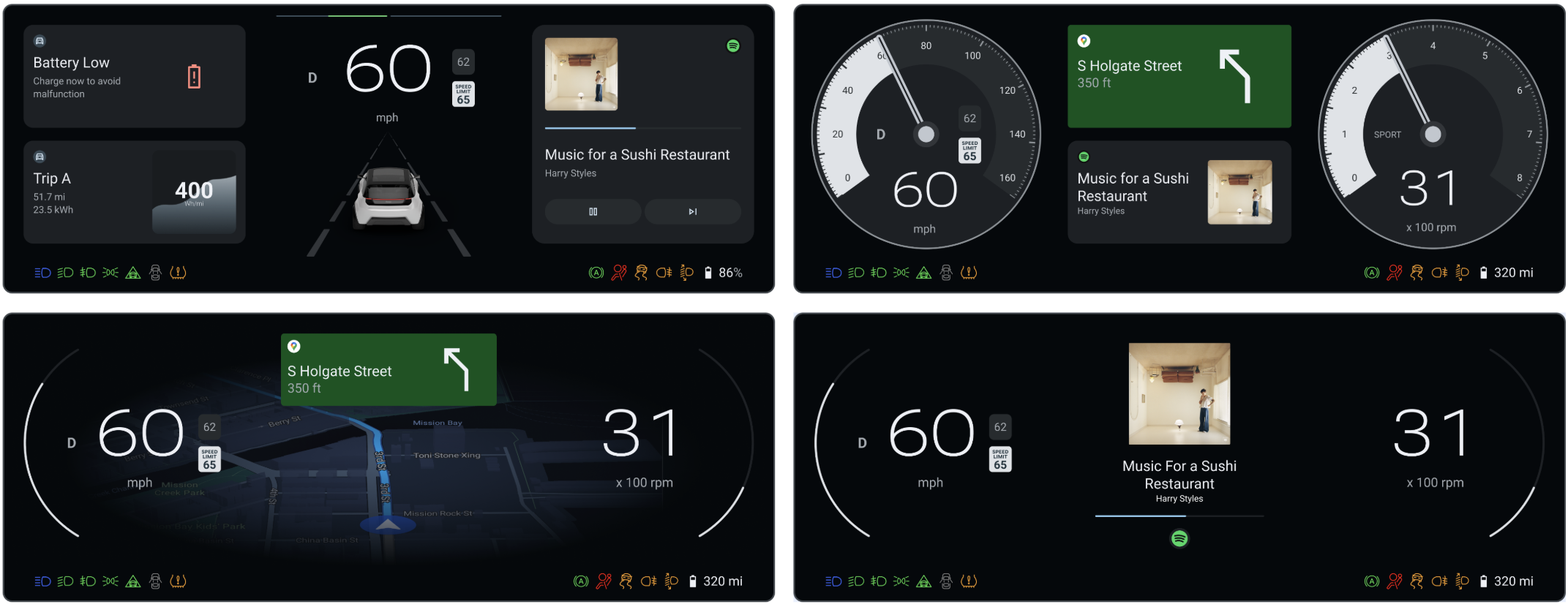
圖 1. DriverUI。
DriverUI 是 Android 系統應用程式,可顯示整個儀表板,但高可用性算繪器 (HAR) 算繪的安全相關或法規元素除外。DriverUI 會顯示媒體播放、電話通話、地圖、導航等相關資訊,並實作 Automotive Design for Compose。
DriverUI 做為預設叢集活動
DriverUI 會以 Android 中的叢集應用程式身分執行,AAOS 則會自動啟動。
AAOS 使用 ClusterHomeManager 類別 (也稱為「Cluster2」) 建構儀表板叢集。這個類別會指定識別儀表板實作項目所需的設定,以及 AAOS 與該實作項目的互動方式。Google 提供 Cluster2 API 的參考實作。
平台
您可以在 SDV 上建構及執行 Display Safety。軟體定義車輛 (SDV) 平台:
- 需要兩個客體 VM。
- 在訪客 VM 的 SDV Media (也稱為快速啟動 VM) 中執行 HAR。
- 在另一個訪客 SDV IVI VM 中執行 DriverUI。
- 在 SDV 媒體 VM 上執行安全監控。
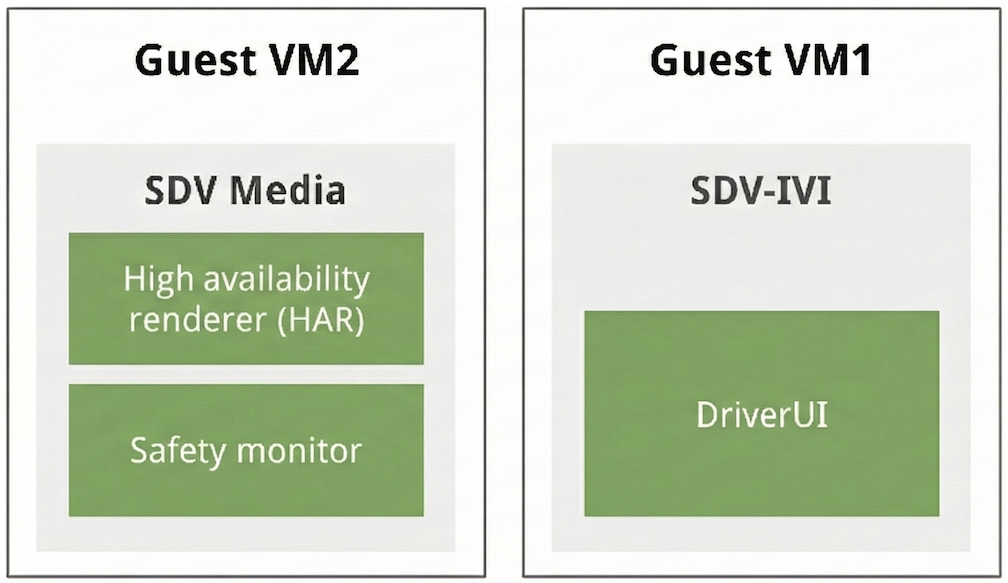
圖 2. SDV 平台架構。
混合 HAR 和 DriverUI 輸出內容
HAR 和 DriverUI 會使用不同的螢幕顯示 UI。這兩項輸出內容會合成並顯示為一張圖片,提供給 DriverUI。
為此,HAR 會根據 DriverUI 的心跳訊息,控制 Android 輸出內容顯示區域的透明度。如果 DriverUI 無法使用,HAR 會偵測到心跳停止,並將 DriverUI 區域設為不透明,顯示預留位置。收到心跳訊號後,系統會移除預留位置,並將 DriverUI 區域設為透明。
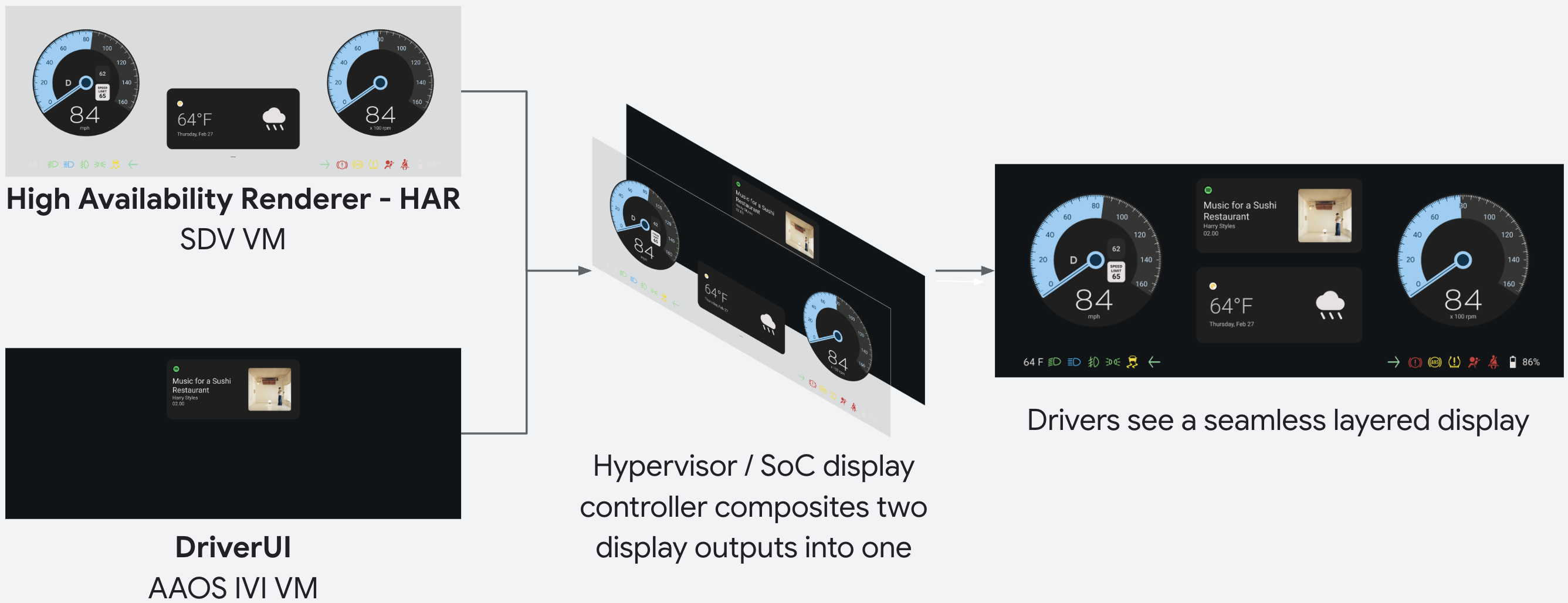
圖 3. HAR 和 DriverUI 組成。
DriverUI 和 HAR 通訊
DriverUI 和 HAR 會透過遠端程序呼叫 (RPC) 彼此通訊。心跳訊息是透過 RPC 通道傳送的資料範例,其中一個欄位是時間戳記。
gRPC 用於 RPC。在 SDV 上,SDV 通訊會提供 SDV 閘道用戶端,以探索並建立從 DriverUI 到 HAR 的管道。gRPC 服務會定義通訊協定緩衝區檔案:
// Heartbeat.
rpc Heartbeat(HeartbeatRequest) returns (HeartbeatResponse) {}

// Document switched in the DriverUI.
rpc DocumentSwitched(DocumentSwitchedRequest) returns (DocumentSwitchedResponse) {}

// Document updated in the DriverUI. Unary RPC.
rpc DocumentUpdated(DocumentUpdatedRequest) returns (DocumentUpdatedResponse) {}

// Document updated in the DriverUI. Requests are streamed with each request
// containing a part of the document and the entire document is assembled from these
// chunks by the server.
rpc DocumentUpdatedStreaming(stream DocumentUpdatedRequest) returns (DocumentUpdatedResponse) {}

/// Request for HAR to change design tokens.
rpc DesignTokenUpdate(DesignTokenUpdateRequest) returns (DesignTokenUpdateResponse) {}

// Request to change the current locale used in HAR.
rpc LocaleUpdate(LocaleUpdateRequest) returns (LocaleUpdateResponse) {}

// Requests to swap a certain variant at a Figma node.
rpc ChangeVariant(ChangeVariantRequest) returns (ChangeVariantResponse) {}

// Requests to change the container (display/root node) configuration (dpi, size) in HAR.
rpc ChangeContainerConfiguration(ChangeContainerConfigurationRequest) returns (ChangeContainerConfigurationResponse) {}
要求和回應詳細資料位於 ub-automotive 程式碼存放區的 packages/apps/Car/DriverUI/proto/driverui.proto 處,也就是 Display Safety 來源。
在 SDV 平台上,SDV 通訊提供 SDV Gateway Client,可從 DriverUI 探索及建立 gRPC 管道至 HAR。
使用 IVI 終端機執行這些指令時,會將通訊內容傳送至 SDV Media,觸發整個叢集的主題更新。
adb shell cmd car_service inject-key -d 1 9 # Purple Theme
adb shell cmd car_service inject-key -d 1 8 # Blue Theme
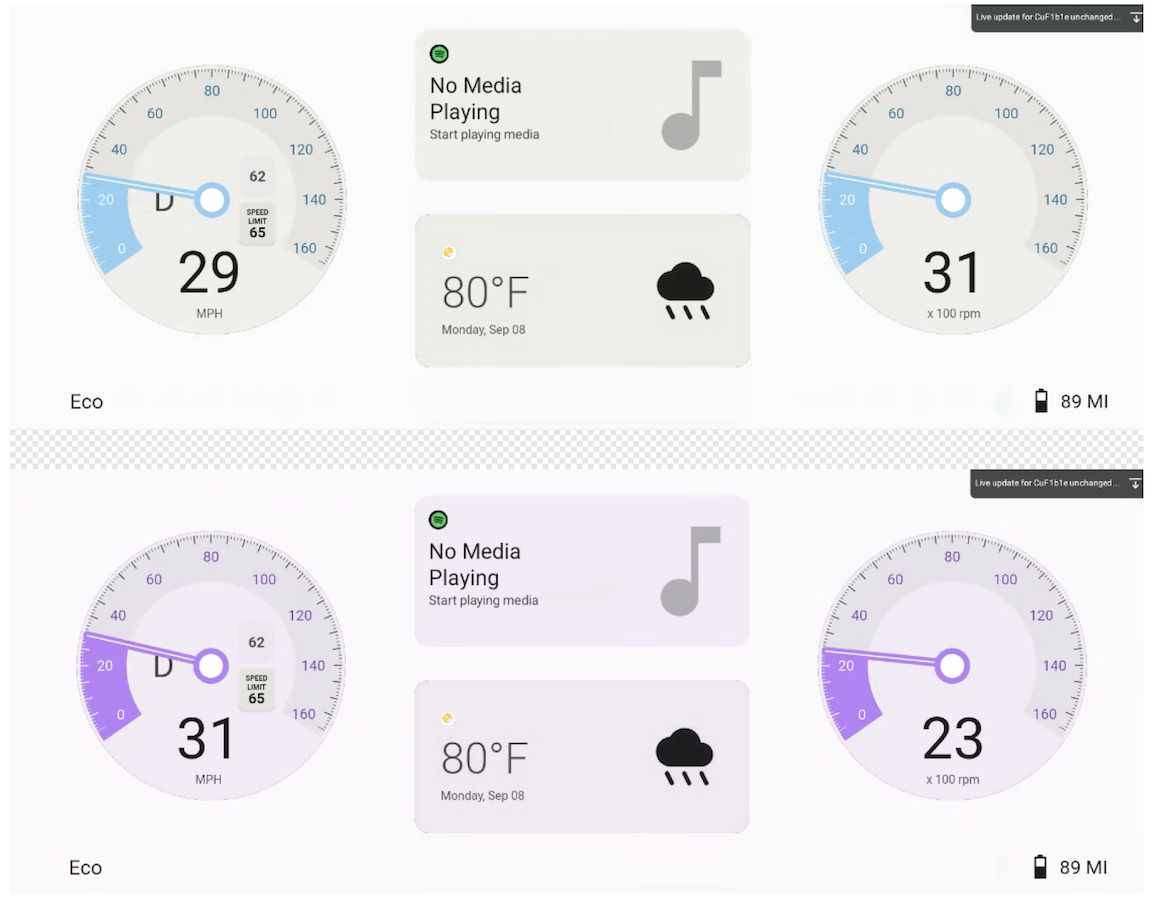
圖 4. RPC 通訊,可同時變更 DriverUI 和 HAR 主題。
在叢集上顯示媒體、地圖和電話通訊資訊
DriverUI 可透過與 IVI 通訊,在參考叢集中顯示媒體、地圖和電話資訊。雖然 Media 是參考實作中的預設狀態,但顯示畫面會根據有效服務,按照下列優先順序更新:
- 地圖
- 電話通訊系統
- 媒體
系統會自動優先顯示地圖導航或使用中的電話服務,而非預設的媒體狀態。
下圖說明各種 DriverUI 顯示狀態:
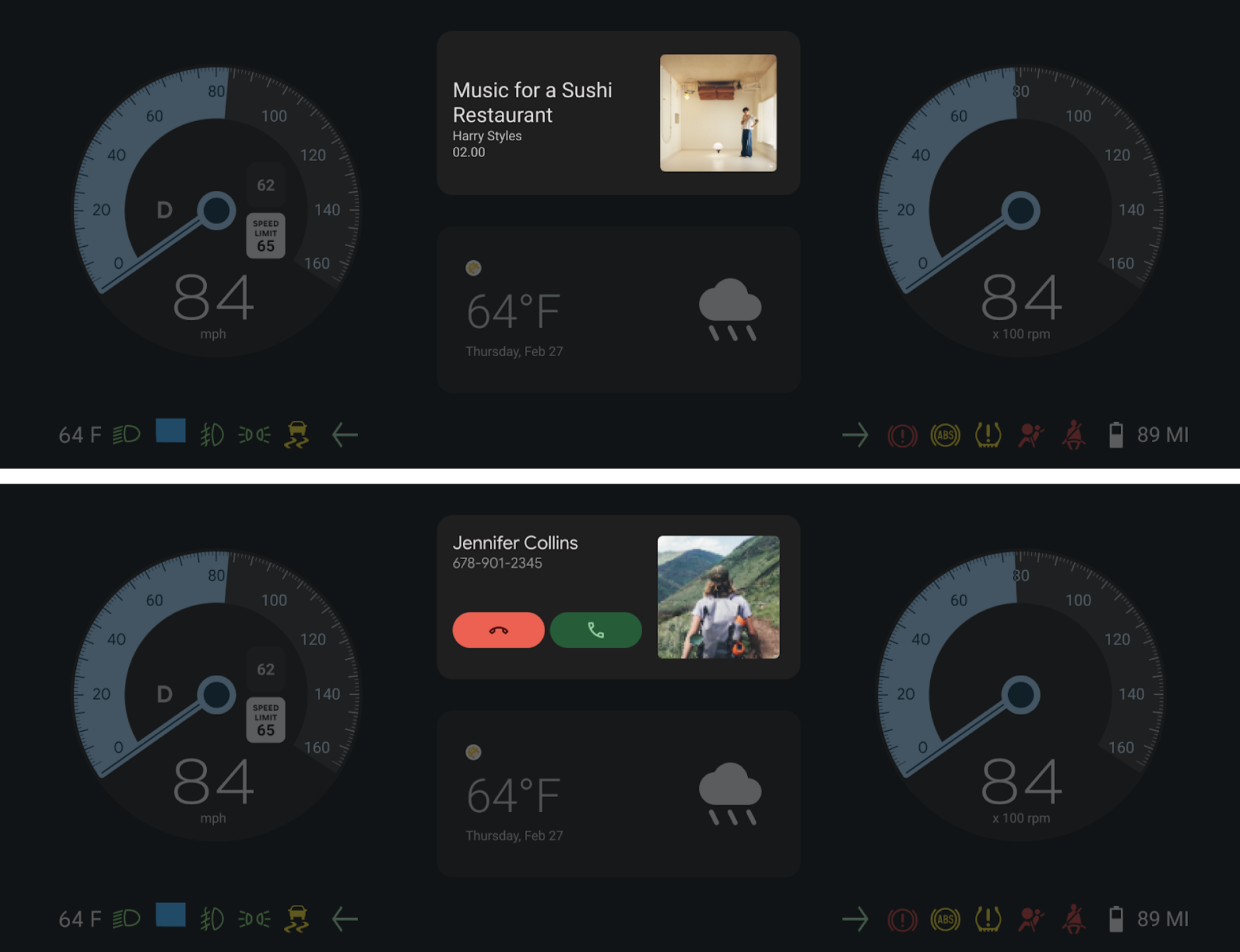
圖 5. DriverUI 顯示完整叢集中的「媒體」和「電話」部分。
整合 Compose 的車輛設計
DriverUI 實作 Automotive Design for Compose,讓設計 (Figma) 直接在 Android 應用程式中展示及疊代。這項整合功能可在執行階段環境中算繪設計文件,縮短設計與開發之間的差距。
存取設計資產
DriverUI 的 Figma 文件範例是程式碼基底的一部分。如要存取及修改這些設計,請按照下列步驟操作:
- 從
packages/apps/Car/DriverUI/src/main/assets/figma/*.dcf啟動 DriverUI,並使用本機 Automotive Design for Compose DCF 設計檔案。 - 找出
packages/apps/Car/DriverUI/src/main/assets/DriverUI.fig資產檔案。 - 將這個檔案匯入 Figma,即可查看來源設計或進行變更。
適用於 Compose 版本的 Automotive 設計
- Gradle 會使用為
designcompose指定的 Automotive Design for Compose 版本 (位於packages/apps/Car/libs/aaos-apps-gradle-project/gradle/libs.versions.toml中)。 - 如要查看 Automotive Design for Compose 版本,請前往版本頁面。
設定即時更新
Compose 的車輛設計支援開發模式下的即時更新,因此在 Figma 中進行的變更會立即在 DriverUI 中算繪。這有助於快速測試及加快設計疊代週期。
執行下列指令,為 DriverUI 設定 Figma 權杖:
adb shell am startservice \
  -n "com.android.car.driverui/com.android.designcompose.ApiKeyService" \
  -a setApiKey \
  -e ApiKey $FIGMA_ACCESS_TOKEN \
  --user 0
雙 VM 設計文件同步
在雙 VM 設定中,設計更新必須跨界傳播,以維持一致性。
- DriverUI 會擷取最新的 Figma 設計文件,並使用本頁詳述的 gRPC 通訊管道傳輸至 HAR。
- 因此,整個叢集會更新為最新的 Figma 設計疊代版本,讓兩個 VM 都與設計來源保持同步。
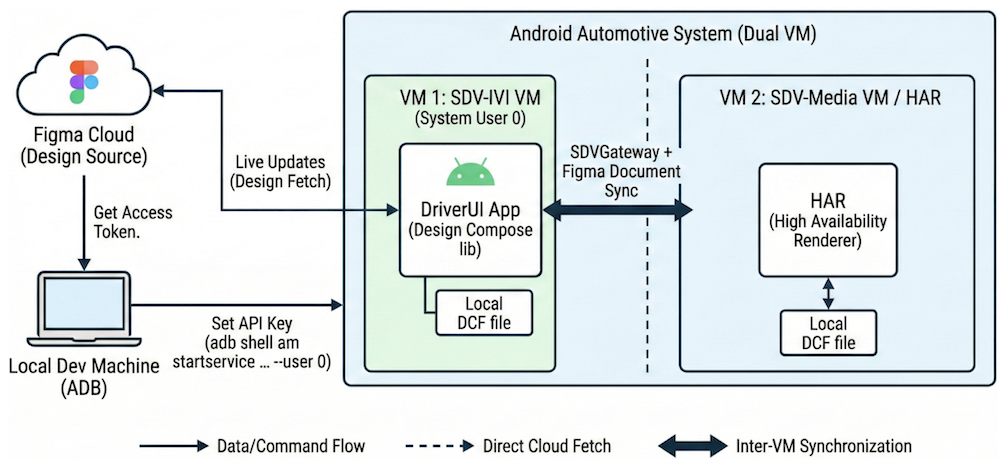
圖 6. 從 Figma 即時更新設計文件至 DriverUI 和 HAR。
保護 gRPC 管道
gRPC 整合了 SSL 和 TLS,並提倡使用 SSL 和 TLS 驗證伺服器,以及加密用戶端和伺服器之間的所有資料交換。用戶端可選擇提供憑證進行雙向驗證。如要進一步瞭解 gRPC 驗證,請參閱「驗證」。