
The Android Contact Picker provides a standard, privacy-preserving
interface that lets users share specific contacts with apps.
Introduced in Android 17, this feature serves as a
permission-free alternative to the broad READ_CONTACTS permission.
By using the Contact Picker, apps can request access to specific contact data, such as phone numbers or email addresses. The user selects the contacts they want to share, and the system grants the app temporary read access to only those details.
Architecture
The Contact Picker consists of two main components:
- Picker UI app: This component serves as the user-facing interface for selecting contacts.
- Session provider: This component acts as the backend service managing the temporary access session.
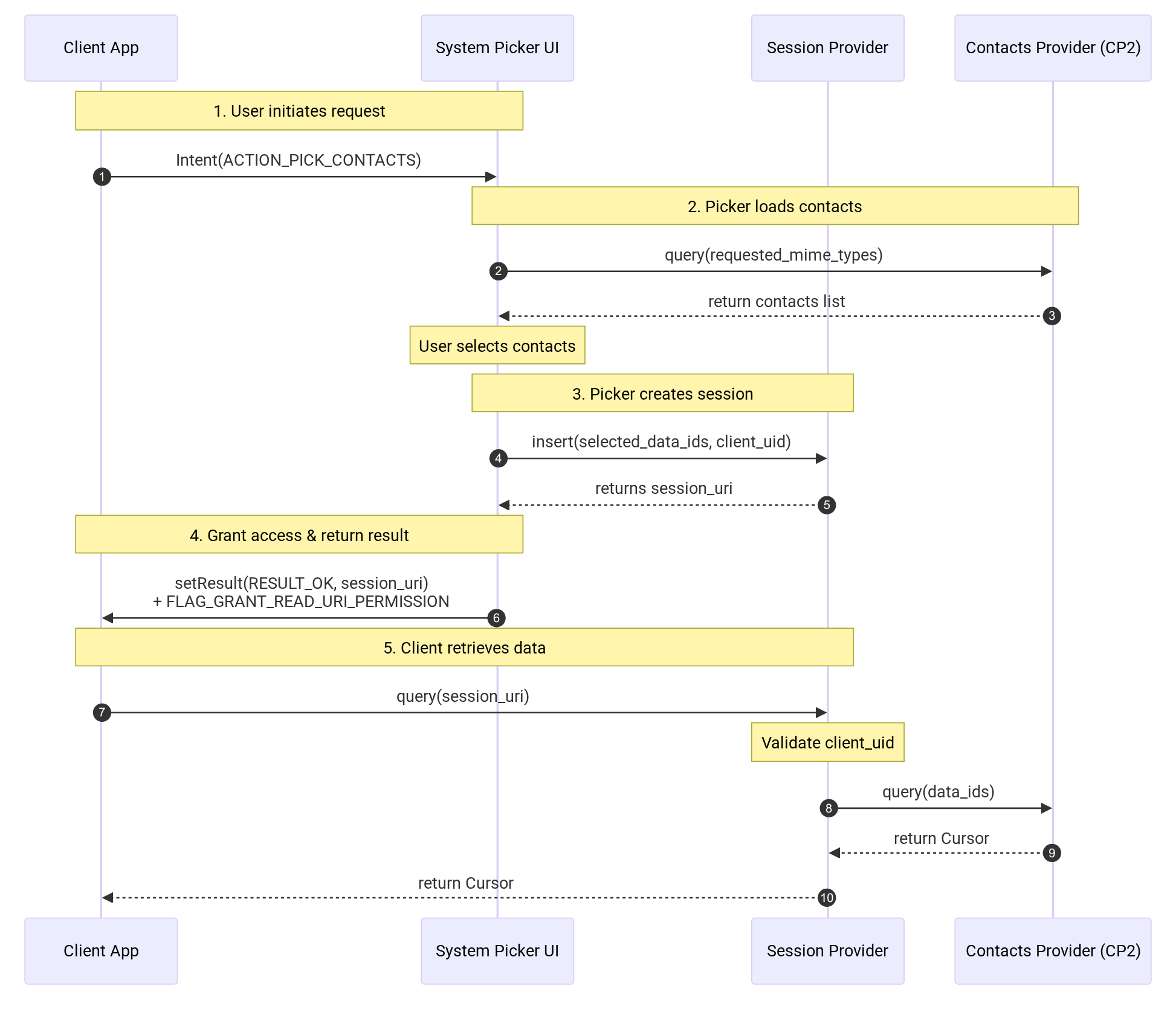
Figure 1. Sequence diagram
Picker UI
The Picker UI handles the user interface for contact selection and queries the contacts provider directly to populate views based on requested data types. Supported views include:
- Phone numbers only: The UI displays contacts containing phone numbers.
- Emails only: The UI displays contacts containing email addresses.
- Custom contact information: The UI displays contacts matching specific requested data fields.
Additionally, the UI supports the following features:
- Alphabetically sorted list: Contacts are sorted alphabetically with deduplication.
- Contact avatars: The UI displays contact photos or avatars.
- Favorites: A Favorites category is displayed at the top of the contacts list.
- Profile switcher: This feature lets users select contacts from different user profiles (for example, Work versus Private).
- Single and multi-select: The system supports both single and multi-selection modes (the default limit is 50 and the maximum is 100).
- Selection preview: Users can preview and manage their selected contacts before confirming.
- Fast scrolling: This feature enables quick navigation through the contact list.
- Search: A search bar is provided for finding specific contacts.
- Privacy banner and privacy details page: A mandatory notice informs users exactly which data fields (for example, phone numbers, emails) the app is requesting.
Session provider
The session provider (packages/providers/ContactsProvider) acts as a secure
intermediary between the client app and the contacts provider.
- Role: Use the session provider only when you launch the picker using
Intent.ACTION_PICK_CONTACTS. - Session management: When a user selects contacts, the picker UI writes the selection data (mapped to the client's UID) into the session provider.
- Data access: The provider returns a
content://com.android.providers.contacts.picker.sessionsURI to the picker. The picker applies appropriate read flags before returning the URI to the client app. This URI grants temporary, granular read access to the specific data fields the user selected, without exposing all the contact's data. - Privileged access: The
android.permission.MANAGE_CONTACTS_PICKER_SESSIONsignature and privileged permissions protect write access to the session provider, ensuring only the trusted system picker can create sessions.
Integration
Hardware manufacturers and partners must include the Android Contact Picker in builds with Android 17 and higher.
Supported intents
Intent.ACTION_PICK_CONTACTS: The recommended intent for apps targeting Android 17 and higher.Intent.ACTION_PICK: Maintained for backward compatibility. The system automatically routes these requests to the new picker for supported MIME types (email, phone, or contact).
Session management
To maintain device health and privacy, the session provider enforces a strict data cleanup policy:
- Cleanup job: A system job (
CleanupJobService) runs periodically to remove session data that is older than 24 hours. - Row limit: To prevent excessive storage usage, the session provider table is capped at a maximum of 5000 rows. If the table reaches this size, the system automatically prunes the oldest rows before inserting new session data.
- Persistence: Session data is transient. Client apps are expected to persist the returned contact data immediately upon receipt.
Permissions
Write access to the session provider requires the
android.permission.MANAGE_CONTACTS_PICKER_SESSION permission, which is
restricted to the Android Contact Picker package.
Customization and compliance
Partners can customize visual elements like fonts and colors, but implementations must adhere to the Android CDD section 3.18.2 System Contacts Picker.
Validation
Partners must verify their implementation using both the Compatibility Test Suite (CTS) and Google Mobile Services Test Suite (GTS).