
Android 9 provides APIs to better support third-party calling apps. Third-party
calling apps typically rely on Telephony APIs such as the PHONE_STATE
broadcast to co-exist alongside carrier phone calls. As a consequence,
third-party calling apps must give carrier calls priority and often resort to
silently rejecting incoming calls in the app, or terminating an ongoing call to
make way for a carrier call.
The APIs in Android 9 support concurrent calling scenarios between third-party apps and carrier calls. This makes it possible, for example, to receive an incoming third-party call while engaged in a carrier call. The framework assumes responsibility for ensuring the carrier call is held when the user engages in the third-party call.
In Android 9, third-party calling apps are encouraged to implement the
self-managed ConnectionService class. For more information on how to build a
calling app using this class, see Build a calling app using the Core-Telecom
library.
The self-managed ConnectionService class also gives developers the opportunity
to opt-in to having calls in their app logged in the system call log (see
EXTRA_LOG_SELF_MANAGED_CALLS). Per the requirements in the Android
Compatibility Definition Document (CDD) (section 7.4.1.2), you should ensure
your dialer or phone app displays these call log entries and shows the name of
the third-party calling app where the call originated (for an example of how the
AOSP dialer app meets this requirement, see Call log entries from third-party
calling apps).
Apps are responsible for setting CAPABILITY_SUPPORT_HOLD and
CAPABILITY_HOLD on their apps' connections. However, it is possible that
an app cannot hold a call in some circumstances. The framework includes
provisions for resolving these types of cases.
Scenarios
You should modify your dialer app to handle the following scenarios.
Handle incoming calls that disconnect an ongoing call
In a scenario where there is an ongoing third-party call (e.g. in a SuperCaller call) that does not support hold, and the user receives a mobile call (for example, using their carrier FooCom), your Dialer or Phone app should indicate to the user that answering the mobile network call will end the ongoing third-party call.
This user experience is important as a third-party calling app may have an ongoing call that cannot be held by the framework. Answering a new mobile call causes the ongoing third-party call to be disconnected.
See the user interface in the figure for an example:
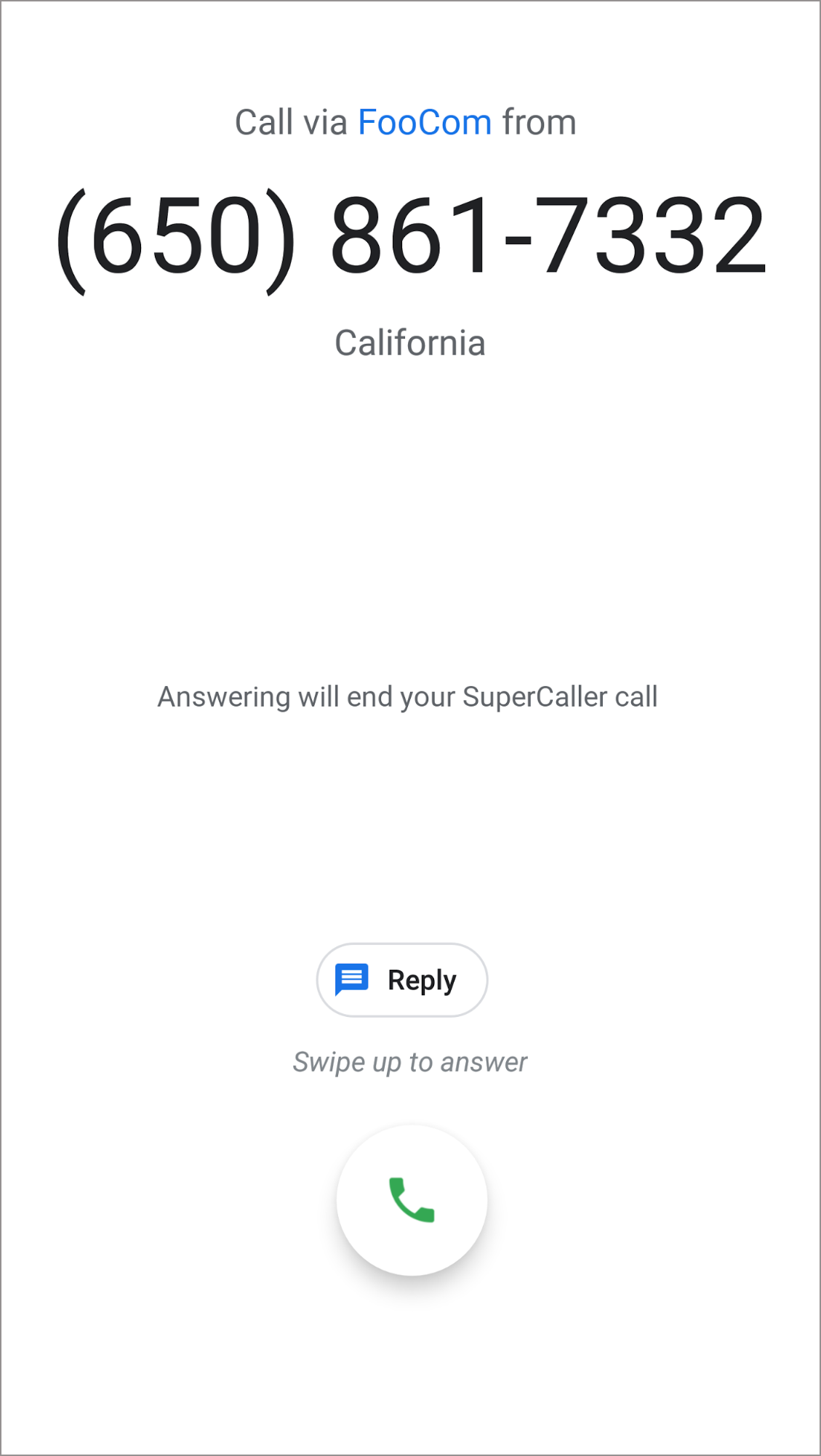
Figure 1. Incoming call disconnecting an ongoing third-party call.
Your dialer app can check if an incoming call causes another call to be
disconnected by checking the call extras. Make sure that
EXTRA_ANSWERING_DROPS_FG_CALL is set to TRUE, and
EXTRA_ANSWERING_DROPS_FG_CALL_APP_NAME is set to the name of the app
whose call is disconnected upon answering the incoming mobile call.
Call log entries from third-party calling apps
Developers of third-party calling apps can opt-in to having calls in their app
logged in the system call log (see EXTRA_LOG_SELF_MANAGED_CALLS). This
means that it is possible to have entries in the call log that are not for
mobile network calls.
When the AOSP dialer app displays call log entries related to a third-party calling app, the name of the app where the call took place is displayed in the call log, as illustrated in the figure:
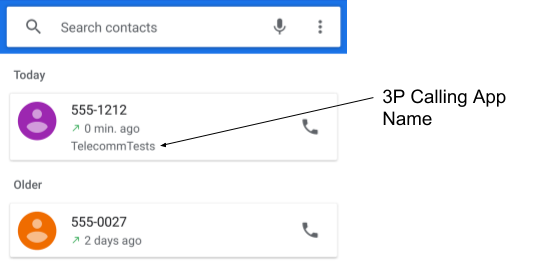
Figure 2. Call log entry with name of third-party calling app on dialer app.
To determine the name of an app associated with a call log entry, use the
PHONE_ACCOUNT_COMPONENT_NAME and PHONE_ACCOUNT_ID columns in the
call log provider to create an instance of PhoneAccountHandle, which
identifies the source of a call log entry. Query TelecomManager to get
the details for the PhoneAccount class. To determine if a call log entry is
from a third-party calling app, check PhoneAccount capabilities to see
if CAPABILITY_SELF_MANAGED is set.
The getLabel method of the returned PhoneAccount returns the name of
the app associated with a call log entry from the third-party calling app.
VoIP call log integration controls
Starting in Android 17 (API level 37), third-party VoIP calling apps
that integrate with Core-Telecom and CallsManager can write their call
history directly to the native Android system call log (CallLog.Calls).
To ensure consistent user privacy and data hygiene across the Android ecosystem,
all Android 17 (API level 37) and higher devices that declare the telecom
feature flag (android.software.telecom) and have the android.app.role.DIALER
role must support per-app VoIP call log integration controls per the Android
Compatibility Definition Document (CDD).
Device implementation requirements
Devices must provide a user-accessible Settings screen (typically located under Settings > Calling accounts > Integrated call logs) that enables users to view and toggle call log integration for individual third-party VoIP apps.
To fulfill this requirement, you must integrate the stock platform default:
- Platform settings integration: Ensure your device includes
com.android.phone.settings.PhoneAccountSettingsActivityprovided by the Android platform out-of-the-box (com.android.phone). - Intent resolution requirement: Your device must resolve the
TelecomManager.ACTION_CONFIGURE_CALL_LOG_INTEGRATION(android.telecom.action.CONFIGURE_CALL_LOG_INTEGRATION) intent to the stock platform management screen.
When an app, system prompt, or deep link invokes the following, the intent must
successfully launch PhoneAccountSettingsActivity and must not throw an
ActivityNotFoundException:
Intent intent = new Intent(TelecomManager.ACTION_CONFIGURE_CALL_LOG_INTEGRATION);
context.startActivity(intent);
Validation
To test that your device supports third-party calling apps, use the Telecomm
test app, which implements the self-managed ConnectionService class. The app
is located in
/packages/services/Telecomm/testapps/.
Build the test app from the root of your Android source repository using:
mmma packages/services/Telecomm/testapps/Install the build apk using
adb install -g -r <apk path>. A Self-Managed Sample icon is then added to your launcher.Tap the icon to open the test app.
Handle incoming calls that disconnect an ongoing call
Follow these steps to verify that an incoming call disconnects an ongoing third-party call.
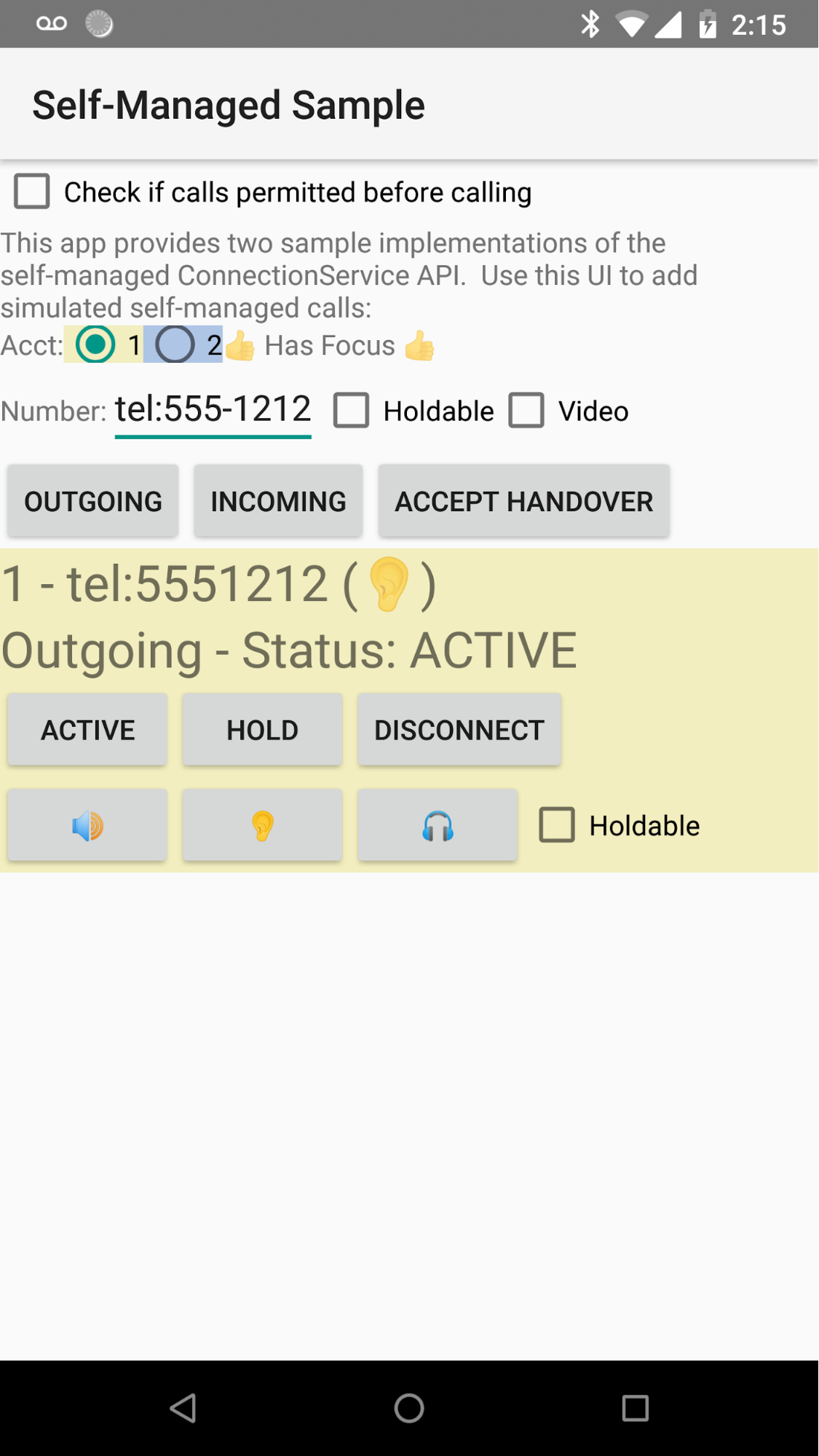
Figure 3. Test app with sample implementations of the ConnectionService class.
- Clear the Holdable option.
- Tap OUTGOING to start a new sample outgoing call.
- Tap the ACTIVE button to make the call go active.
- Call the phone number of the device under test with another phone. This invokes the scenario where your dialer is provided with the name of an app, which will have its call disconnected.
- When you are finished, tap the DISCONNECT button in the test app.
Call log entries from third-party calling apps
After completing the steps above, the test app should have logged a call to the system call log. To confirm the device logs calls from third-party calling apps, open your dialer app and confirm the call appears in the system call log.
VoIP call log integration controls
To verify compliance with the VoIP call log integration intent requirement on
Android 17 and higher, run the CtsTelecomTestCases Compatibility Test Suite
(CTS) test. This test verifies across package boundaries that sending
TelecomManager#ACTION_CONFIGURE_CALL_LOG_INTEGRATION
(android.telecom.action.CONFIGURE_CALL_LOG_INTEGRATION) resolves on device
to a valid exported activity handler (resolveActivity check).