

對於折疊式裝置,您可以根據裝置的實體狀態調整螢幕旋轉行為,進而提升使用者體驗。舉例來說,你可以設定裝置在展開成平板電腦時自動旋轉螢幕,但在折疊時鎖定為直向。
從 Android 13 開始,Android 可根據裝置狀態 (例如折疊、展開或半折疊 (桌面模式)) 自訂自動旋轉設定。
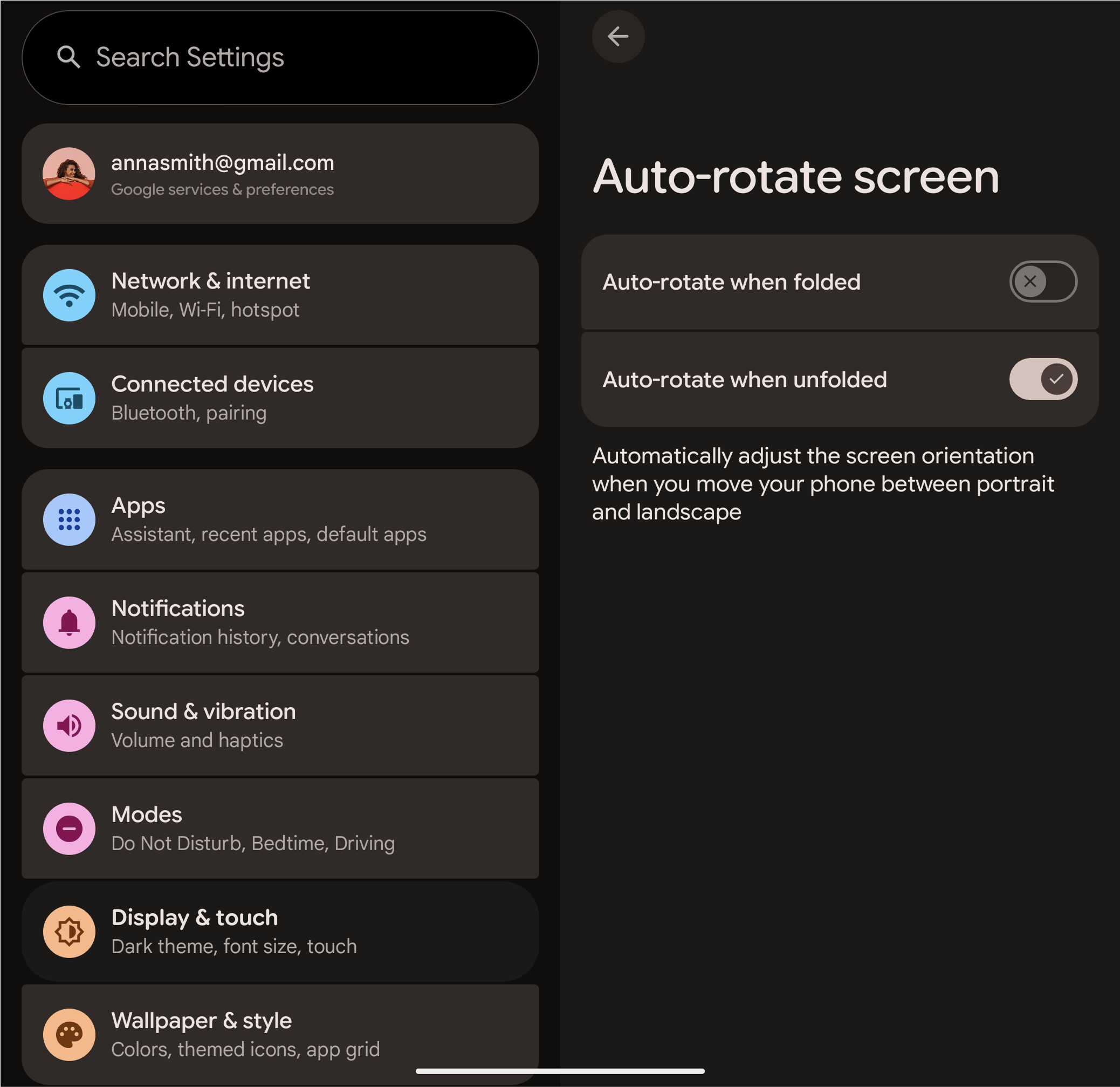
圖 1. 使用者看到的裝置狀態自動旋轉設定。
啟用根據裝置狀態自動旋轉的設定
如要啟用及設定根據裝置狀態自動旋轉螢幕,請為架構的 config.xml 檔案建立裝置疊加層,如下所示:
如要為不同裝置姿勢設定預設的自動旋轉行為,請在裝置的疊加層
config.xml中填入config_perDeviceStateRotationLockDefaults整數陣列:<!-- In your device overlay, for example, device/generic/goldfish/phone/overlay/frameworks/base/core/res/res/values/config.xml --> <resources> <!-- Map of device posture to rotation lock setting. Each entry must be in the format "key:value", or "key:value:fallback_key" for example: "0:1" or "2:0:1". The keys are one of Settings.Secure.DeviceStateRotationLockKey, and the values are one of Settings.Secure.DeviceStateRotationLockSetting. --> <integer-array name="config_perDeviceStateRotationLockDefaults"> <item>0:1</item> <!-- CLOSED -> LOCKED --> <item>1:0:2</item> <!-- HALF_OPENED -> IGNORED and fallback to device posture OPENED --> <item>2:2</item> <!-- OPENED -> UNLOCKED --> <item>3:0:0</item> <!-- REAR_DISPLAY -> IGNORED and fallback to device posture CLOSED --> </integer-array> </resources>fallback-key是指其他裝置資安態勢,您必須指定資安態勢值為Settings.Secure.DEVICE_STATE_ROTATION_LOCK_IGNORED的時間。如果姿勢是這樣設定,任何取得或設定自動旋轉偏好的要求,都會重新導向至備用姿勢。舉例來說,如果
HALF_OPENED姿勢會改回OPENED姿勢:- 讀取
HALF_OPENED的自動旋轉設定會傳回OPENED的目前設定。 - 在裝置
HALF_OPENED時寫入新的自動旋轉偏好設定,會更新OPENED姿勢的偏好設定。
- 讀取
為每個使用者可設定的裝置資安態勢設定說明。在裝置的「設定」應用程式疊加層中填入
config_settableAutoRotationDeviceStatesDescriptions字串陣列:<!-- In your device's Settings app overlay --> <resources> <!-- The settings/preference description for each settable device posture defined in the array "config_perDeviceStateRotationLockDefaults". The item in position "i" describes the auto-rotation setting for the device posture also in position "i" in the array "config_perDeviceStateRotationLockDefaults". --> <string-array name="config_settableAutoRotationDeviceStatesDescriptions"> <item>Auto-rotate when folded</item> <item>@null</item> <!-- No description for state in position 1 (it is not settable by the user) --> <item>Auto-rotate when unfolded</item> </string-array> </resources>請使用正確的 API 以程式輔助方式修改這些設定,而非直接寫入設定供應器,以免發生不一致的行為:
如要變更目前的螢幕旋轉鎖定狀態 (修改
ACCELEROMETER_ROTATION):- 從 SystemUI 或啟動器使用
RotationPolicy#setRotationLock(...)。 - 在視窗管理員中,使用
DisplayRotation#freezeRotation()或thawRotation()。
- 從 SystemUI 或啟動器使用
如要變更特定裝置狀態的螢幕旋轉鎖定偏好設定 (修改
DEVICE_STATE_ROTATION_LOCK):- 使用
requestDeviceStateAutoRotateSettingChange(...)(來自RotationPolicy或DeviceStateAutoRotateSettingManager)。
- 使用
實作詳細資料
以下各節將說明控制摺疊式裝置自動旋轉行為的設定和核心鍵類別。
設定
系統會使用下列兩項設定管理自動旋轉功能:
Settings.System.ACCELEROMETER_ROTATION:這是主要的自動旋轉設定。如果是摺疊式裝置,這個值會反映裝置目前的姿勢是否啟用自動旋轉功能。Settings.Secure.DEVICE_STATE_ROTATION_LOCK:這項設定會儲存使用者各裝置型態 (例如摺疊或展開) 的自動旋轉偏好設定。這樣一來,系統就能在裝置姿勢改變時套用正確的偏好設定。這項設定會以半形冒號分隔字串的形式儲存。每對值代表裝置姿勢和對應的旋轉設定。格式為:
<device_posture_0>:<rotation_value_0>:<device_posture_1>:<rotation_value_1>...輪替值如下:
0:已忽略 (使用備用型態的設定)1:已鎖定 (自動旋轉已關閉)2:已解鎖 (自動旋轉已開啟)
舉例來說,字串
"0:2:2:1"的意義如下:- 在摺疊狀態 (姿勢
0) 下,自動旋轉功能會解除鎖定 (2)。 - 在展開狀態 (姿勢
2) 下,自動旋轉功能會鎖定 (1)。
主要類別
下列類別會處理管理裝置狀態的自動旋轉設定邏輯:
DeviceStateAutoRotateSettingManagerImpl:管理DEVICE_STATE_ROTATION_LOCK設定。這個類別提供更新設定、擷取設定值,以及註冊變更監聽器的相關方法。DeviceStateAutoRotateSettingController(視窗管理員): 同步處理ACCELEROMETER_ROTATION和DEVICE_STATE_ROTATION_LOCK。裝置姿勢改變時,系統會根據使用者對新狀態的偏好設定更新ACCELEROMETER_ROTATION。確保ACCELEROMETER_ROTATION的任何變更都會儲存回DEVICE_STATE_ROTATION_LOCK,以供目前的裝置姿勢使用;同樣地,目前姿勢的DEVICE_STATE_ROTATION_LOCK變更也會反映在ACCELEROMETER_ROTATION中。DeviceStateAutoRotateSettingController(「設定」應用程式):控制裝置狀態自動旋轉設定頁面的 UI。PostureDeviceStateConverter:在一般裝置狀態 ID 與這項功能使用的裝置型態 ID 之間轉換。
驗證
由於這項功能的行為高度取決於原始設備製造商 (OEM) 的設定,因此沒有專屬的 CTS 測試。您必須執行手動測試,確認裝置在您設定的不同實體狀態之間轉換時,自動旋轉設定會如預期變更。